16 electrolux
Residual Heat Function
When a Cooking Duration time is set, the
oven will automatically switch off a few
minutes before the end of the programmed
cooking duration to finish your dishes in the
oven without further energy consumption. All
current settings will be displayed until the
Cooking Duration time is over.
This function will not operate when the Cook-
ing Duration time is less than 15 minutes.
Demo Mode
This mode is intended to be used in shops
to demonstrate the oven functionality
without any power consumption except
the interior light, the display and the fan.
This function can only be switched on when
the appliance is first connected.
If there is a power failure, when the power
supply is restored again, the Demo function
can only be switched on if in the
display
12:00 and the symbol
are flashing
automatically.
1.
Touch the control for approximately
2 seconds.
An acoustic alarm will
sound for a short time.
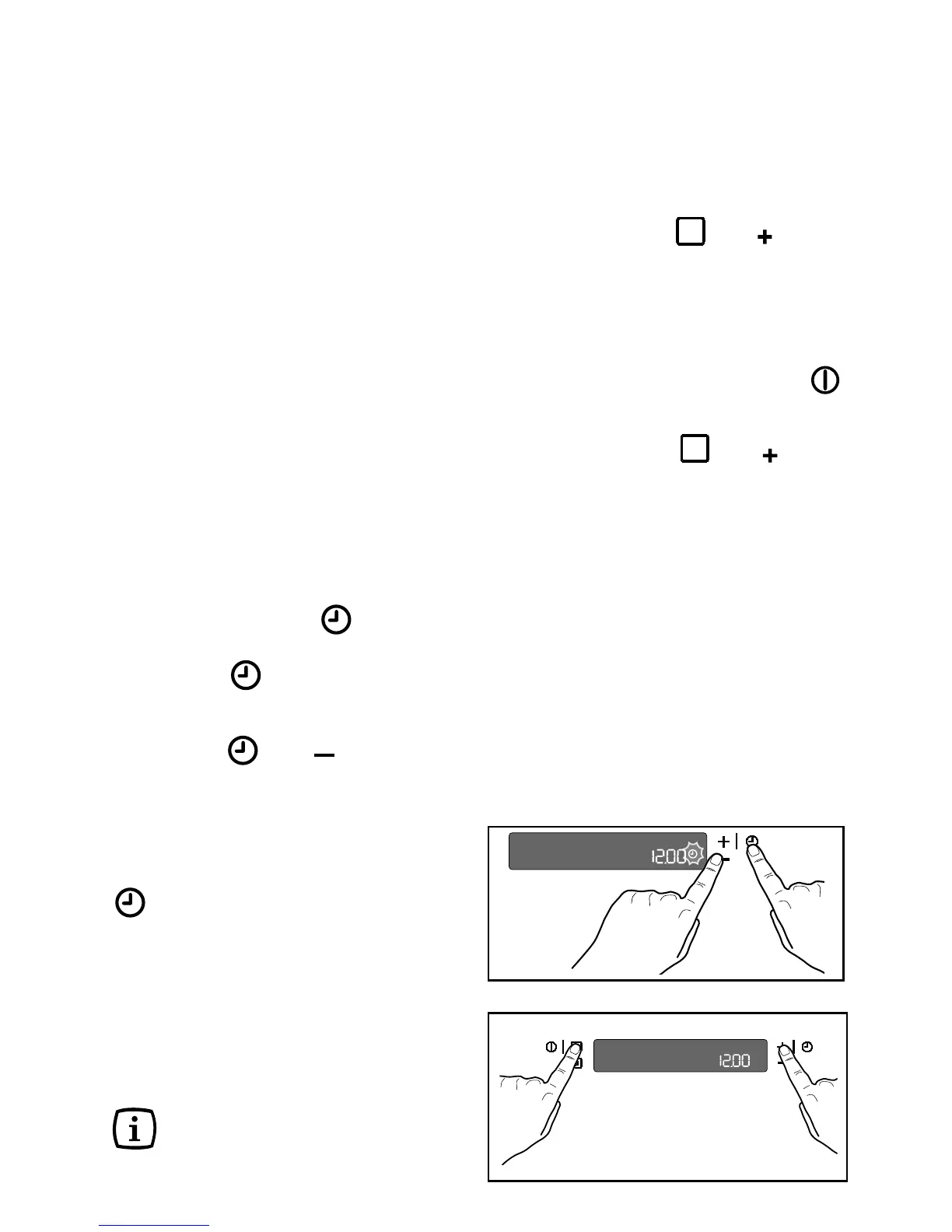
2.
Touch the
and “ ”controls at the
same time. A short acoustic alarm will
be heard and the time
12:00
will appear
in the display
(Fig. 16)
.
When the oven is switched on
the
symbol
appears in the display.
This means that
the Demo function is activated.
All oven functions can be selected.
The oven is not really working and the
heating elements do not switch on.
Switch off the oven and follow the procedure
described above to switch off the demo
mode again.
The Demo function remains saved in
the programme in the event of a
power failure.
Fig. 16
Beep on control
You can set the oven so that it beeps each
time a control is touched.
This function can only be activated when the
oven is switched off.
1. Touch the controls
and “ ” at the
same time for about 3 seconds. The
alarm signal beeps once (Fig. 17).
How to disable the “Beep” Function:
1. With the oven switched on, touch the
control so that the oven switches off.
2. Touch the controls and “ ” at the
same time for about 3 seconds. The
acoustic alarm beeps once.
Error Codes
The electronic programmer does a
continuous diagnostic check of the system.
If parameters are not correct, the activated
functions are stopped and the corresponding
error code (the letter “F”, followed by
numbers) appears.
If an error code is displayed in the oven’s
electronic control panel, the light bar also
lights up.
For further details, see the section “If
something is wrong” on page 37.
Fig. 17



 To Next Page