electrolux 35
Emptying the water tank
To empty the water tank, proceed
as described below:
Make sure the appliance has
cooled down before proceed
with emptying.
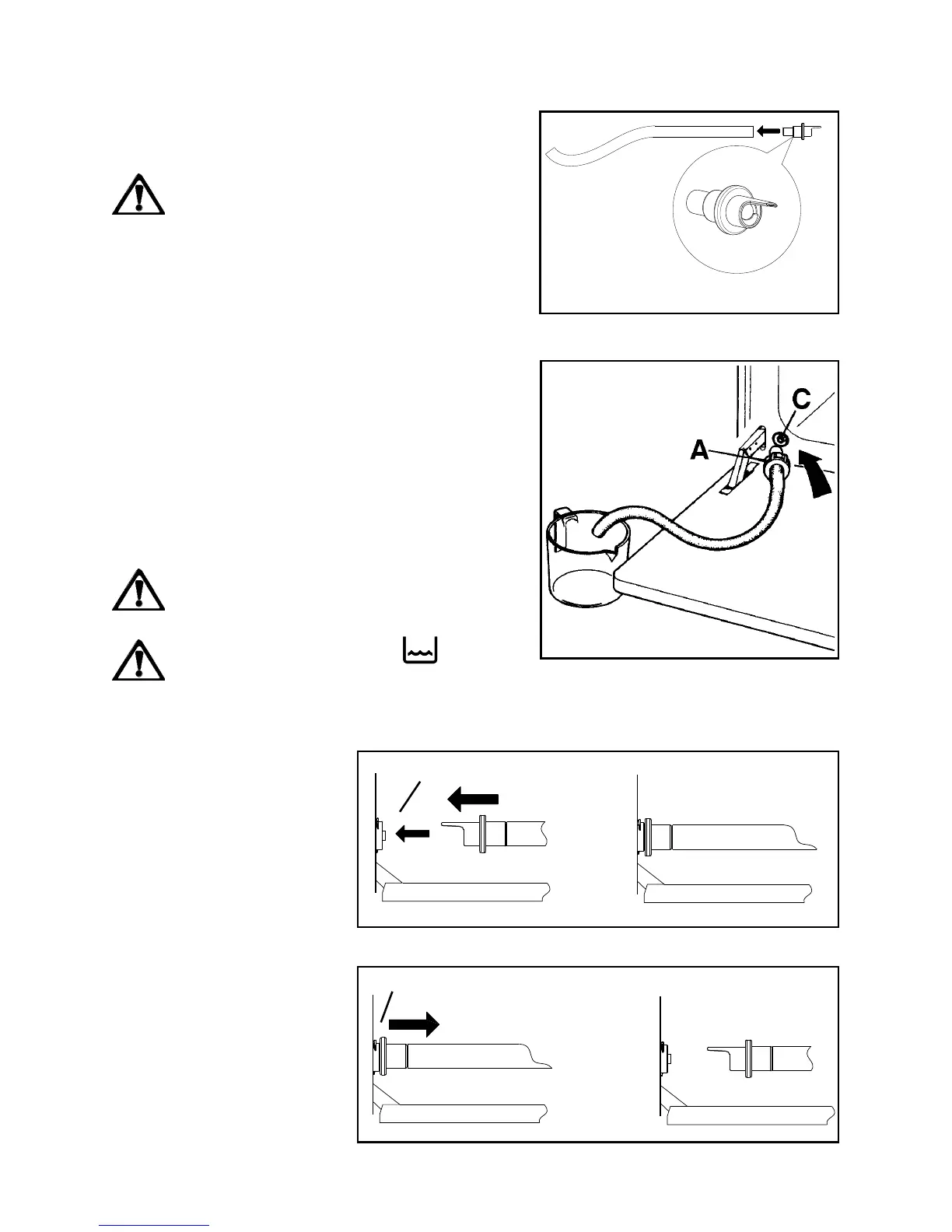
1. Prepare the probe for the water outlet.
Fit the connector marked with the letter
(A) in Fig. 44 on one end.
2. Place the free end (B) of the probe into a
container of any sort;
3. Open the oven door (Fig. 45) and insert
the connector (A) in the outlet valve (C)
located near the lower left corner of the
oven door, as shown in Fig. 46a. To fit
the connector (A) on the valve (C) and
allow the water to flow out, press lightly
in the direction shown in the figure.
4. When the water stops flowing, remove
the connector from the valve (Fig. 46b).
Do not use the drained water to
refill steam tank again.
Even if tank empty light is
on it does not mean tank is
completely empty. Wait till water
flow from water outlet valve
stops.
Fig. 44
Fig. 45
A
B
C
Fig. 46a
C
Fig. 46b
)



 To Next Page