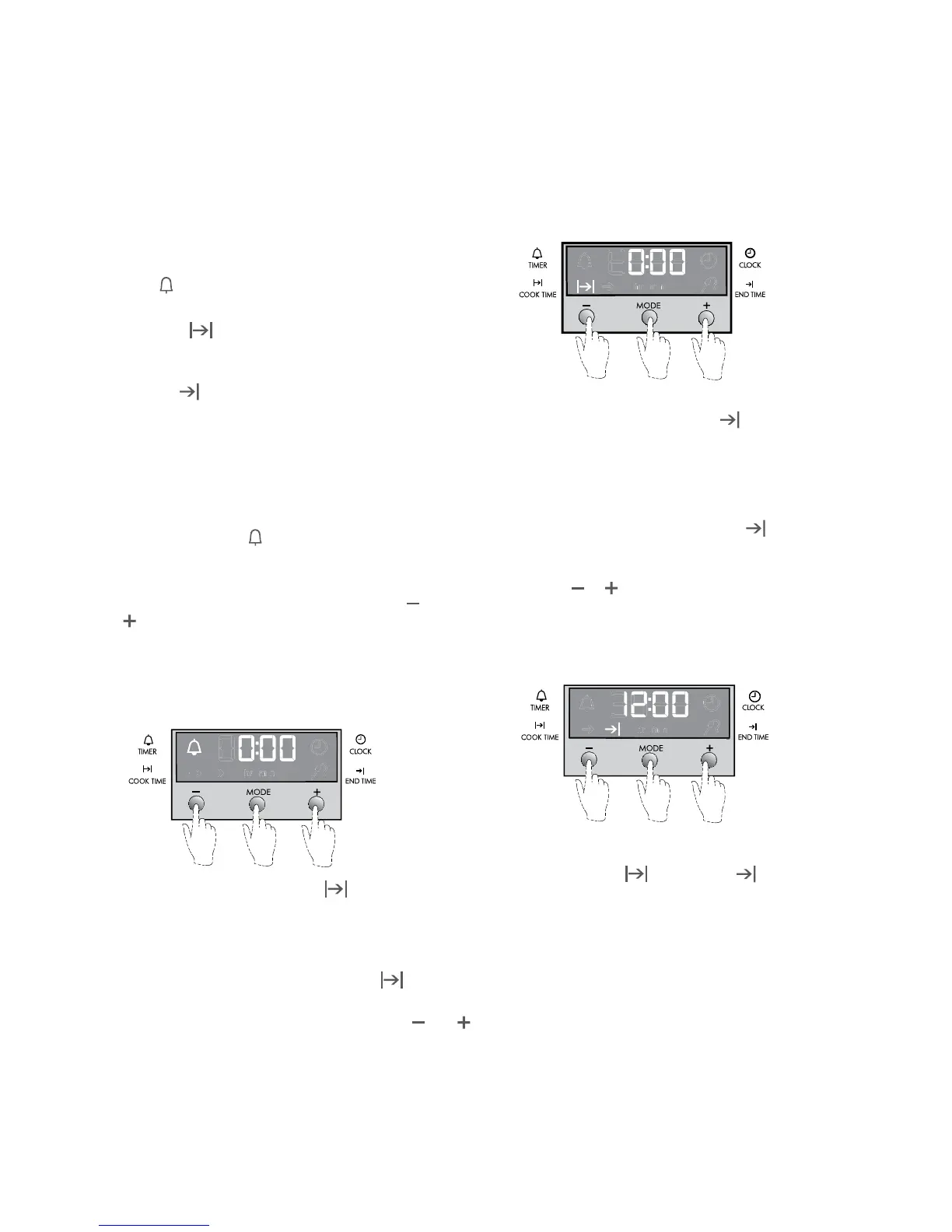
3 button programmable clock
6 BEFORE OPERATING YOUR APPLIANCE Built-in Cooking
Your oven is equipped with a 3 button timer that has the
following features:
• Timer
- you can set a countdown time that will beep
when the set time has elapsed.
• Cooktime
- you can set cooking duration. A timer will
count down the preset cooking time, beep when the time
has elapsed and turn the appliance off.
• Endtime
- instead of setting a cooking duration
you can set a cooking finish time. When the finish
time has been reached the timer will beep and turn the
appliance off.
• Delayedstartcookingtime-youcancombinethecooking
time and end cooking time to switch oven on and off at a
specific time during the day.
Selecting the timer
• PresstheMODEbuttonuntilthetimer‘indicator’begins
flashing.
• Setthecountdowntimeyouwantbyusingthe
and
buttons. 5 seconds after the last change the timer
‘indicator’ will stop flashing and the countdown will start
in minutes.
• Tostopthebeeper,pressanybutton.
• MaximumCountdownTimeis2hrs30mins
Setting the cooking duration
• Selectthedesiredovenfunctionandtemperature.
• Theovenindicatorlightwillglowandtheheatingsource
will come on.
• PresstheMODEbuttonuntilthecooktime
‘indicator’
begins flashing.
• Setthecookingdurationyouwantbyusingthe
and
buttons. Five seconds after the last change the cook time
‘indicator’ will stop flashing, and the time of day will be
displayed.
• Tostopbeeper,pressanybutton.
Note:
• Remembertoaddpre-heatingtimeifnecessary.
Setting the cooking end time
• Checkthattheclockdisplaysthecorrecttimeofday.
• Selectthedesiredovenfunctionandtemperature.The
oven indicator light will glow and the heating source will
come on.
• PressMODEbuttonuntiltheendtime
‘indicator’
begins flashing.
• Enterthetimeofdayyouwanttonishcookingby
pressing
or buttons. Five seconds after the last
change, the end time ‘indicator’ will stop flashing and the
current time of day will be displayed.
• Tostopbeeper,pressanybutton.
Setting the delayed start cooking time
• Setthecooktime
and end time as described in
the previous sections.
• Onceboththecooktimeandendtimehavebeenset,the
cook time and the end time ‘indicators’ will stop flashing
and the current time of day will be displayed.
• Tostopbeeper,pressanybutton.







 To Next Page