19
3.3. Operation
a. Creating and Saving a User Recipe:
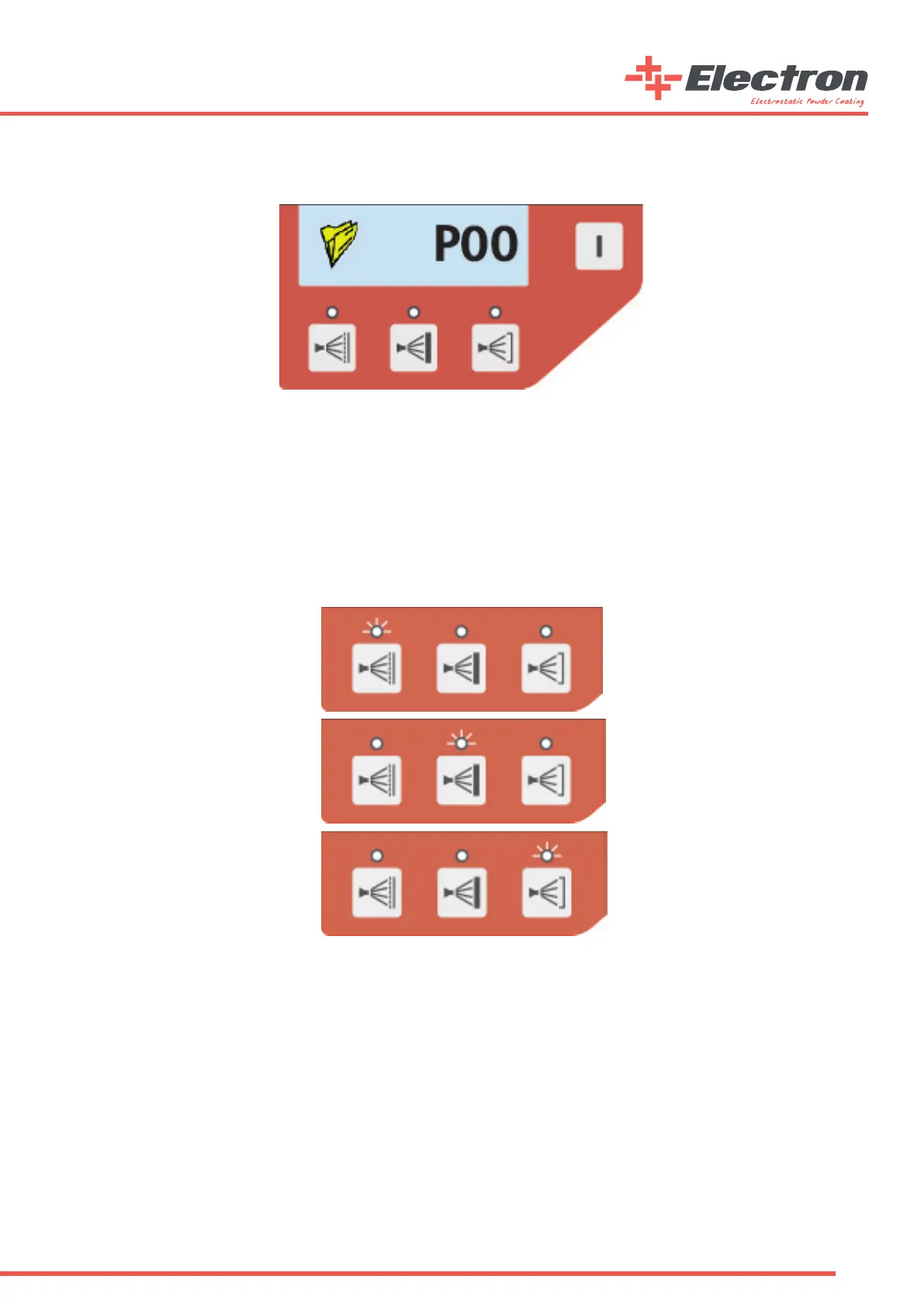
Recipe Segment
After adjusting the values from the control unit, the user can save the recipe for future usage. To save the current recipe, press
and hold the segment button next to the recipe segment button for three seconds. You will see the recipe number ashing every
500ms. The user then chooses the recipe number for the current recipe. Turn the knob until the desired recipe number is selected.
Once the number is selected the recipe can be saved.
To save the recipe, press and hold the same segment button for three seconds. This time, the screen will start ashing every 200ms
for 2 seconds and the recipe will be saved successfully. If instead of pressing and holding for three seconds, the user presses the
button, the current recipe will not be saved and the screen will turn to its rst position.
b. Predened Recipe Usage
Predened Recipe Recall Buttons
Pressing the rst predened recipe on the left side calls the at surface coating application. After pressing, the screen automatically
brings the P01 recipe and the LED indicator will light up. Similarly, if the user presses the button on the middle, the control unit
brings up the P02 recipe which is the “Coating on Coated Surface”, and if the user presses the right button the “Coating on Notched
Surface”. Recipe will be recalled and the proper LED will light up.


 To Next Page