22
MENU OPERATION
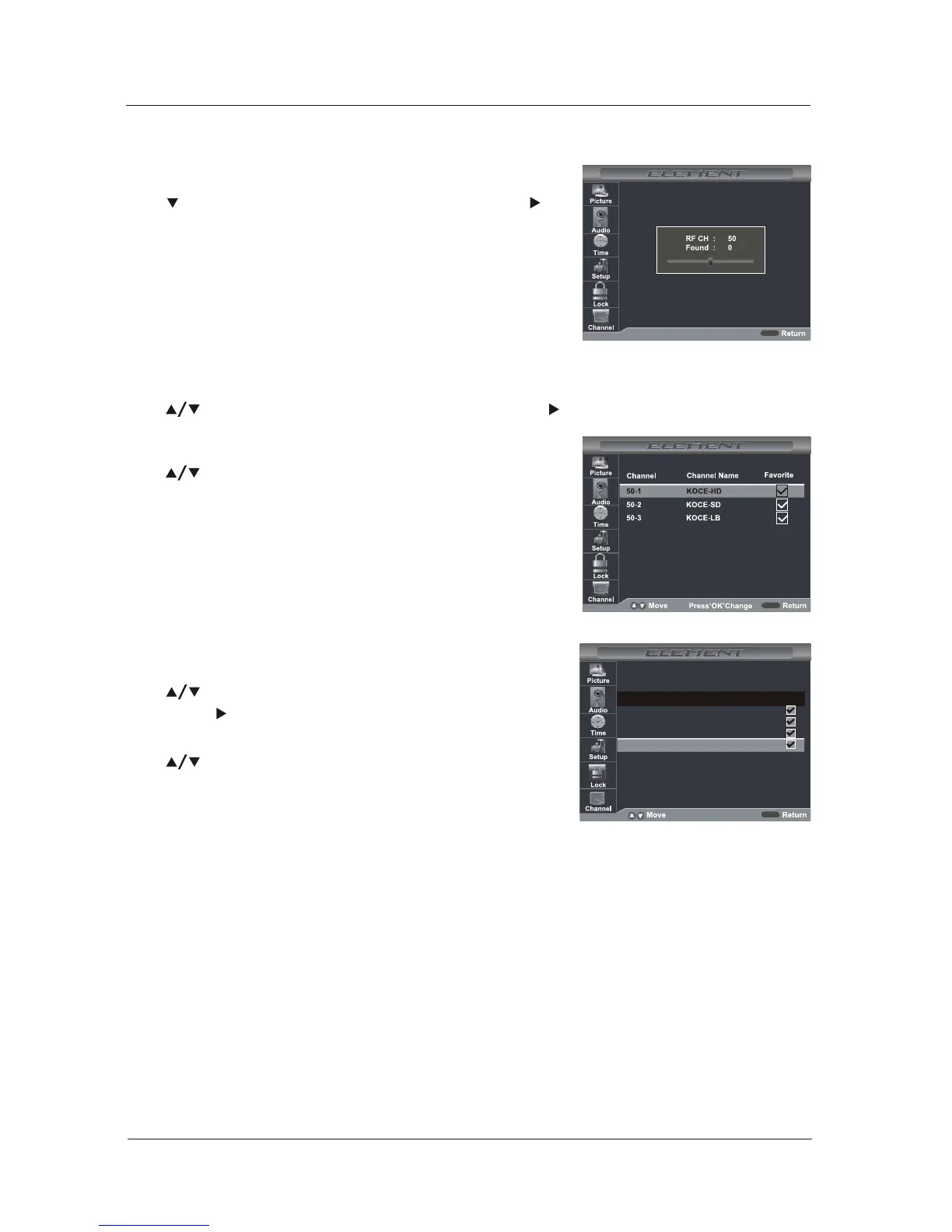
Show / Hide
Allows you to show or hide the channels.
Use button to highlight the “Show / Hide” item,
then press button to enter into the following
menu.
Channel No.
Display the number of current channel.
Channel Label
Display the label of current channel.
DTV Signal:
Display the quality of current DTV signal.
Use button to highlight the desired item, then
press OK button to show or hide the highlighted channel.
MENU
9-19-1
9-29-2
ENCOREENCORE
Channel Channel
3-03-0
KQED-HDKQED-HD
Channel NameChannel Name
Add/DeleteAdd/Delete
11-011-0
Press 'OK' changePress 'OK' change
Favorite
Allows you to add these channels which you desired as the favorite channels.
Use button to highlight the “Favorite”item, then press button to enter into the following
menu.
Use button to highlight the desired item, then press OK
button to add or remove the highlighted channel as favorite.
MENU
MENU
If you select “Cable”as input signal in Antenna item, allows
you to select Cable System among: Auto, STD, IRC and HRC.
Use button to highlight the “Start to Scan”, then press
button to search the channels automatically. The receivable
channels will be stored automatically. When searching
channels, press MENU to stop.



 To Next Page