
 Need help?
Do you have a question about the ELGA Micra and is the answer not in the manual?
Crucial safety precautions for operating the Micra unit.
Step-by-step guide for installing the unit's power cable.
Installing the 10 Micron Depth Filter and Carbon Filter.
Operating the Micra with automatic reservoir level control.
Operating the Micra without automatic reservoir control.
Interpreting display lights and recommended actions for issues.
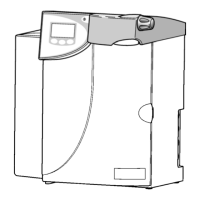
The ELGA Micra is a water purification system designed to provide CLSI Type II pure water for manual and semi-automatic clinical analyzers, with a daily consumption capacity of up to 25 liters. It is engineered for ease of use and reliability, ensuring a consistent supply of purified water to meet various laboratory requirements.
The Micra system operates through a multi-stage purification process to achieve high-quality water. The incoming potable water first passes through a 10 Micron Depth Filter, which removes larger particulate matter, protecting subsequent purification stages. Following this, a Carbon Filter is employed to remove chlorine and other organic contaminants that could degrade the performance of the reverse osmosis (RO) module. The core of the purification process is the Reverse Osmosis (RO) Module, which effectively removes dissolved inorganic solids, heavy metals, and microorganisms. Finally, a Purification Cartridge (often referred to as a DI pack) further polishes the water, removing any remaining ions to achieve the desired resistivity for Type II water.
The system can operate in two primary modes: automatic and manual. In automatic mode, the Micra is connected to a suitable reservoir and utilizes a level control system to automatically fill the tank as needed, ensuring a continuous supply of purified water without constant user intervention. In manual mode, the user initiates and stops the purification process by pressing a "Process" button, making it suitable for situations where a reservoir is not used or specific volumes are required.
A key feature of the Micra is its integrated water quality alarm. This alarm is automatically set to warn the user when the water quality falls below 10 MΩ/cm, indicating that the purification cartridges may need replacement. This set point is adjustable to 5 MΩ/cm or 2 MΩ/cm, allowing users to tailor the alarm sensitivity to their specific application needs.
The Micra is designed for flexible installation, capable of being wall-mounted, floor-mounted, or bench-mounted, provided it is placed on a flat, level surface in a clean, dry environment. The unit's compact design and clear labeling of components facilitate straightforward setup and operation.
Installation involves several steps:
For automatic operation, the level control supplied with the unit should be plugged in and positioned in the reservoir to monitor water levels, allowing the Micra to automatically maintain the desired water volume.
The user interface is simple, featuring an On/Off button and indicator lights that communicate the system's status:
In the event of an unexpected power shortage, the unit is designed to resume working automatically once power is restored, initiating with a 1-minute flush.
Regular maintenance is essential to ensure the Micra continues to provide high-quality water and operates efficiently. The manual outlines several user-performable maintenance tasks, emphasizing safety precautions.
Safety First: Before any maintenance, it is critical to turn off the Micra and disconnect it from the electrical power supply to prevent electric shock.
Consumable Replacement: The Micra uses a consumable kit (LC226) which includes a 10 Micron Depth Filter, a Carbon Filter, and a Purification Cartridge. These components have an estimated service life of 6 months and a maximum shelf life of 2 years. The indicator lights on the unit will signal when these cartridges are exhausted. It is recommended to exchange all three components at the same time to ensure optimal purification results. The Reverse Osmosis Module (LC229) has a typical life of 2-3 years and a maximum shelf life of 2 years. Replacement of the RO Module is typically performed if the permeate water purity or flow rate is inadequate, and users are advised to contact Customer Support for this.
Water Quality Alarm Adjustment: The water quality alarm set point can be adjusted by the user. This involves unscrewing the top cover, locating a specific link on the internal circuitry (TH2), and moving it to a different position according to a provided table to set the alarm at 10 MΩ/cm, 5 MΩ/cm, or 2 MΩ/cm.
Sanitization: The Micra should be sanitized once a year, ideally when the Purification Cartridge is nearing exhaustion. The sanitization process involves:
Troubleshooting: The manual includes a self-help guidelines section with a table that correlates display indicators (lights) with recommended actions. This allows users to diagnose and resolve common issues such as no power, normal operation, low water quality, or incorrectly fitted cartridges. For issues that cannot be resolved through troubleshooting, users are directed to contact their local ELGA LabWater representative.
Disposal of all end-of-life consumable items should be carried out in accordance with local statutory regulations. Any maintenance work not explicitly covered in the manual should be performed by an approved supplier or distributor.
 General
| TOC | < 5 ppb |
|---|---|
| Bacteria | < 1 CFU/ml |
| Resistivity | 18.2 MΩ.cm |
| Flow Rate | Up to 2 l/min |
| Product Water Quality | Type 1 ultrapure water |
| Power Supply | 50/60 Hz |
| Operating Temperature | 5-35 °C |
| Operating Humidity | 10% to 80% (non-condensing) |


 To Next Page