67
English
ADVANCED
OPERATIONS
・
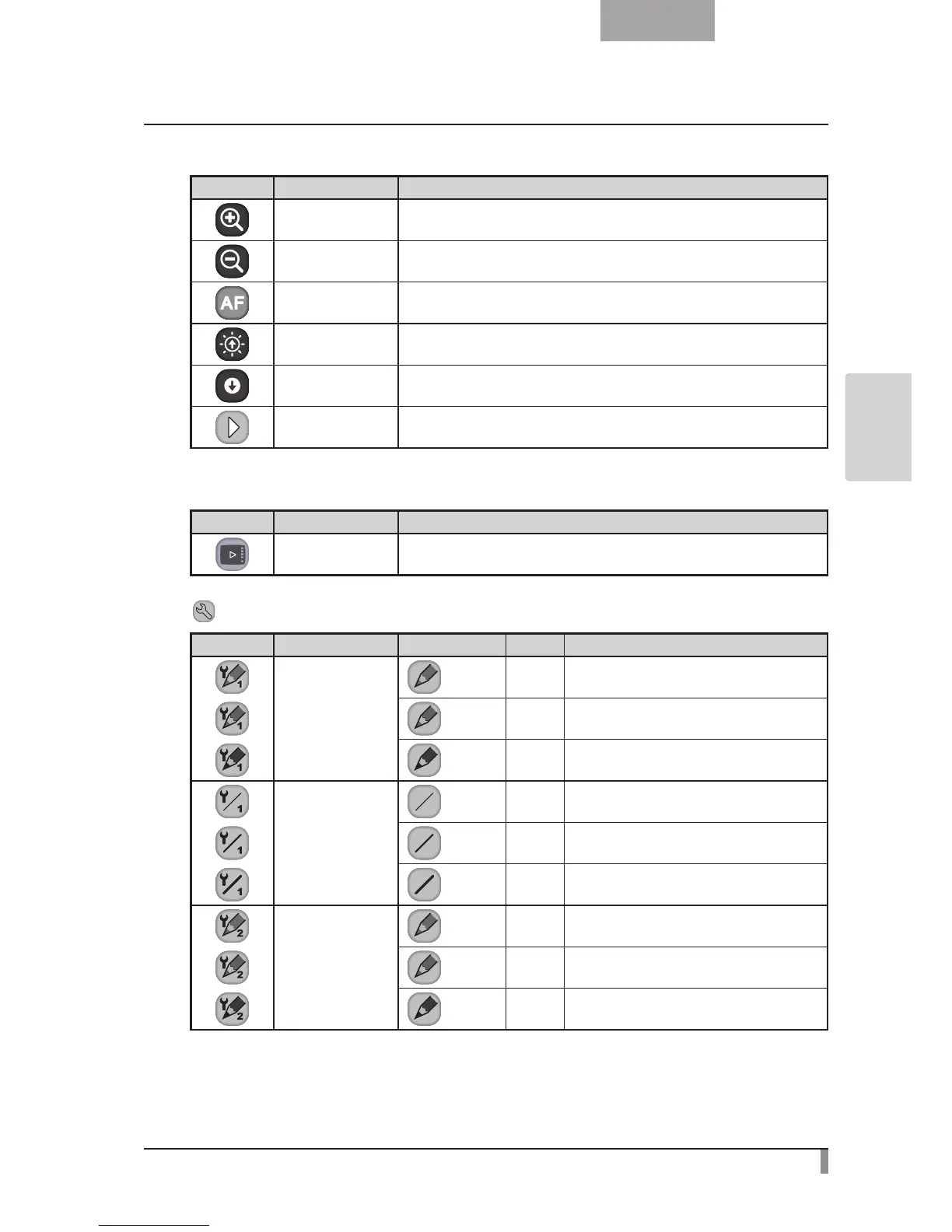
Main Menu 3
Icon Name Function
Zoom In To enlarge the size of the camera image.
Zoom Out To reduce the size of the camera image.
AF To enable autofocus operation.
Brighten To brighten the camera image.
Darken To darken the camera image.
Next To go to Main Menu 1.
・
Main Menu 4
Icon Name Function
Show To show the menu.
Setting Menu
Icon Name Selection Item Default Function
Pen1 Color
Red
✔
To set the pen color to red.
Blue To set the pen color to blue.
Black To set the pen color to black.
Pen1 Thickness
Thin To decrease the pen thickness.
Medium
✔
To set the pen thickness to medium width.
Thick To increase the pen thickness.
Pen2 Color
Red To set the pen color to red.
Blue To set the pen color to blue.
Black
✔
To set the pen color to black.


 To Next Page