EasyManua.ls Logo

Elmo L-12id - Setting Up the Main Unit; Connecting to Display Devices

Elmo L-12id
92 pages
Print Icon
To Next Page IconTo Next Page
To Previous Page IconTo Previous Page
Loading...
12
Español
P56~P73
Deutsch
P38~P55
Français
P20~P37
English
P02~P19
P74~P91
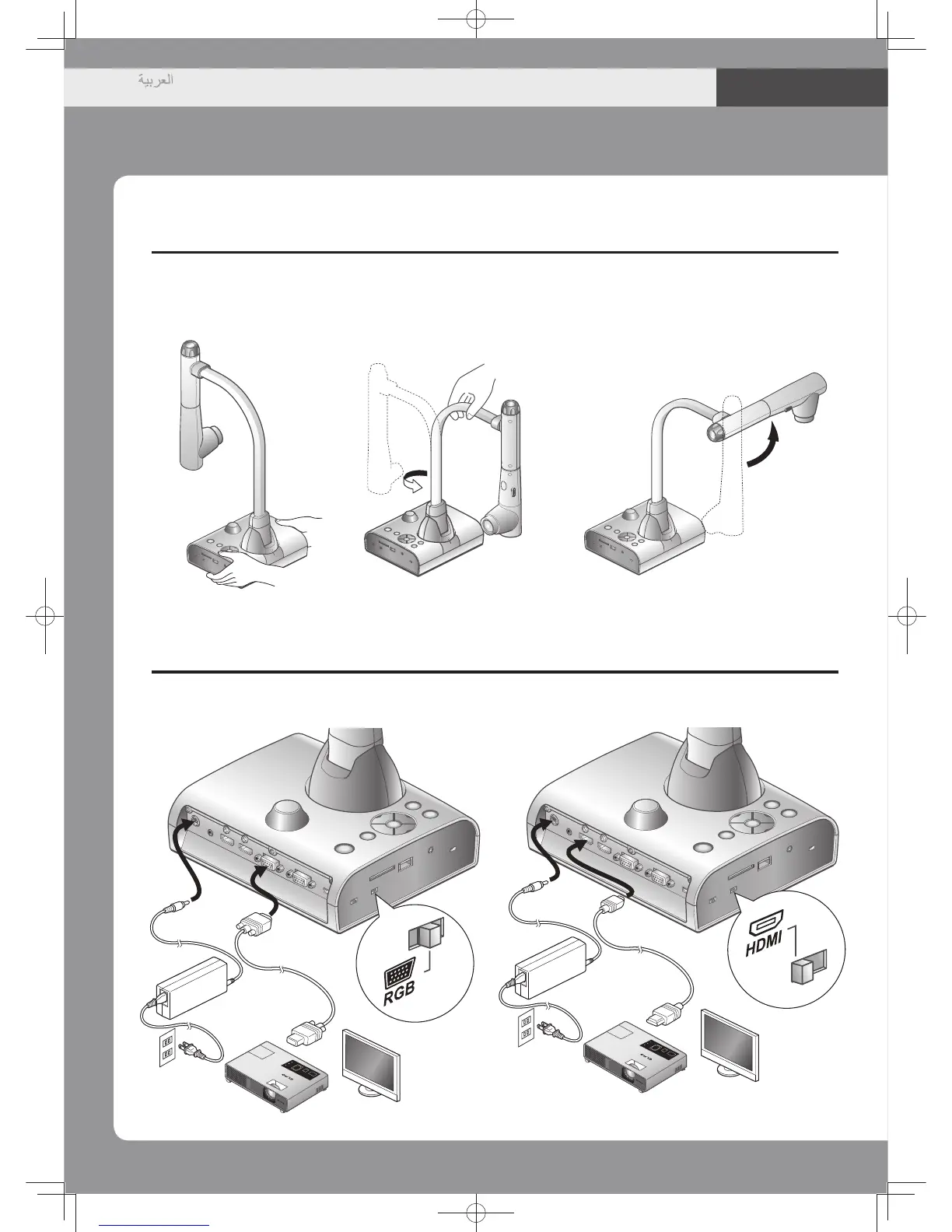
Let'sgetready
②Settingthemainunit
③Connectingtoprojectorormonitor
90°
180°
1.
Placeonaflat
surface.
2.
Turnthecamera
columninthedirection
showninthefigure.
3.
Turnthecamerahead
inthedirectionshown
inthefigure.
ConnectviaaRGBcable(soldseparately)
ConnectviaaHDMIcable(soldseparately)
ACadapter
ACadapter
RGBcable
(soldseparately)
HDMIcable
(soldseparately)
Positionof
theswitch
Positionof
theswitch
Toprojector/monitor
ACcord
ACcord
Towalloutlet
Towalloutlet

Table of Contents