EasyManua.ls Logo

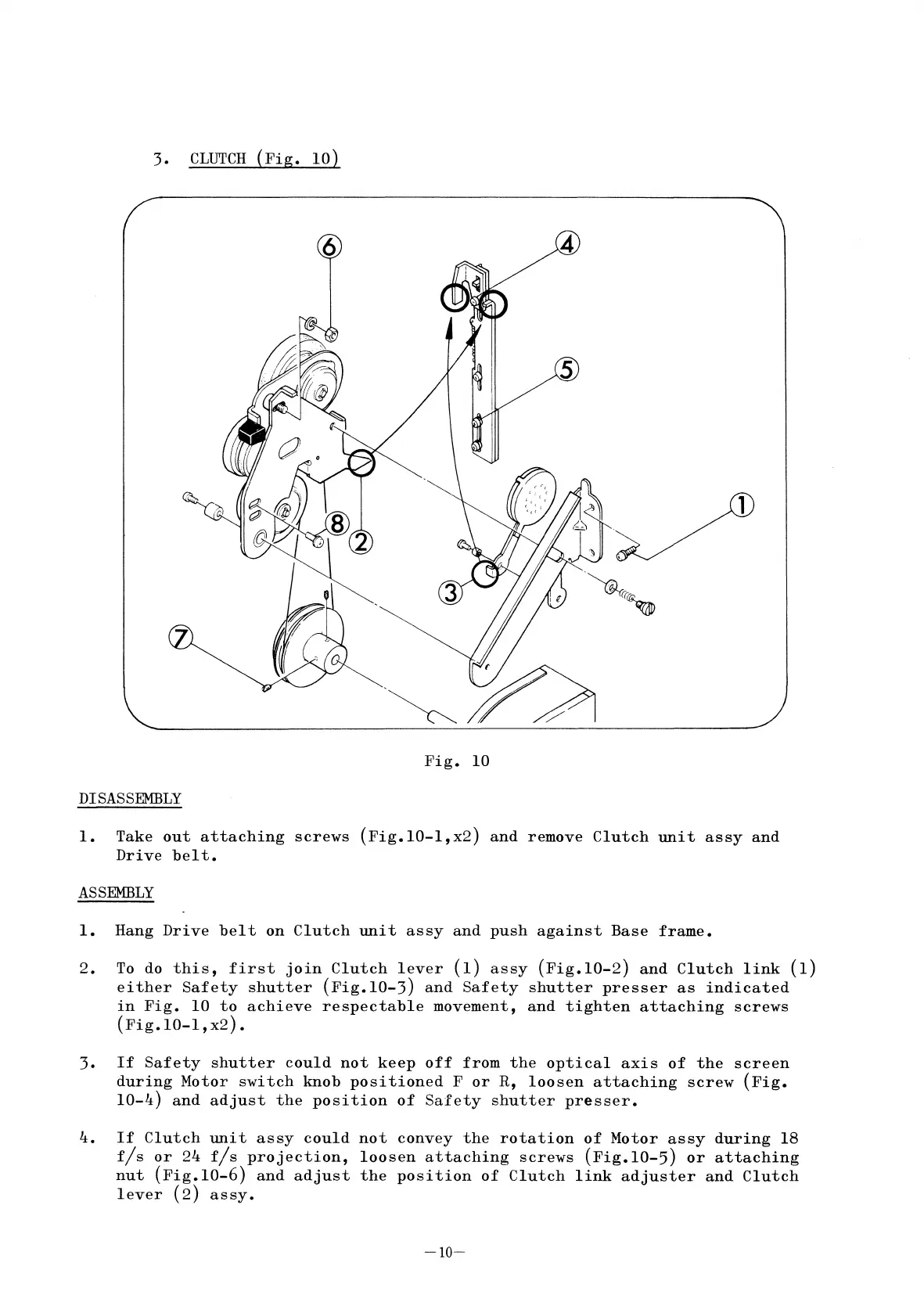
Elmo ST-1200 - 3. CLUTCH (Fig. 10)

Elmo ST-1200
41 pages
Print Icon
To Next Page IconTo Next Page
To Previous Page IconTo Previous Page
Loading...
3.
CLUTCH
(Fig.
10)
4
1
Fig.
10
DISASSEMBLY
1.
Take
out
attaching
screws
(Fig.lO-l,x2)
and
remove
Clutch
unit
assy
and
Drive
belt.
ASSEMBLY
1.
Hang
Drive
belt
on
Clutch
unit
assy
and
push
against
Base
frame.
2.
To do
this,
first
join
Clutch
lever
(1)
assy
(Fig.10-2)
and
Clutch
link
(1)
either
Safety
shutter
(Fig.lO-3)
and
Safety
shutter
presser
as
indicated
in
Fig.
10
to
achieve
respectable
movement,
and
tighten
attaching
screws
(Fig.lO-l,x2).
3.
If
Safety
shutter
could
not
keep
off
from
the
optical
axis
of
the
screen
during
Motor
switch
knob
positioned
F
or
R,
loosen
attaching
screw
(Fig.
10-4)
and
adjust
the
position
of
Safety
shutter
presser.
4.
If
Clutch
unit
assy
could
not
convey
the
rotation
of
Motor
assy
during
18
fls
or
24
fls
projection,
loosen
attaching
screws
(Fig.lO-5)
or
attaching
nut
(Fig.lO-6)
and
adjust
the
position
of
Clutch
link
adjuster
and
Clutch
lever
(2)
assy.
-10-

Related product manuals