PDF Studio
-
PDF Editor for Mac, Windows, Linux. For Evalua
−−
−↿
∙⋅
⋅⊽
‘.
'4.
Universal Thread Tensions
The universal settings make it possible
for
most
sewing jobs
to
be done
without
changing
the
tension, i.e.:
Lower
tension:
preset
at
factory. See page 11,
"Universal
Ten« Upper tension ∣⊂∘∘
weak
_
↟∃⊊⊒∙ 5
Sim‘
−
LOWE’
Thread"
↧∘
Check
⋔∂↕
The ∣≺⊃∨∨∊⋅⋅↾ The
upper
thread is visible underneath the material. Increase
the
⋔
read
↕⊝∩⊆⋮∘⊓
is
∁∘∏∊∁↕⋅
tension,
turn
to
a
higher number,
between
5 and 9.
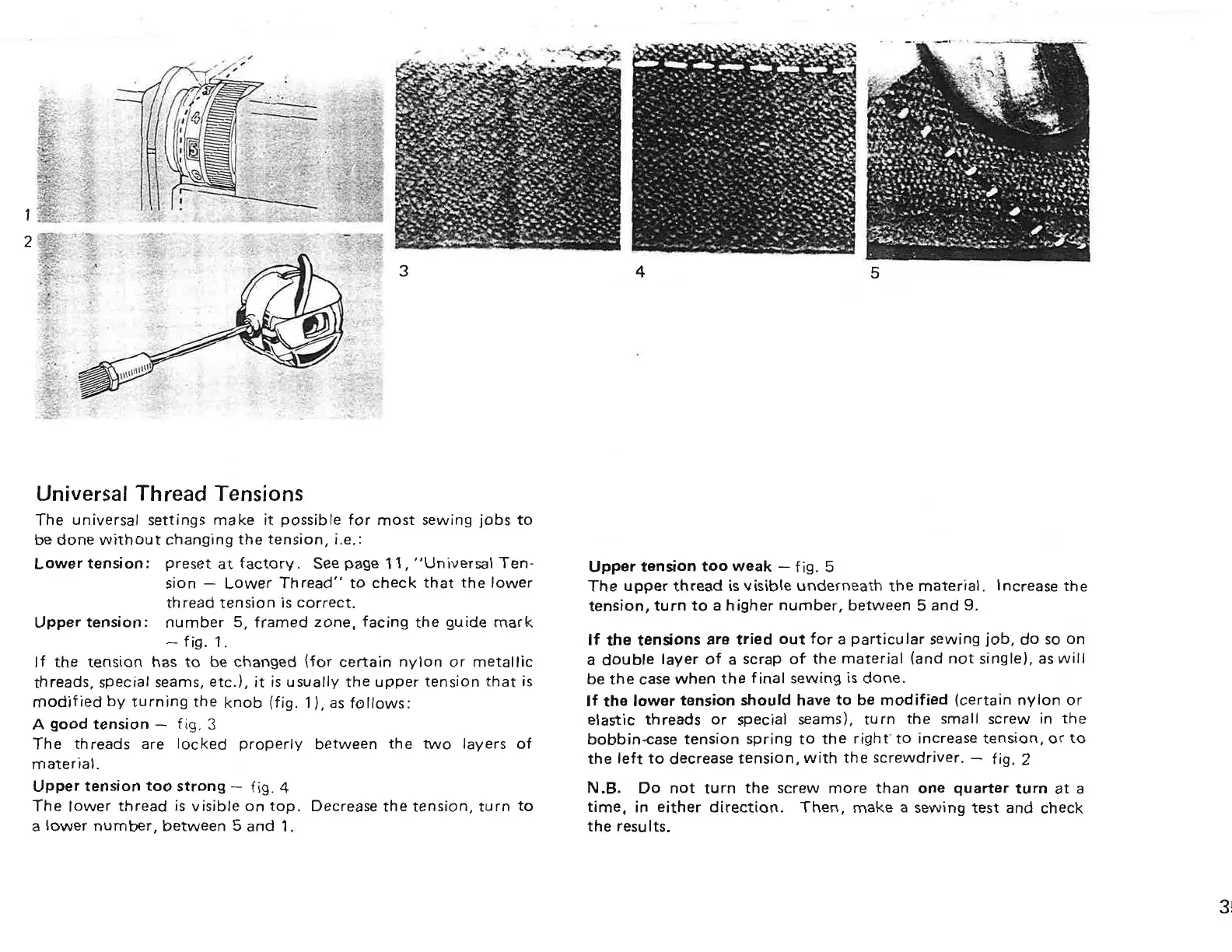
Upper
tension:
number 5,
framed
zone,
facing
the
guide
mark
If
the tensions
are
tried
out
for
a particular sewing job, do
so
on
a double layer
of
a
scrap
of
the
material
(and
not
single),
as
will
be
the
case
when
the
final
sewing is
done.
If
the
lower tension should have
to
be modified (certain nylon
or
elastic threads
or
special seams),
turn
the small
screw
in
the
bobbin-case
tension
spring
to
the
right’
to
increase tension,
or
to
the
left
to
decrease tension,
with
the screwdriver.
—
fig, 2
—
fig. 1.
If
the tension has
to
be changed (for certain nylon
or
metallic
threads, special seams, etc.),
it
is usually
the
upper
tension
that
is
modified
by turning
the
knob
(fig. 1),
as
follows:
A
good
tension
—
fig. 3
The
threads
are
locked
properly between
the
two
layers of
material.
UPPBT Tension
100
Strong
—
fig. 4 N.B. Do
not
turn
the
screw
more
than
one
quarter
turn
at
a
The
lower
thread
is
visible
on
top.
Decrease
the
tension,
turn
to
time, in either
direction.
Then, make a sewing
test
and check
a
lower
number, between 5 and 1. the results.
PDF Studio - PDF Editor for Mac, Windows, Linux. For Evaluation. https://www.qoppa.com/pdfstudio



 To Next Page