3.
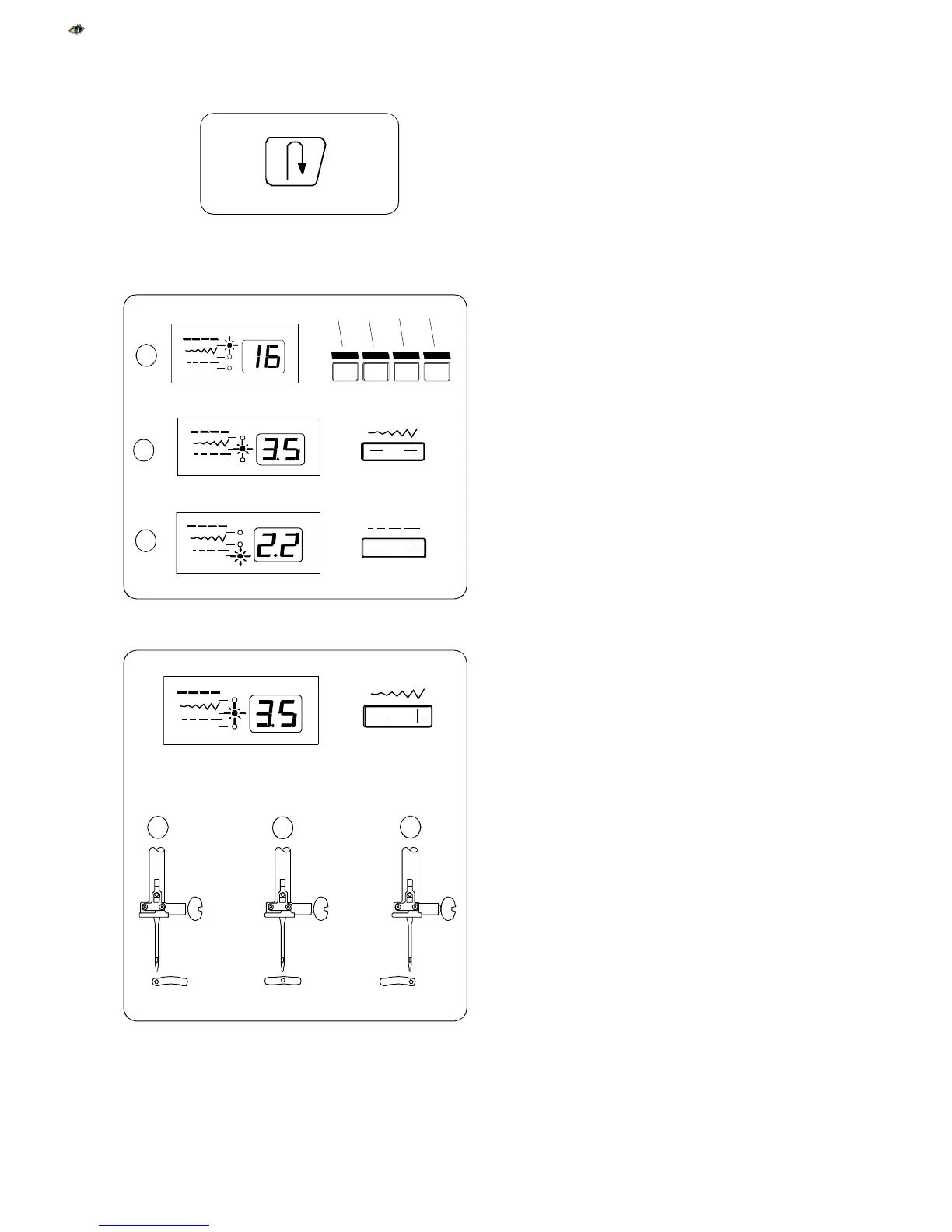
Reverse Key
If you are sewing a straight stitch, zigzag stitch
or 3-step zigzag stitch, press and hold this key.
The machine will sew in reverse until you release
the key.
* If you are sewing utility or decorative stitches,
the machine will immediately stop and sew a
locking stitch when you press this key.
4. Indicator Lights and LED Readout
a. When this light is lit, the readout displays the
selected stitch.
b. When this light is lit, the readout displays the
selected stitch width/needle position.
c. When this light is lit, the readout displays the
selected stitch length.
5. Stitch Width and Needle Position Key
Press this key to display pre-programmed stitch
width or needle position.
To decrease stitch width or move needle position
to the left, press – side of key.
To increase stitch width or move needle position
to the right, press + side of key.
The stitches listed below allow you to move the
needle to any position by pressing the – or +
side of the key. There are 15 needle positions for
straight stitches (0.0 – 7.0).
a Left position
b Center position
c Right position
14
1
a
b
c
a
b
c
15
16
30
31
45
46
60
1


 To Next Page
 Loading...