EasyManua.ls Logo

eMachines EL1700 - User Manual

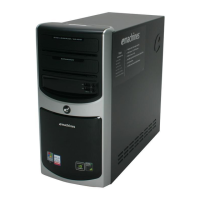
eMachines EL1700
84 pages
Print Icon
To Next Page IconTo Next Page
Loading...
eMachines
EL1700
Service Guide
PRINTED IN TAIWAN
Service guide files and updates are available
on the ACER/CSD web; for more information,
please refer to http://csd.acer.com.tw

Table of Contents

Questions and Answers

  • K
    khallAug 1, 2025
    How to fix eMachines EL1700 when it will not power on?
    • V
      Vanessa WilliamsAug 1, 2025
      If your eMachines Desktop isn't powering on, make sure the power cable is securely connected to both the system and the AC power source. Also, verify that the voltage selector switch is set to the correct voltage.
  • J
    joe69Aug 8, 2025
    Why does my eMachines EL1700 make a continuous long beep?
    • E
      Emily WebbAug 8, 2025
      A continuous long beep usually means there's an issue with the memory. This could be due to the memory not being installed correctly or a memory error.
  • K
    keith16Aug 15, 2025
    Why does my eMachines EL1700 beep once long then twice short?
    • L
      Linda ChapmanAug 15, 2025
      A single long beep followed by two short beeps indicates that the BIOS is damaged.
  • D
    Daniel McdonaldAug 23, 2025
    What does it mean when my eMachines EL1700 beeps twice?
    • G
      gduranAug 25, 2025
      Two short beeps indicate that the CMOS is damaged, there's a CMOS checksum error, or the CMOS battery is losing power.

Summary

Revision History

Copyright

Disclaimer

Conventions

Service Guide Coverage

FRU Information

Chapter 1 System Tour

System Features Overview

Summary of system features including processor, chipset, memory, storage, audio, networking, and I/O.

Ports and Connectors

Details of front and rear I/O ports, system BIOS, and power supply.

Component Identification

Visual guide to front, rear, and internal system components.

System LED Indicators

Explanation of system LED indicators and their meanings.

Chapter 2 System Utilities

CMOS Setup Utility Basics

Introduction to CMOS setup, entry, and navigation.

BIOS Configuration Options

Details on Standard CMOS Features, Advanced BIOS, Chipset, and Integrated Peripherals settings.

Power Management and Security

Configuration for power management, PC health, and BIOS security features.

System Defaults and Exit

Options for loading defaults and saving/exiting the BIOS setup.

Chapter 3 System Disassembly

Disassembly Preparation

Tools and procedures required before disassembling the system.

Main Unit Disassembly Overview

Diagram of main unit disassembly and screw list.

Component Removal Procedures

Step-by-step guides for removing side panel, front bezel, heat sink, processor, and drives.

Board and Cable Removal

Instructions for removing memory modules, I/O boards, mainboard, and power switch cables.

Chapter 4 System Troubleshooting

Hardware Diagnostic Procedure

General steps for performing hardware diagnostics on Acer products.

System Check Procedures

Steps for power system checks, external, and internal inspections.

Error Identification

Using beep codes and POST messages to identify system errors.

Online Support Resources

Information on accessing online technical support and documentation.

Chapter 5 System Block Diagram and Board Layout

System Block Diagram

Visual representation of the system's architecture and components.

Mainboard Layout

Diagram identifying components and connectors on the mainboard.

System Jumpers

Identification and function of system jumpers on the mainboard.

Chapter 6 FRU (Field Replaceable Unit) List

eMachines L1700 Exploded Diagram

Exploded view diagram illustrating component assembly for the eMachines L1700.

eMachines L1700 FRU Part List

Comprehensive list of Field Replaceable Units (FRU) for the eMachines L1700.

Appendix A Technical Specifications

Processor Specifications

Detailed specifications for Intel Core 2 Quad, Duo, Pentium, and Celeron processors.

System Board and Memory Specs

Specifications for major chips on the system board and memory modules.

Storage and Interface Specifications

Details on hard drives, PCI, network, SATA interfaces, and input devices.

Drive Specifications

Technical specifications for optical drives.

eMachines EL1700 Specifications

General IconGeneral
BrandeMachines
ModelEL1700
CategoryDesktop
LanguageEnglish

Related product manuals