Buzz
7
emax-usa.com
Buzz Flight Controller
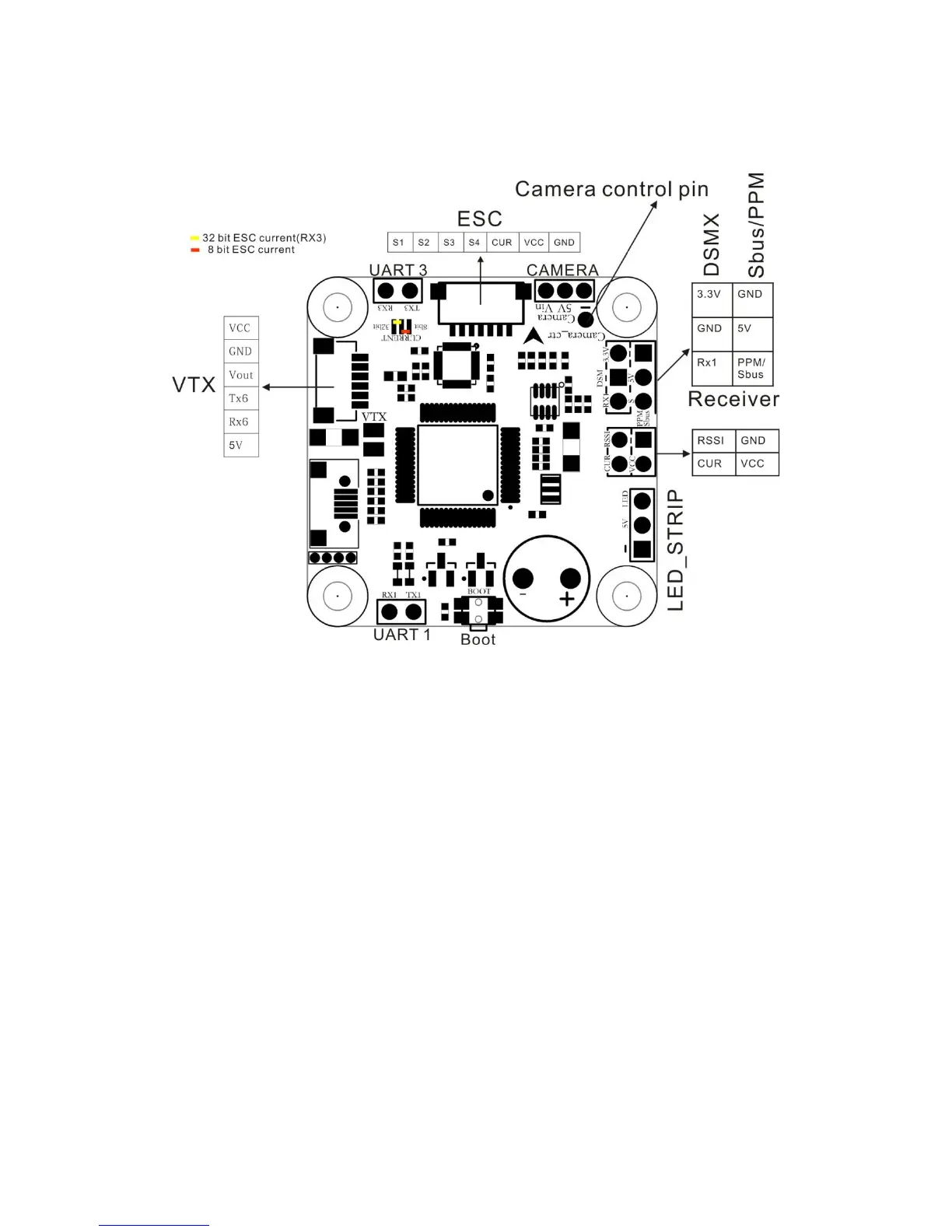
FC Schematic and pinout Diagram
Stock Flight Controller Settings
Buzz is configured to take a channel map of the TAER1234 convention. That is the
channel map is in the respective order: throttle, aileron, elevator, rudder, AUX
Channels. The arm switch on Buzz is set on AUX 1 and armed with the highest
value. AUX 3 is set to beeper with beeping on in a high state. AUX 4 is set to the
VTX power switch: High value is VTX on and Low value is VTX off.
Caution: Make sure your control is set with a channel map described above,
otherwise Buzz may not operate properly or even transmit video.
Camera control is already set up with stock settings and is connected to pin A08. To
enter the control menu of the camera, move throttle to middle throttle position and
yaw all the way right. You can move through the menu by pitching up and down. To
enter a menu or selection, yaw right. In this menu you can change exposure,
brightness, contrast, and many other camera settings.
PID profiles: PID profile 1 is tuned and optimized for Buzz for ultimate control of flight
indoors and outdoors. Please do not change these values. Change the rates to get
the flight control characteristic desired.
Caution: Changing PID settings can cause poor flight behavior and worst case
burning a motor or ESC. Departure from stock PIDs will void all warranty with the
Buzz.














 To Next Page