Buzz
8
emax-usa.com
Current Sensor Jumper
There is jumper pads on the FC shown in the diagram above to choose the current
sensing style desired. Solder jumped in the yellow mark configuration connects 32bit
telemetry to UART 3 RX. This configuration has all the features 32 bit ESC’s offer.
Soldering the jumper highlighted in the red connects an analog current sense signal
to the correct ADC for the omnibus and overall current draw can be known that way.
Adjusting Software Settings (Betaflight Configurator)
Betaflight Configurator can be used to changed programmed settings on Buzz and to
flash new firmware if desired. Betaflight Configurator can be downloaded at
https://github.com/betaflight/. The hardware target for Buzz Flight Controller is
OmnibusF4 and the correct firmware can be found on emax-usa.com.
DISCLAIMER: We do not suggest changing any PID settings on Buzz or upgrading
the firmware to new or old versions. Buzz comes stock with an optimal tune for
superior flight performance. Changing this can affect flight time, overall speed,
control of the aircraft, or excessive heat within the motors.
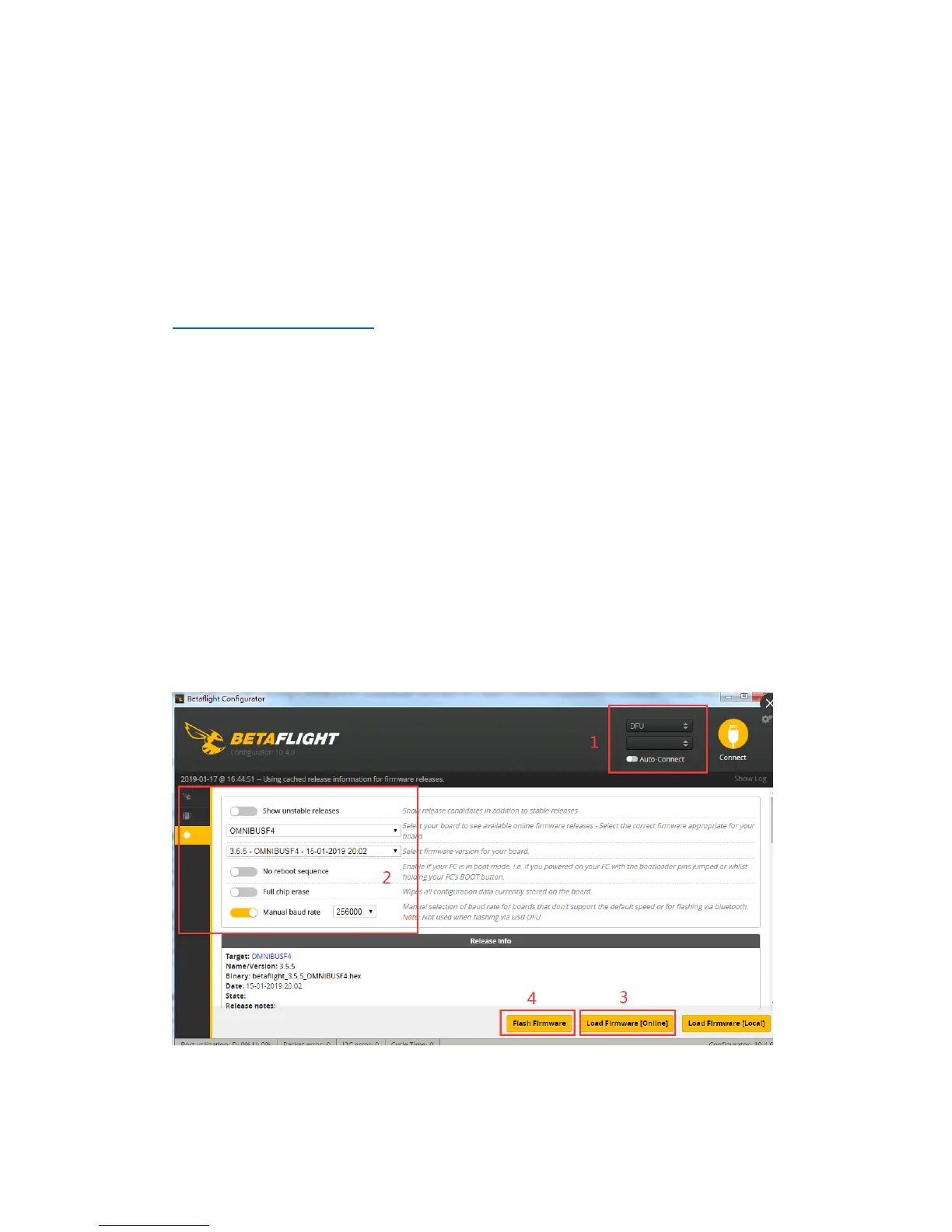
Reprogramming Buzz Flight Controller
1. Put the Flight Controller in DFU mode by pressing the Boot button while
plugging in the micro USB cable to a computer.
2. Select OmnibusF4 as the target and then select the desired firmware (4.0.0
stock). Betaflight 4.0.0 firmware can also be downloaded from emax-usa.com
if it is not available in the drop down menu. Select Manual Baud Rate with
256000 in the drop down menu
3. Select Load Firmware(Online) to download the firmware or if the hex
file was downloaded from emax-usa.com select Load Firmware (Local)
and select the path to the correct hex file.
4. Select Flash Firmware to program the flight controller
Set the Correct Settings
1. Download the latest CLI Dump File from https://emax-usa.com/
2. Connect Buzz to Betaflight configurator and select the CLI tab














 To Next Page