iMX RT1062 OEM Developer’s Kit - User’s Guide
Copyright 2019 © Embedded Artists AB
2.6 General Handling Care
Handle the iMX RT1062 OEM Board and iMX OEM Carrier Board with care. The boards are not
mounted in a protective case/box and are not designed for rough physical handling. Connectors can
wear out after excessive use. The iMX OEM Carrier Board is designed for prototyping use, and not for
integration into an end-product.
For boards with LCD, do not exercise excessive pressure on the LCD glass area. That will damage the
display. Also, do not apply pressure on the flex cables connecting the LCD/touch screen. These are
relatively sensitive and can be damaged if too much pressure is applied to them.
Note that Embedded Artists does not replace boards where the LCD has been improperly
handled.
2.7 Handling SO-DIMM Boards
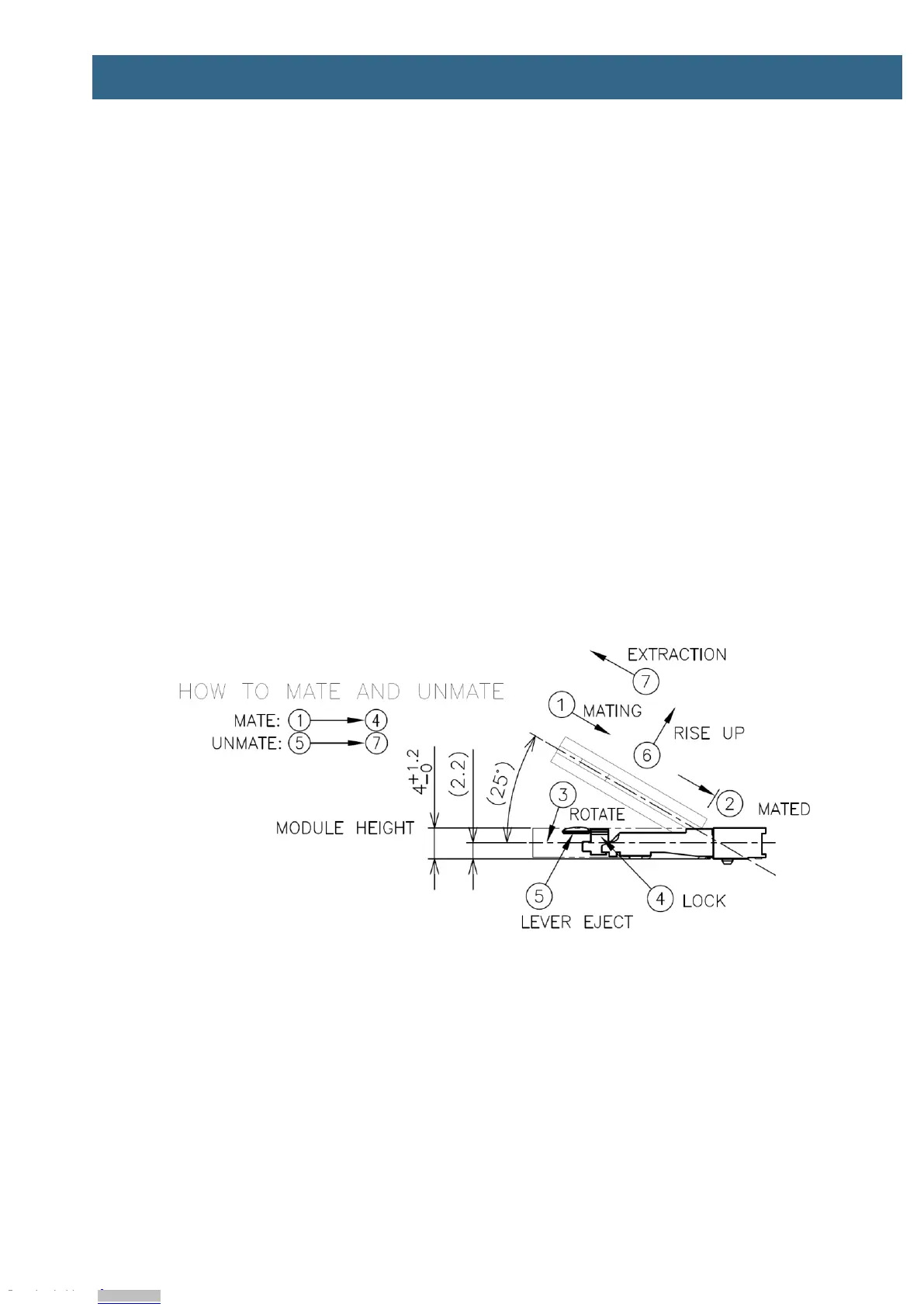
See picture below for instructions about how to mount/remove the OEM Board in the SODIMM
connector of the iMX OEM Carrier Board.
To install the OEM Board, align it to the socket (1). Push the board gently, and with even force
between the board edges, fully into the socket (2). Then push the board down in a rotating move (3)
until it snaps into place (4). The OEM Board shall lie flat and parallel to the base board.
To remove the OEM Board, spread the two arms of the SO-DIMM socket apart slightly. The board will
pop up (5). Gently rise the board in a rotating move (6) and then extract the board from the socket (7).
Apply even force between board edges when removing so that the board is removed parallel to the
locking arms.
Figure 9 – Instructions how to Mount/Remove the an OEM Board
Do not forget to follow standard ESD precaution routines when mounting/removing the OEM Board.
Most signals exposed on the 200 edge contact fingers on the SO-DIMM board are unprotected.
Maintain the same electrical potential of the OEM Board (to be mounted) and the base board. Do not
touch the OEM Board edge connectors. Handle the OEM Board only by the three other edges. Also,
do not touch the components on the board.
Downloaded from Arrow.com.Downloaded from Arrow.com.Downloaded from Arrow.com.Downloaded from Arrow.com.Downloaded from Arrow.com.Downloaded from Arrow.com.Downloaded from Arrow.com.Downloaded from Arrow.com.Downloaded from Arrow.com.Downloaded from Arrow.com.Downloaded from Arrow.com.Downloaded from Arrow.com.


 To Next Page