Amplifier System Assembly
SD32+
System
5. Amplifier System Assembly
5.1. connecting the headbox to the amplifier
You can connect the Headbox to the amplifier either directly or by using the Headbox to
amplifier Cable.
Direct Headbox Connection
To connect the Headbox directly to the amplifier:
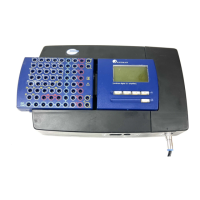
1. Slide the Headbox firmly into the headbox platform on the top of the amplifier
casing.
2. Ensure that the Headbox Connection port on the amplifier and the Headbox
Amplifier Connection port on the Headbox are fully connected. The Headbox
should be flush against the LCD display and menu control area.
Remote Headbox Connection
To connect the Headbox to the amplifier using the Headbox to Amplifier Cable:
1. Press the release button beneath the portion of the Headbox that extends over the
end of the amplifier and slide the Headbox away from the LCD until it is free of the
amplifier casing.
2. Connect one end of the Headbox to Amplifier Cable to the Patient Box Link port on
the amplifier.
3. Connect the other end of the Headbox to Amplifier Cable to the Removable Patient
Box Link port on the Headbox.
5.2. connecting the amplifier to the
sandman elink
adapter
To connect the amplifier to the Sandman elink Adapter:
1. Insert one end of the fiber optic cable into the Optical Link port on the amplifier
until you hear or feel it click into place; the plug will only fit into the port one way.
2. Insert the opposite end of the fiber optic cable into the Optical Link connector on the
Sandman elink Adapter until you hear or feel it click into place; the plug will only fit
into the port one way.
5.3. connecting the external power supply to the amplifier system
To provide the SD32+ system with power:
1. Screw the AC/DC Adapter’s DC input plug into the DC In socket on the Sandman
elink Adapter.
2. Screw the appropriate end of the Power Transfer Cable into the DC Out socket on
the Sandman elink Adapter.
3. Screw the opposite end of the Power Transfer Cable into the DC In socket of the
amplifier.
4. Insert the power cord into the three-pronged plug of the AC/DC Adapter.
5. When you are ready to start collecting data, plug the AC/DC power cord into a wall
outlet.
24


 To Next Page