56
Epsilon Ei DeviceNet Drive Reference Manual
Explanation of PLC Program
The copy command in Rung 0 will activate when B3:0/0 is turned on. This command will
send out a request to the DeviceNet master by copying the N10 integer file into the M0: file.
After this request gets sent out, the PLC indicates when it has all data returned by setting bit
I:3/15 high. Once this occurs bit B3:0/1 can be set high to view the results via a copy
command from the scanner card M1: to integer file N11:.
Once the data is received, the response buffer must be cleared before the next explicit
message can be sent. This is accomplished by setting bit B3:0/2 high. When this is
implemented, the I:3/15 bit will be cleared by the scanner card and the explicit messaging
system is free to use again.
Note
After each send a clear response buffer message must be sent in order to continue
communication.
Examples
Example 1 Read Index 0 Velocity
This example will show how to use explicit messaging to capture the current index velocity
in an Ei-DN drive.
Create a PowerTools Pro configuration file ensuring that both the MacID (04) and the
network BaudRate (125 KB) are configured. For this example, set the Index 0 Velocity is to
1000 units. Download this to the drive.
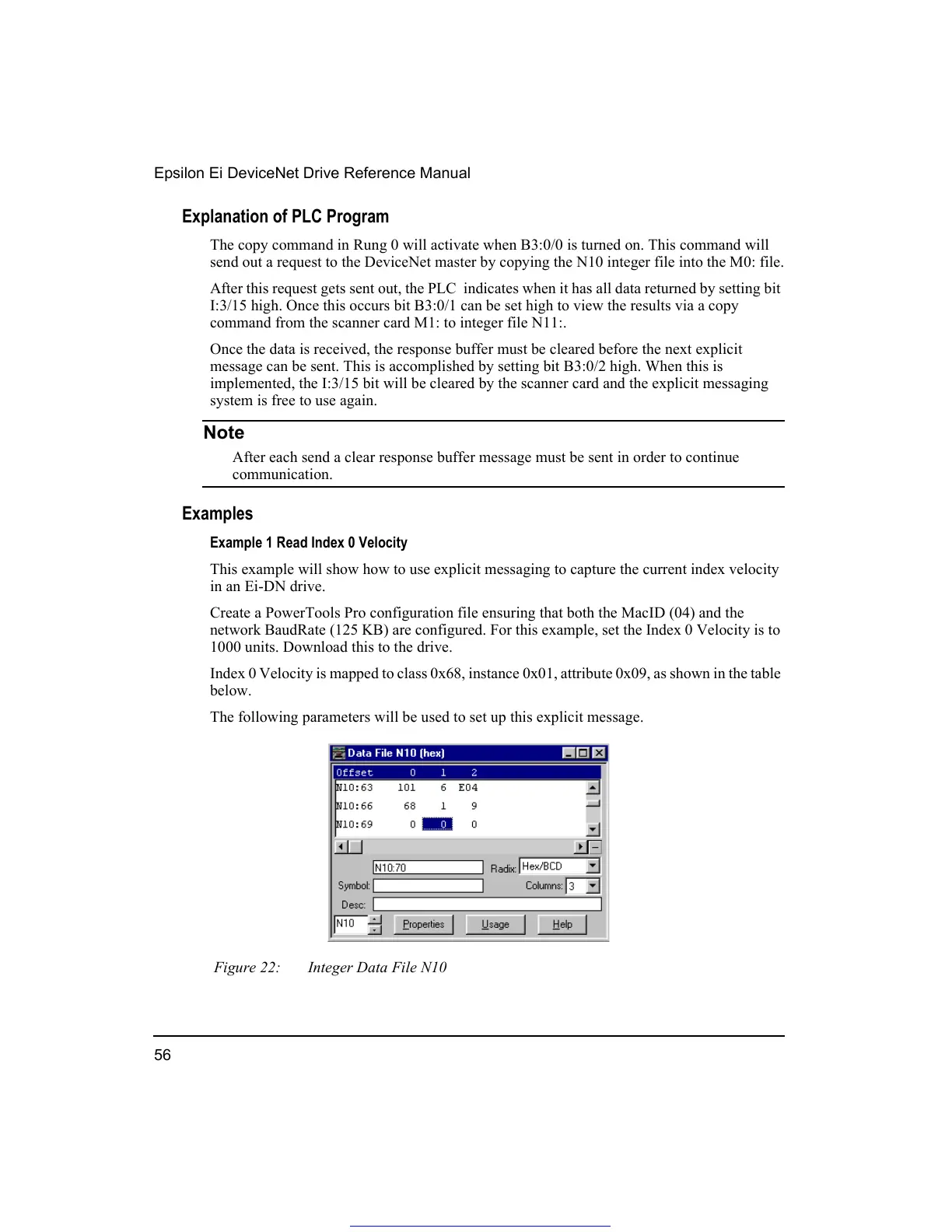
Index 0 Velocity is mapped to class 0x68, instance 0x01, attribute 0x09, as shown in the table
below.
The following parameters will be used to set up this explicit message.
Figure 22: Integer Data File N10
Get other manuals https://www.bkmanuals.com




 To Next Page