EasyManua.ls Logo

Emerson EV477 - Recording Mode

Emerson EV477
47 pages
Print Icon
To Next Page IconTo Next Page
To Previous Page IconTo Previous Page
Loading...
ON-SCREEN TIMER PROGRAMMING (CONTINUED)
OPERATION (SINGLE PROGRAMMING)
30
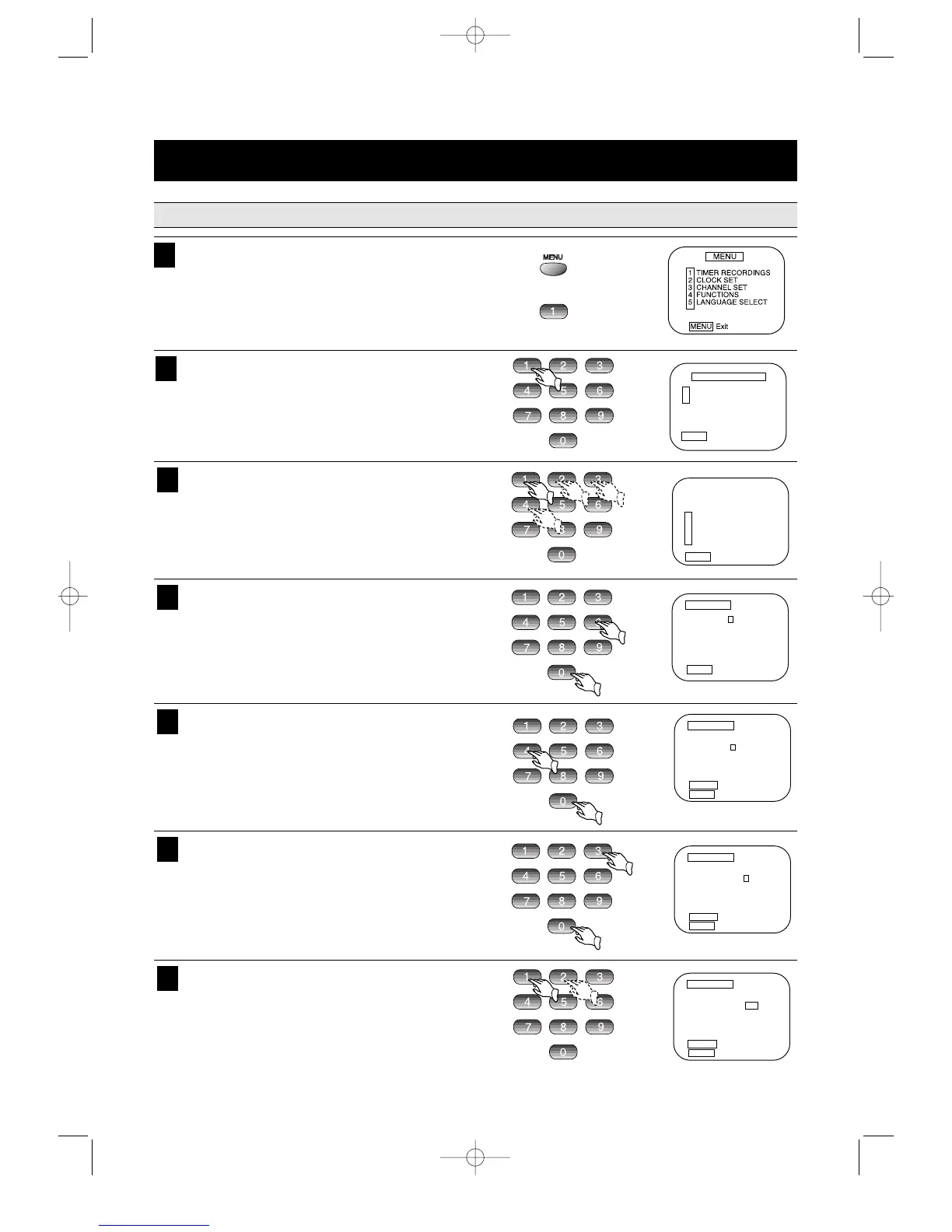
Press the MENU key on the remote control. The
Menu screen appears.
Press the number key 1 to enter the Timer
Recording mode.
1
To select the desired programming type press the
number key 1, 2, 3 or 4.
In this example, select number 1 for one time pro-
gramming.
NOTE:Daily,Weekdays and Weekly programming
process are same as one time’s.
3
To select "Make a New Program" mode, press the
number key 1.
2
Press the number keys to select the desired
Channel (06).
While the VCR is in the CABLE mode, if a channel
over 100 is desired, press 100's key and then the
next 2 digits in order.
4
Press the number keys on the remote control to
set the Hour (04).
5
Press the number keys to set the Minute (30).
6
Press the number keys to select the AM or PM (1
or 2).
7

TIMER RECORDINGS
1 Make a New Program
2 Review/Cancel Programs
MENU Exit
How often do you want
to record program?
1 One Time
2 Daily (Sun-Sat)
3 Weekdays (Mon-Fri)
4 Weekly (Once a week)
MENU Exit
PROGRAM1 (ONE TIME)
Channel –
Start Time – :
End Time – :
Start Date – / /
Tape Speed EP
MENU Cancel
PROGRAM1 (ONE TIME)
Channel 06 Cable
Start Time –
:
End Time – :
Start Date – / /
Tape Speed EP
CLEAR Correct
MENU Cancel
PROGRAM1 (ONE TIME)
Channel 06 Cable
Start Time 0
4 : 3 0 1=AM
End Time – : 2=PM
Start Date – / –/–
Tape Speed EP
CLEAR Correct
MENU Cancel
PROGRAM1 (ONE TIME)
Channel –
Start Time – :
End Time – :
Start Date – / /
Tape Speed EP
MENU Cancel
PROGRAM1 (ONE TIME)
Channel 06 Cable
Start Time 04
:
End Time – :
Start Date – / /
Tape Speed EP
CLEAR Correct
MENU Cancel

Related product manuals