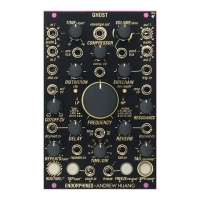
🠚 Split your banging techno 909-style kick drum and apply it into AUDIO IN 1
🠚 Set the DISTORTION and COMPRESSOR knobs to own taste, usually around 12
o’clock
🠚 Set the VCF filter type to normal LP/HP and set the filter FREQUENCY knob around 11
o’clock
🠚 Apply clock from your sequencer into CLOCK IN jack (typically expected in 16
th
notes)
and set the TIME/DIV knob to obtain desired repeats. Set DELAY DRY/WET and
REPEATS to own taste, usually both around 12 o’clock
🠚 Enable REVERSED REVERB by ROUTING + FREEZE/reverse* . Set REVERB
DRY/WET and TAIL to your own taste until you obtain a whooshing sound. For proper
groove set the pre-delay amount by ROUTING + TAIL/preleday* to approx. 12 o’clock
🠚 Apply kick-drum trigger into SIDECHAIN TRIG IN jack. Set the ducking envelope
amount to 50% with ROUTING + SIDECHAIN to 12 o’clock. Then move SIDECHAIN knob
alone to around 10-11 o’clock to catch the proper pumping time
🠚 Mix the sound from AUDIO OUT 1/2 with the original kick drum using a mixer such as
Cockpit 2
🠚 TIP: it is best to keep your low end consistent or even better - MONO. So when using the
delay to create the rumble, set TAPS DISTRIBUTION to STEREO mode via ROUTING +
TAP to avoid PING-PONG effect or simply only use AUDIO OUT 1 .
GHOST DRONE
ROUTING 3
GHOST structure and multidimensional modulation matrix is capable of producing dark
drones and ephemeral soundscapes full of texture and harmony.
🠚 Set the ROUTING mode to the third order (VCF → FX → DISTORTION) when ROUTING
button LED is off when ROUTING button is fully lit
🠚 Select the COMB FILTER by pressing the ROUTING + FILTER BUTTON and set the
RESONANCE fully CW
🠚 Patch a variable waveform oscillator into the AUDIO IN 1 , SAW and SQUARE waves
work best. Feed an additional envelope or LFO to the pre VCA input on the GHOST to
create movement. Patch the AUDIO OUT 1/2 to your mixer
🠚 Set DELAY DRY/WET to 80% with REPEATS around 30-40%, adjust the
REPEATS/tone* by pressing the ROUTING + REPEATS knob to around 13:00 - 14:00.
Sync the delay by sending a clock from your sequencer into the CLOCK IN and leave
TIME/DIV knob at 12:00
🠚 Set REVERB DRY/WET to 60% with a moderate TAIL amount at around 40%. Adjust
the PRE-DELAY by pressing the ROUTING + turning the TAIL/predelay* knob to
approximately 70-80%


 To Next Page