EasyManua.ls Logo

EnerSys NexSys+ NIP3 - BATTERY CHARGING PROCESS; Charger Idle Display Information

EnerSys NexSys+ NIP3
47 pages
Print Icon
To Next Page IconTo Next Page
To Previous Page IconTo Previous Page
Loading...
NexSys
®
+
Owner’s Manual
AM-NXSPLUS-OM
Rev AC October 2018
23
CHARGING THE BATTERY
At this point, the charger should have been set up by a qualified service person. Charging can
only begin when a battery of the proper type, capacity and voltage is connected to the charger.
With the charger in wait mode (no battery connected) and without pressing the Stop/Start button,
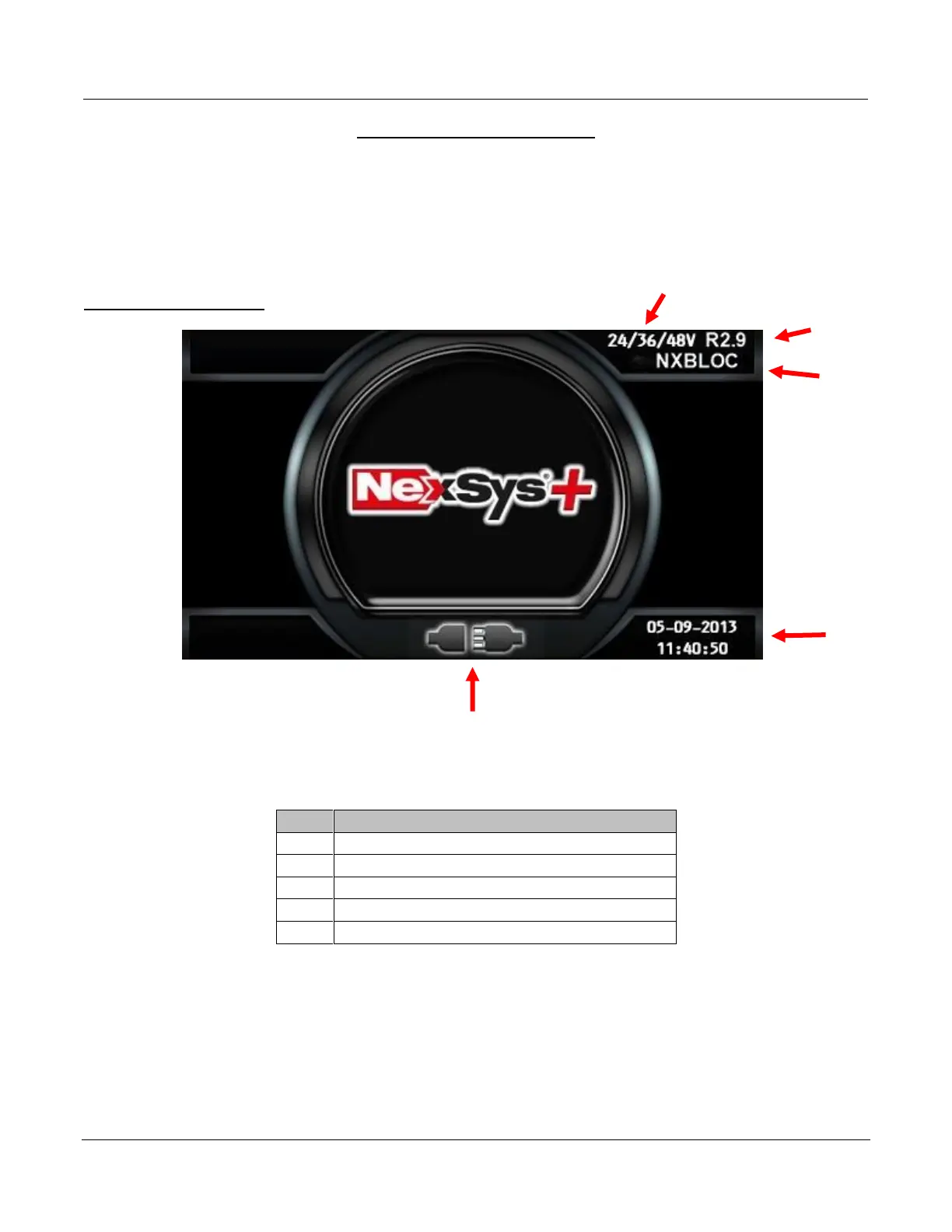
the display will show the following information:
Charger Idle Display

Ref
Description
1
Charger DC Voltage
2
Firmware Version
3
Selected Charge Profile
4
System Time and Date
5
Connect Battery
S11
-36-48V US11
3
4
2
1
5

Table of Contents

Related product manuals