5User instructions
EN
USING VENTILATION UNIT
When the ventilation has been carefully planned and
installed, there is really not much you need to do. Just
sit back, relax and enjoy properly ventilated air.
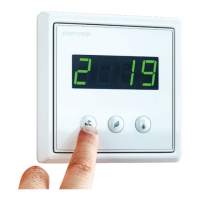
eWind control panel
eWind control panel
1. Mode display 2. Temperature display 3. Mode button
4. Eco button 5. Temperature button
Button / display Description
Mode display Current use mode.
Temperature
display
Target supply air temperature.
Mode button Selection of use mode.
(Browsing of parameters.)
Eco button Selection of Eco mode.
(Browsing of parameters.)
Temperature
button
Selection of target supply air
temperature.
(Browsing of parameters.)
NOTE: Some of the control panel functionalities
are for installation or maintenance use only.
3
5
4
1
2


 To Next Page







