6
Every day use of ventilation
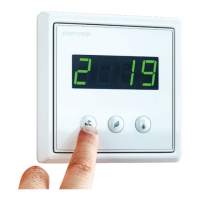
Ventilation is controlled with a simple and easy-to-use
control panel that is based on actual use situations.
Operation modes based on these situations cover
all the ventilation needs at your home. Selecting an
operating mode changes the functionality of the
ventilation unit accordingly. The installer of the unit
will apply the operation mode parameters when
commissioning the ventilation unit.
The control panel is normally in stand-by mode with a
dimmed display. You can activate the unit by pressing
any button.
Operation modes
1 = Away (when not at home)
2 = Home (when at home)
3 = Home (when at home, with boosted ventilation)
4 = Boosted (when even more ventilation is needed)
F-PL = Overpressure (when lighting a replace)
HEAt = Heating on / heating o mode
Eco = When energy ecient ventilation is wanted
Away mode (1)
If you are for example going on vacation or otherwise
spending time away from the premises, you may want
to reduce the ventilation.
To select:
1. Press the Mode button to scroll to mode 1.
• The ventilation system adjusts itself to the new
setting.
NOTE: The Away mode can be selected also by
an external switch (if installed).
Home mode (2)
If you are at home, the ventilation unit runs normally in
the Home mode.
To select:
1. Press the Mode button to scroll to mode 2.
• The ventilation system adjusts itself to the
new setting.
Home mode with boosted
ventilation (3)
When extra ventilation is needed, the air ow can be
increased.
To select:
1. Press the Mode button to scroll to mode 3.
• The ventilation system adjusts itself to the new
setting.
Boost mode (4)
If you are having more people over, sometimes the
ventilation that is designed for your daily life is not
enough. This is especially true if there is a sauna
involved.
To select:
1. Press the Mode button to scroll to mode 4.
• The ventilation system adjusts itself to the
new setting. The boost mode is time limited,
running of the time is shown in the display by
alternating bars after the mode number.
NOTE: If an external button is used for
controlling the Boost mode, the mode remains
activated as long as the button is switched on.
After switching o the Boost mode remains on
for the expiration time set in the system. Factory
setting is 2 hours.
Changing supply air temperature
The supply air target temperature (shown in the
display) is set by the installation of the system. You can
adjust it within the range of 15-22 °C.
To adjust:
1. Press the Temperature button to scroll to the
desired target temperature.
• The system adjusts the eciency of the heat
recovery or eect of the after-heating / cooling
as required.


 To Next Page







