9User instructions
EN
Service reminder view
The Service reminder is intended to remind the user
once the service interval is expired. The interval is set to
4 or 6 months depending on the unit model.
• When expired, text FILS is shown in the display.
Time to service
To view:
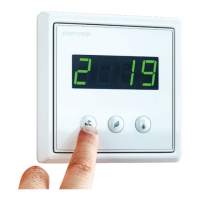
1. Press the Eco and Temperature buttons
simultaneously once.
2. Press the Mode button to scroll to parameter n13.
• The time to the next service is displayed in
days.
eWind Measurements list
Display Explanation
Designation in
schematics and
connection on ESC
main board
Note Modbus-register
r1 Outside air
temperature, °C
TE01 All models 6
r2 Supply air temperature
after heat recovery, °C
TE05 All models 7
r3 Supply air temperature,
°C
TE10 All models 8
r4 Extract air temperature,
°C
TE30 All models 10
r5 Exhaust air
temperature, °C
TE32 All models 9
r6 Return water
temperature of water
heating coil, °C
TE45 ESW only.
Other models show “0”.
12
r7 Pre-heated outside air
temperature (CHG/
AGH/electrical pre-
heater), °C
TE02 Only if equipped with
CHG/AGH or electrical
pre-heater.
32
r8 Relative humidity of
extract air, %RH
RH30 All models 13
r9 CO2 level, ppm Without external CO2
sensor (accessory)
showing ”- -”
23
r10 External relative
humidity measurement,
%RH
Without external %RH
sensor (accessory)
showing ”- -”
23
r11 Supply air heat recovery
temperature eciency,
%
All models
Calculated value
29
r12 Extract air heat recovery
temperature eciency,
%
All models
Calculated value
30
Measurements view
You can follow the temperature, humidity, heat
recovery eciency among other measurements in the
eWind Measurements list shown in the measurements
display.
eWind Measurements list
To select:
1. Press the Eco and Temperature buttons
simultaneously twice.
• A parameter (r1..rn) and the value of the
parameter are shown in the display.
2. Press the Mode or Eco buttons to scroll the
parameter list up or down.
To return to the basic view:
1. Press the Eco and Temperature buttons
simultaneously once.


 To Next Page







