50
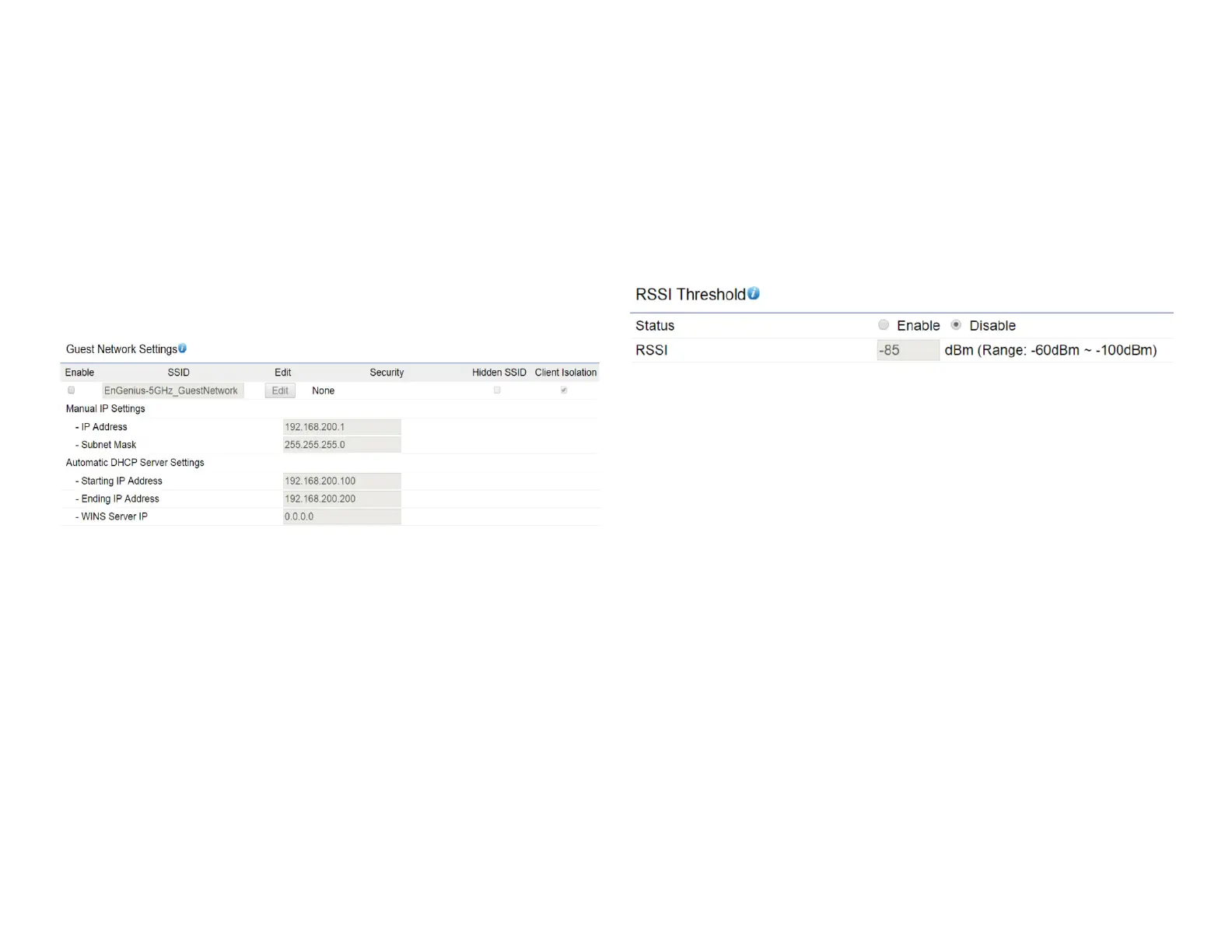
Guest Network Settings
When EnJet disabled, you can add a guest network which
allows visitors to use the Internet without giving out your
ofce or company wireless security key. You can add a
guestnetworktoeachwirelessnetworkinthe5GHzac/
a/n frequencies.
SSID:SpeciestheSSIDforthecurrentprole.
Suppressed SSID: Check this option to hide the SSID from
clients. If checked, the SSID will not appear in the site survey.
Station Separation: Click the appropriate radio button to
allow or prevent communication between client devices.
IP Address: The IP Address of this device.
Subnet Mask: The IP Subnet mask of this device.
Starting IP Address: TherstIPAddressintherangeof
the addresses by the DHCP server.
Ending IP Address: The last IP Address in the range of
addresses assigned by the DHCP server.
RSSI Threshold
RSSI Threshold: Enable the Fast Handover feature when
EnJet disable by ensuring that each client is served by
at least one Access Point at any time. Access Points
continuously monitor the connectivity quality of any
clientintheirrangeandefcientlysharethisinformation
with other Access Points in the vincinity of that client to
coordinate which of them should serve the client best.
RSSI: Enter the RSSI (Received Signal Strength Index) in
order to determine the handover procedure which the
current wireless link will terminate. RSSI is an indication of
the power level being received by the antenna. Therefore,
the higher the RSSI number, the stronger the signal.













 To Next Page