Sigma DS4 and DS4-ES1 Instant Financial Issuance System 9
3 Input/3 Output Multi-Hopper Printer
Printers with a 3 input/3 output multi-hopper is available as an option or an upgrade kit.
Cartridge Release
Buttons
The cartridge release buttons allow you to remove the cartridge
from the multi-hopper unit. Push in the buttons, squeeze the
cartridge, and pull it out from the multi-hopper.
You do not need to remove a hopper cartridge to load cards.
Exception Slide The exception slide allows you to insert a single card into the printer
without unlocking the multi-hopper or opening a hopper cartridge.
Refer to “Use the Multi-Hopper Exception Slide” on page 38.
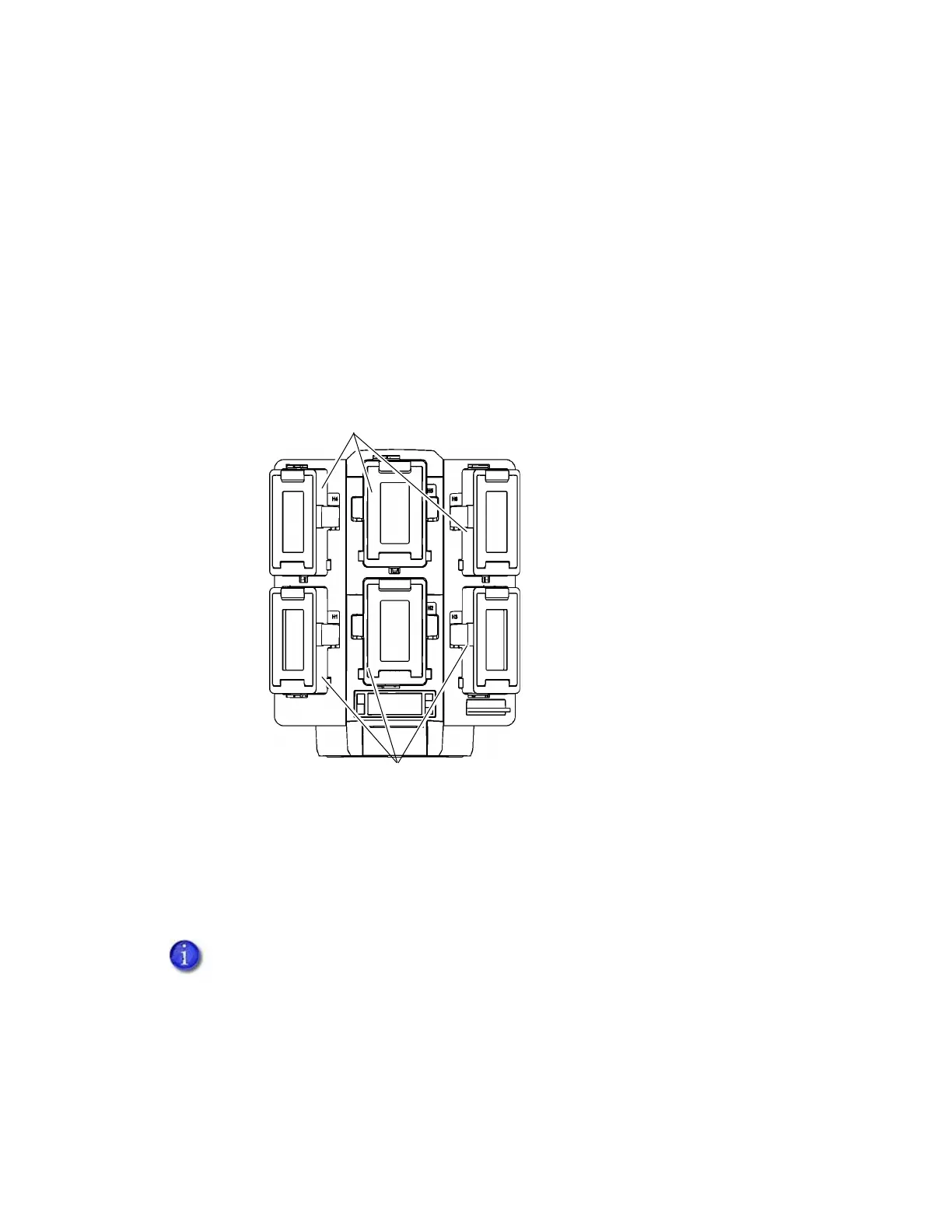
Input Hoppers 4–6 The input hoppers have dark gray doors and are installed on the top
row (H4, H5 and H6) of the multi-hopper.
Output Hoppers 1–3 The output hoppers have light gray doors and are installed on the
bottom row (H1, H2 and H3) of the multi-hopper.
Condition “245: Configuration error” on page 77 displays on the printers front panel
when the input/output hoppers are not correctly placed in the multi-hopper.
Input Hoppers 4–6
Output Hoppers 1–3
H1
H2
H3
H4
H5
H6



 To Next Page