45
Video Overlay
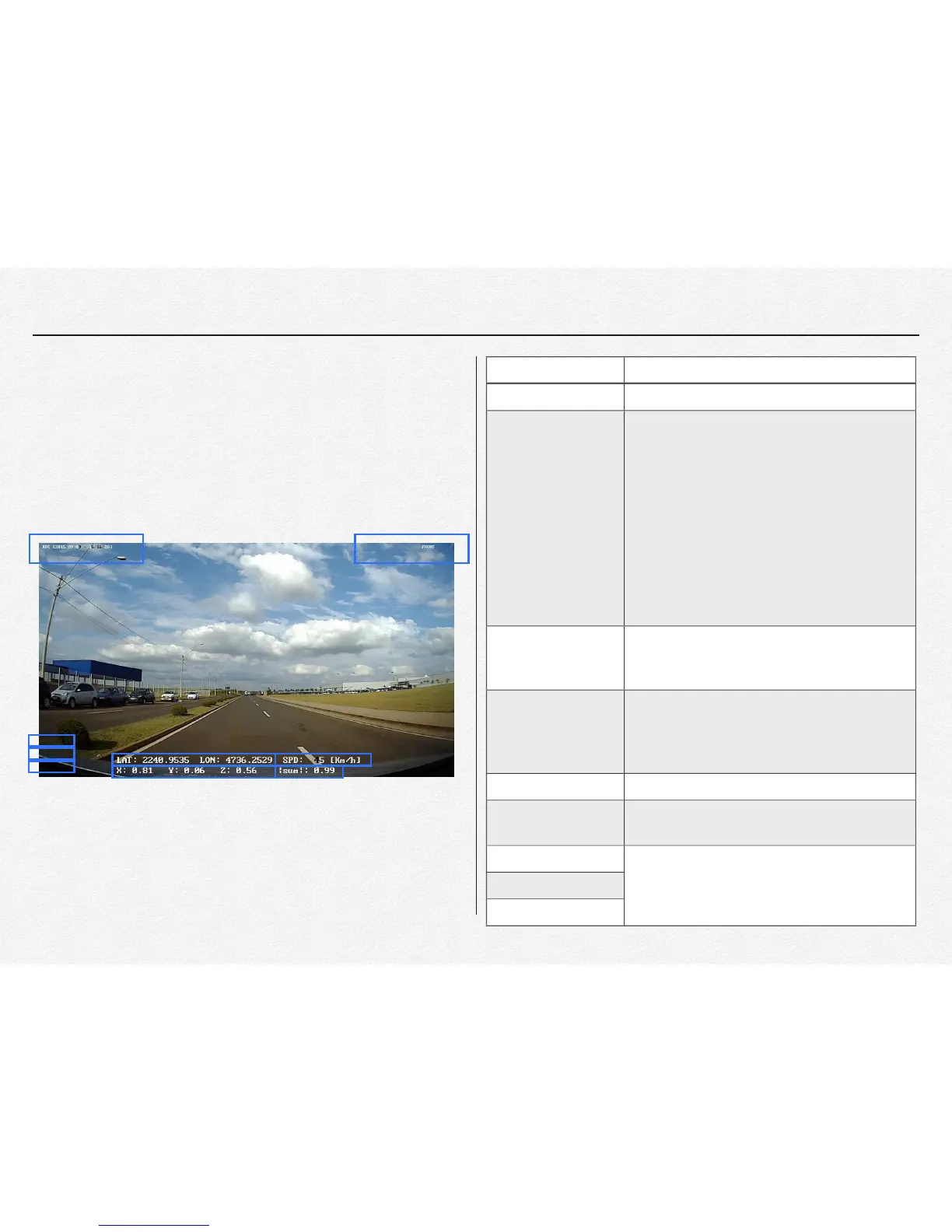
The video image is contain the information about time and
location even have driver information. In case of information
that the driver and company name with number plate of vehicle.
①
⑨
②
③
④ ⑤
⑥
⑧
⑦
[ Figure 6.1.1] Information of overlaid on the front video
The time information is selected by configuration
setup as “Timezone”
[Case 1: Only RTC is overlaid]
RTC[YYYY:MM:DD-HH:MM:SS]
[Case 2: Only UTC is overlaid]
RTC[YYYY:MM:DD-HH:MM:SS]
[Case 3: RTC & UTC are overlaid]
RTC[YYYY:MM:DD-HH:MM:SS]
UTC[YYYY:MM:DD-HH:MM:SS]
[Case 4: RTC with Daylight Saving Time]
DST[YYYY:MM:DD-HH:MM:SS]
LAT is ‘ Latitude’ , LON is ‘Longitude’.
If the NDVR will not be received GPS data then
each of the value filed are inserted as “-”
Each vale is displayed up to the decimal point
second place. The section shows procedures
regarding X-axis value Gx, Y-axis value Gy and
Z-axis value Gz.
This value is total sum about G-sensor
This value is receiving from GPS signal.
(Km/Mph/Knot per every 0.5 seconds)
This value is able to setup by PC manager
This value is able to setup by PC manager
This value is able to setup by PC manager


 To Next Page