25
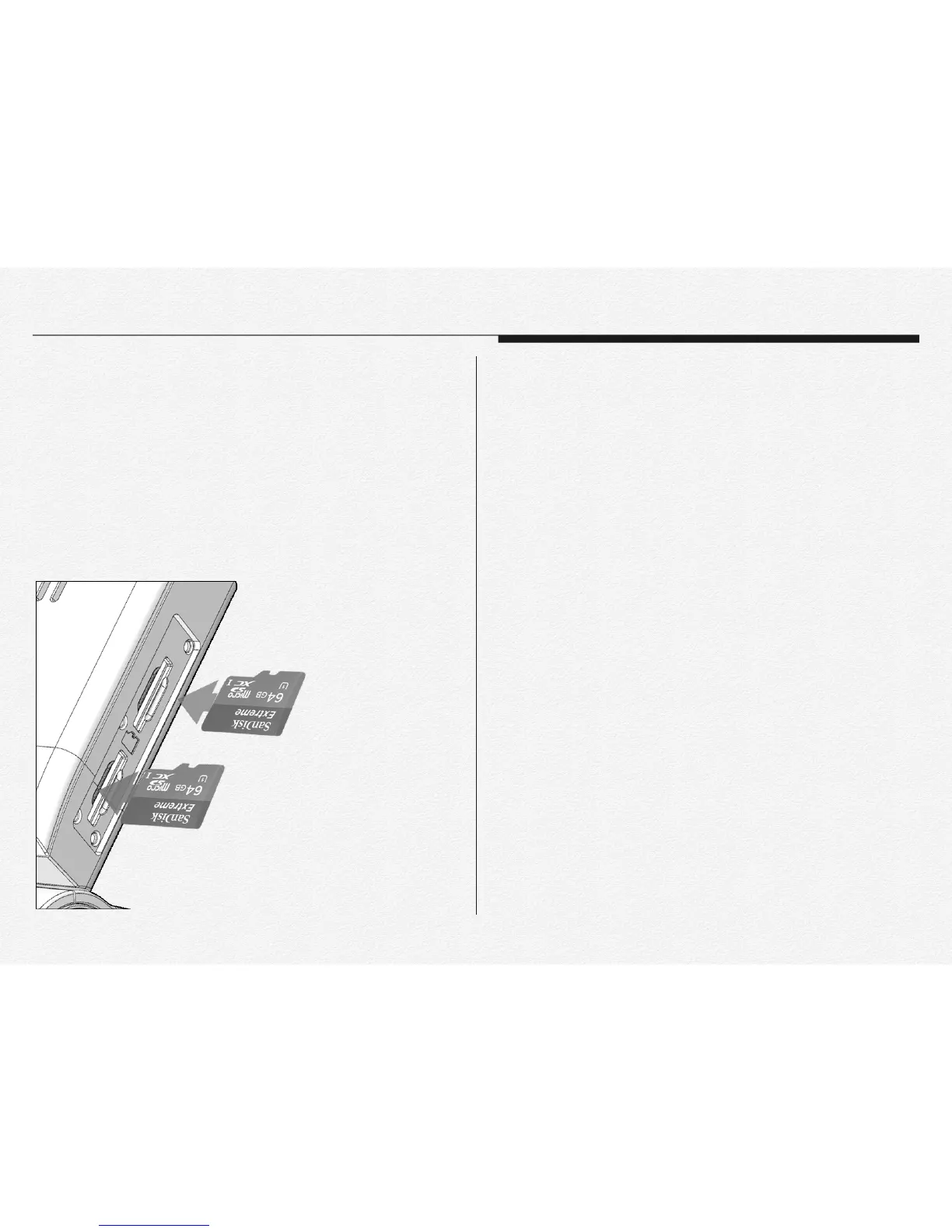
1) Insert micro SD card when NDVR power off.
2) Open the memory card cover as shown the the figure.
3) Insert the micro SD card into the card slot until it softly click
of a latch. (⚠ Make sure that the NDVR is placed as shown
above and the terminal portion of the card is facing up.)!
!
To eject a memory card
!
1) Turn off the NDVR. (Pull off DC power jack)
2) Open the memory card cover and gently push the micro SD
card to eject it.
3) Pull the micro SD card out of the memory card slots and
close the cover.
⚠
* To avoid data loss, turn off the NDVR by removed the power
cable before inserting or ejecting the memory card.
* Be careful not to push the memory card too hard. The
memory card may suddenly pop out.
* If you eject the memory card from the NDVR while it is on, the
NDVR turns off.
* Card compatibility with this NDVR may vary depending on the
card manufacturer and type.
Section 5
To insert a memory card.


 To Next Page