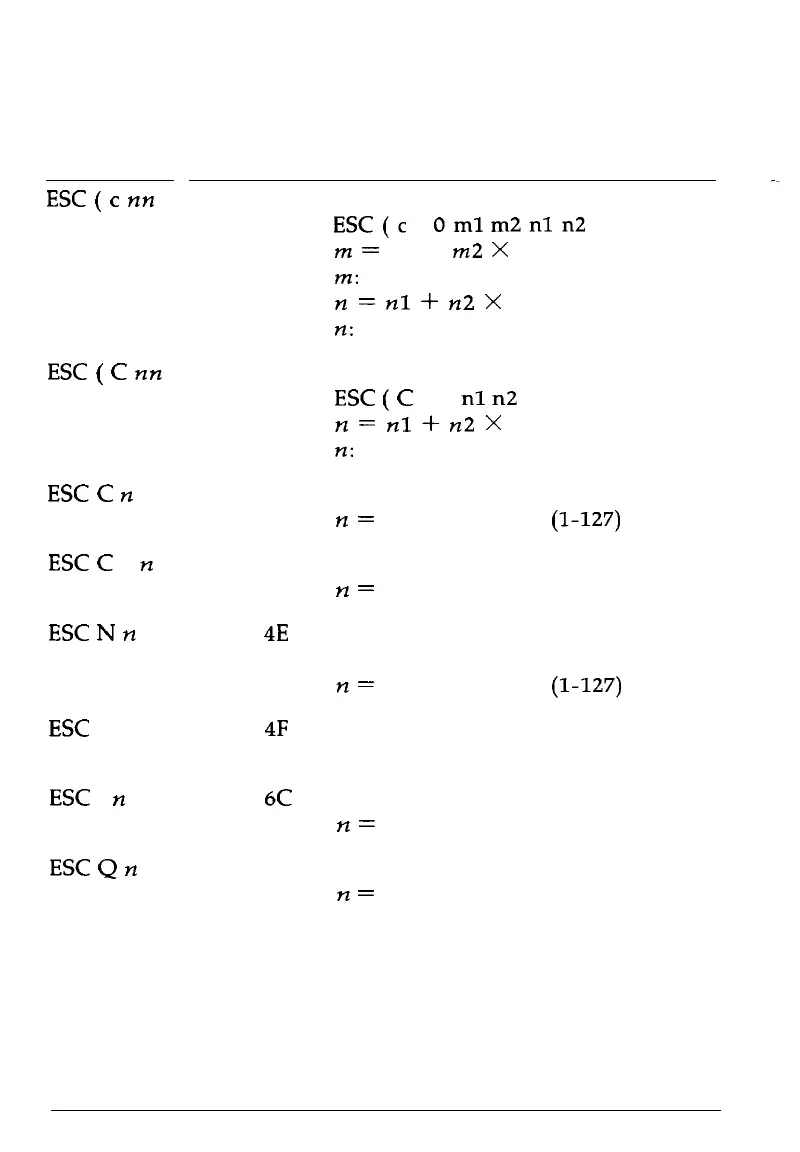
Commands Arranged by Topic
Page format
ASCII
Dec. Hex. Description
ESC
(
c
nn
ESC
(
C
nn
ESC
C
n
67
ESC
C
0
n
67
ESC
N
n
78
ESC
0
79
ESC
1
n
108
ESC
Q
n
81
40 99
40 67
28 63
28 43
43
43
4E
4F
6C
51
Set Page Format
ESC(c
4
Oml
m2nln2
m
=
ml+
m2
X 256
m:
Top margin in defined units
n
=
nl
-I-
n2 X 256
n: Bottom margin in defined units
Set Page Length in Defined Units
ESC
(
C
2 0
nl
n2
n
=
nl
i-
n2
X
256
n:
Number of defined units
Set Page Length in Lines
n
=
number of lines (1-127)
Set Page Length in Inches
n
=
number of inches (1-22)
Set Bottom Margin for Continuous
Paper
n
=
number of lines (1-127)
Cancel Top/Bottom Margin for
Continuous Paper
Set Left Margin
n
=
left margin column
Set Right Margin
n
=
right margin column
8-4
Command Summary










 To Next Page