Assembling the Printer
CAUTION: Never move the print head while the printer
is turned on or you might damage the printer. Also, if
you just used the printer, the print head may be hot; let
it cool for a few minutes before touching it.
4.
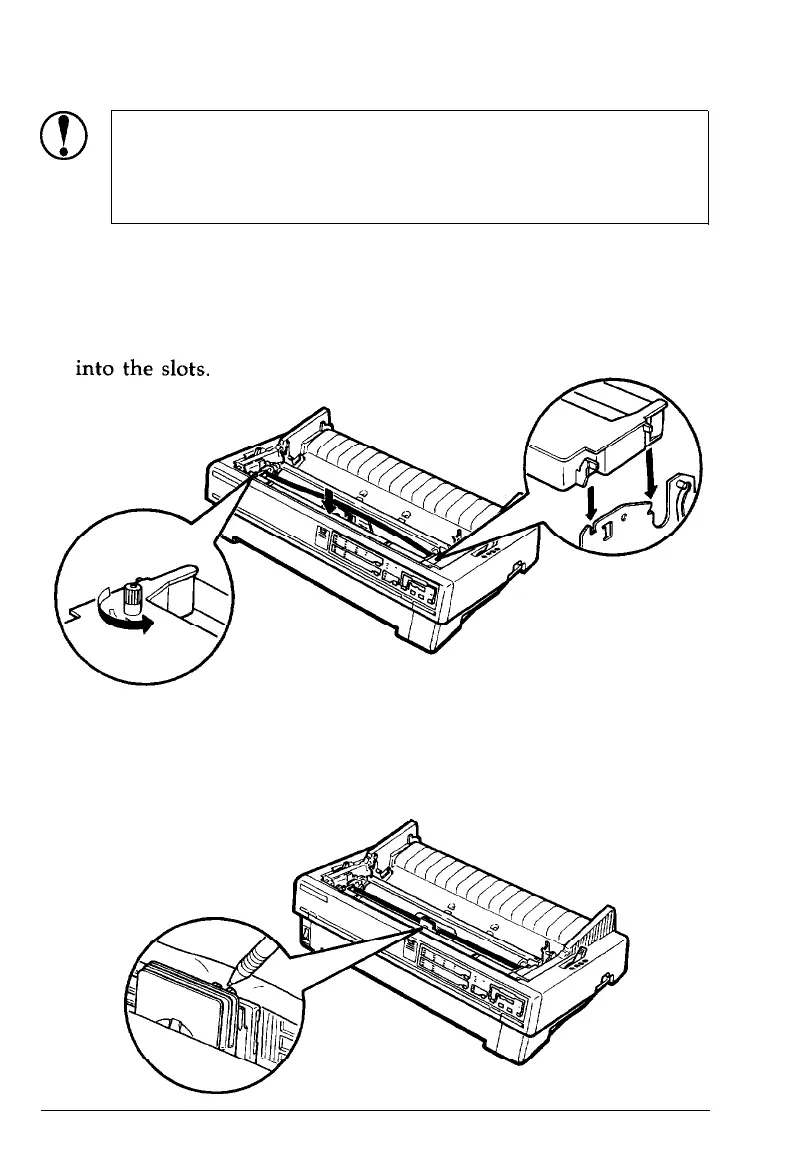
Turn the ribbon-tightening knob in the direction of the arrow
to remove any slack in the ribbon. Next, hold the ribbon
cartridge by its handle and push it firmly down into position;
then press on both ends of the cartridge to fit the plastic hooks
5.
Use a pointed object, such as a ball point pen, to guide the
ribbon between the print head and ribbon guide while you
turn the ribbon-tightening knob to help feed the ribbon into
place.
Setting Up the Printer
1-7










 To Next Page