EPSON Stylus Color 600 Service Manual
Rev. A
3-2
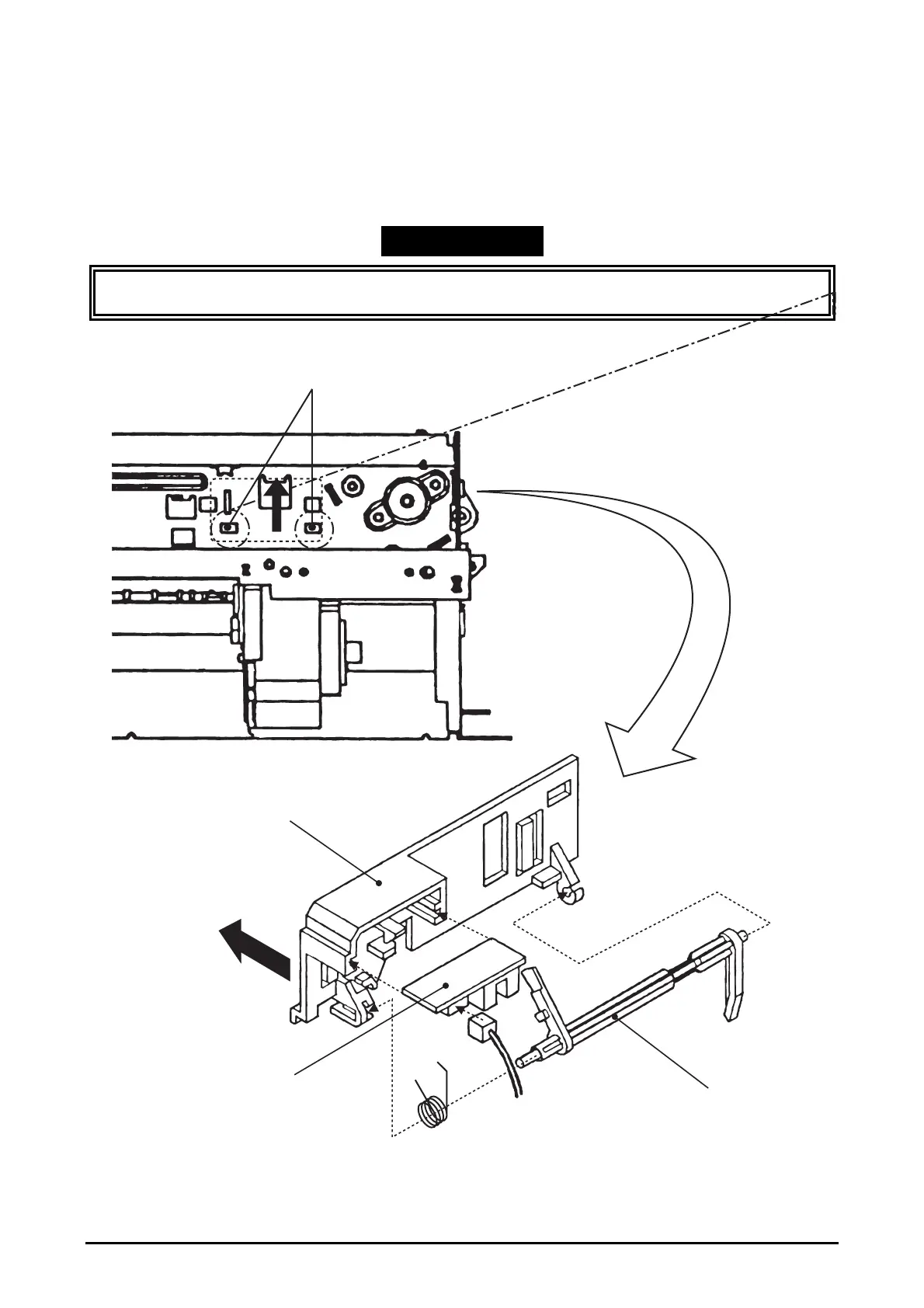
3.2.5.8 PE Sensor Assembly Removal
1. Removing the upper housing. (Refer to section 3.2.1)
2. From the front side of the mechanism, unhook two hooks fixing “SENSOR, ASSEMBLY, PE” to the
3. mechanism. Then, slide it to upward to remove it. After removal, disassemble the assembly if
necessary.
WORK POINT
When re-install the assembly, be sure that the sensor lever is correctly inserted into a hole of “PAPER
GUIDE, ASSEMBLY”, UPPER”.
LEVER, PE
BOARD ASSY., PE
HOLDER, PE
To frame
Release these hooks to
remove the PE Sensor Assembly
From the back side of
the mechanism
Figure 3-24. PE Sensor Assembly Removal


 To Next Page