USING SELECTYPE MODE TO ADJUST THE HP EMULATION MODE
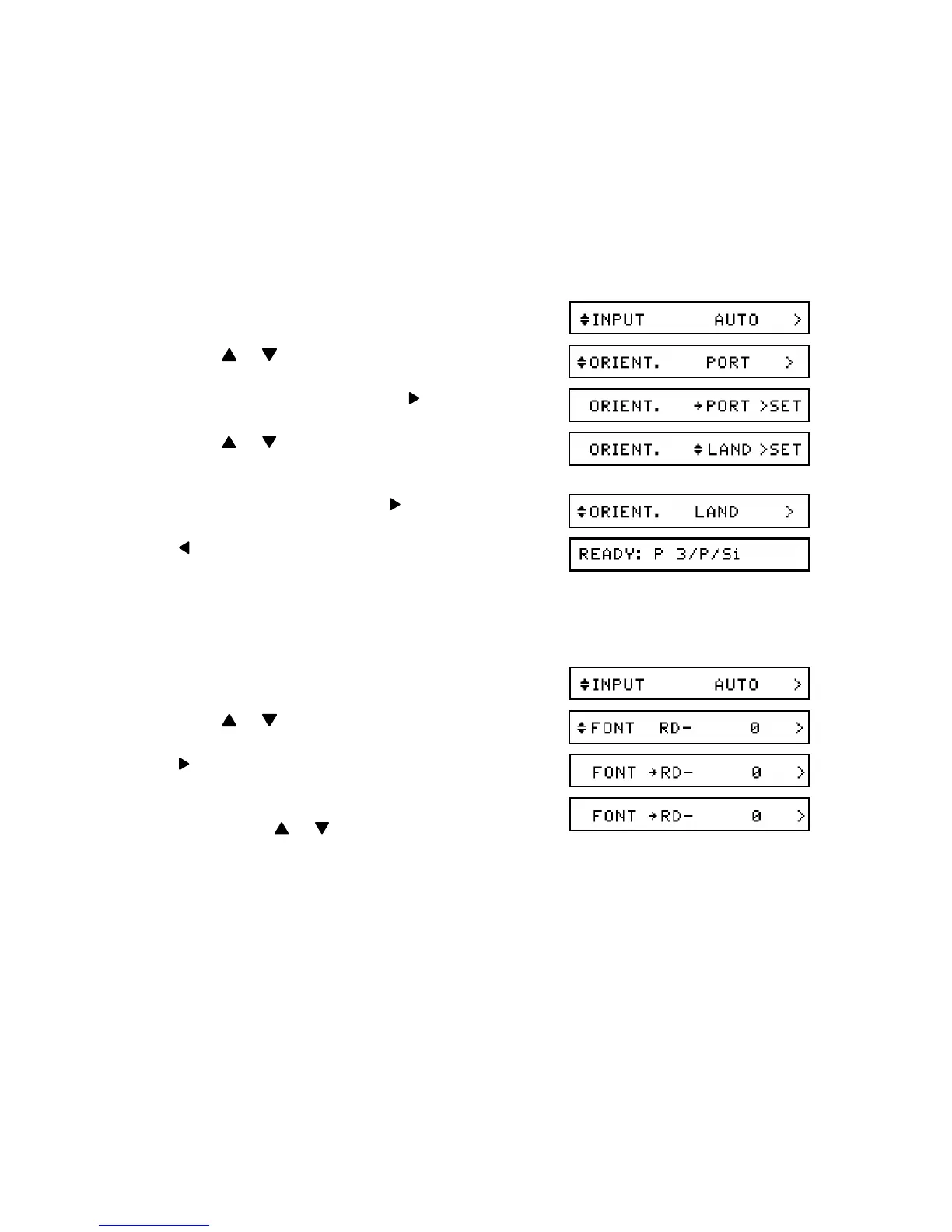
ORIENT (Page Orientation)
This feature allows you to select the direction in which characters are printed on the
page.
Available Options: PORT (portrait; vertical), LAND ( landscape; horizontal), R-PORT
(opposite direction of portrait), R-LAND (opposite direction of landscape)
1. Enter Level 1 mode (see page 26).
2. Press or until ORIENT. is displayed.
3. To change the current setting:
4. Press or until the required setting is dis -
played.
5. Store the displayed setting:
6. twice to return to printer "Ready" mode.
FONT
Use this feature to select the source of your font, and the font itself.
1. Enter Level 1 mode (see page 26).
2. Press or until FONT is displayed.
3.
4. If you have installed an optional font car -
tridge, press or to select the required
font source.
❐ RD is for the resident fonts. If you have in -
stalled an optional font card or cartridge,
you will also have the choice of A (for the
fonts on the font card), C (for the fonts on
the cartridge), or DL (for downloaded
fonts) . See Appendix D for more on the
use of optional font kits.
APPENDIX B. HP EMULATION MODE
B-5


 To Next Page