USING SELECTYPE TO ADJUST EPSON LQ AND FX EMULATION
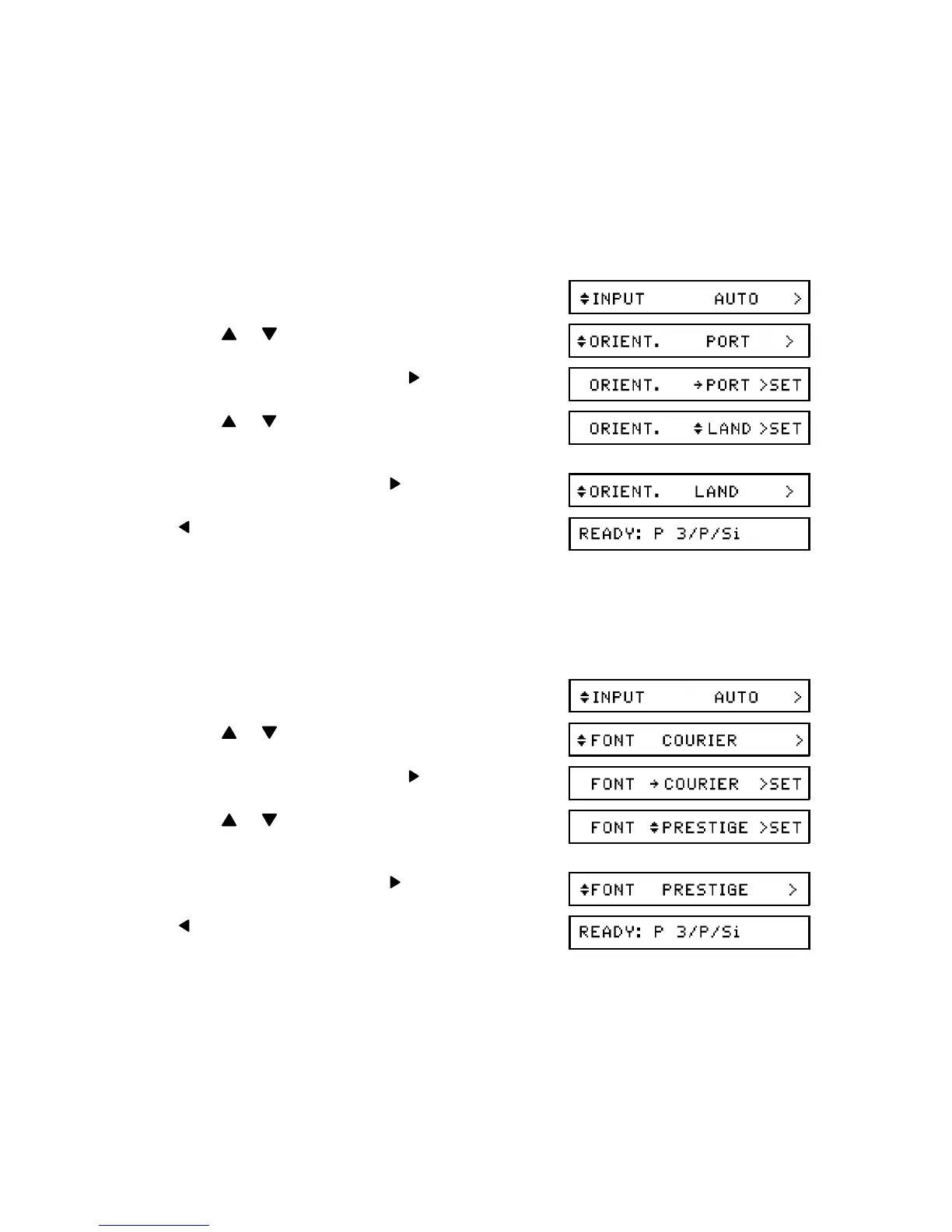
ORIENT (Page Orientation)
This feature allows you to select the direction in which characters are printed on the
page.
Available Options: PORT (portrait; vertical), LAND ( landscape; horizontal)
1. Enter Level 1 mode (see page 26).
2. Press or until ORIENT. is displayed.
3. To change the current setting:
4. Press or until the required setting is dis -
played.
5. Store the displayed setting:
6. twice to return to printer "Ready" mode.
FONT
Use this feature to select the font.
Available Options: Courier, Prestige, DL (downloaded)
1. Enter Level 1 mode (see page 26).
2. Press or until FONT is displayed.
3. To change the current setting:
4. Press or until the required setting is dis -
played.
5. Store the displayed setting:
6. twice to return to printer "Ready" mode.
After selecting the font, you can adjust the character spacing and font size with the
PITCH and CONDENSED settings in the SUB CONFIG menu. When the machine is in
an Epson emulation mode, you can download fonts to the machine in the same man -
ner as you would download to an Epson printer.
APPENDIX C. EPSON LQ AND FX EMULATION MODES
C-2


 To Next Page