SUB CONFIG.
SUB CONFIG. is a menu within SelecType Level 1. It contains two features.
❐ FORM: Use this to set the number of lines for the selected page size and orienta -
tion. The setting that you choose affects the line spacing on printouts. This setting is
affected by the PAGE SIZE, ORIENT, and FONT settings.
Available Options: 0 to 128.
If you select 0, the line spacing will be 1/6 inch [about 4.2 mm].
If *** appears on the display, you selected a number that is out of the possible range
for the paper that you are using.
❐ SYMSET: Use this feature to select one of the 41 resident HP symbol sets. See
page B-9 and subsequent pages for tables of these symb ols.
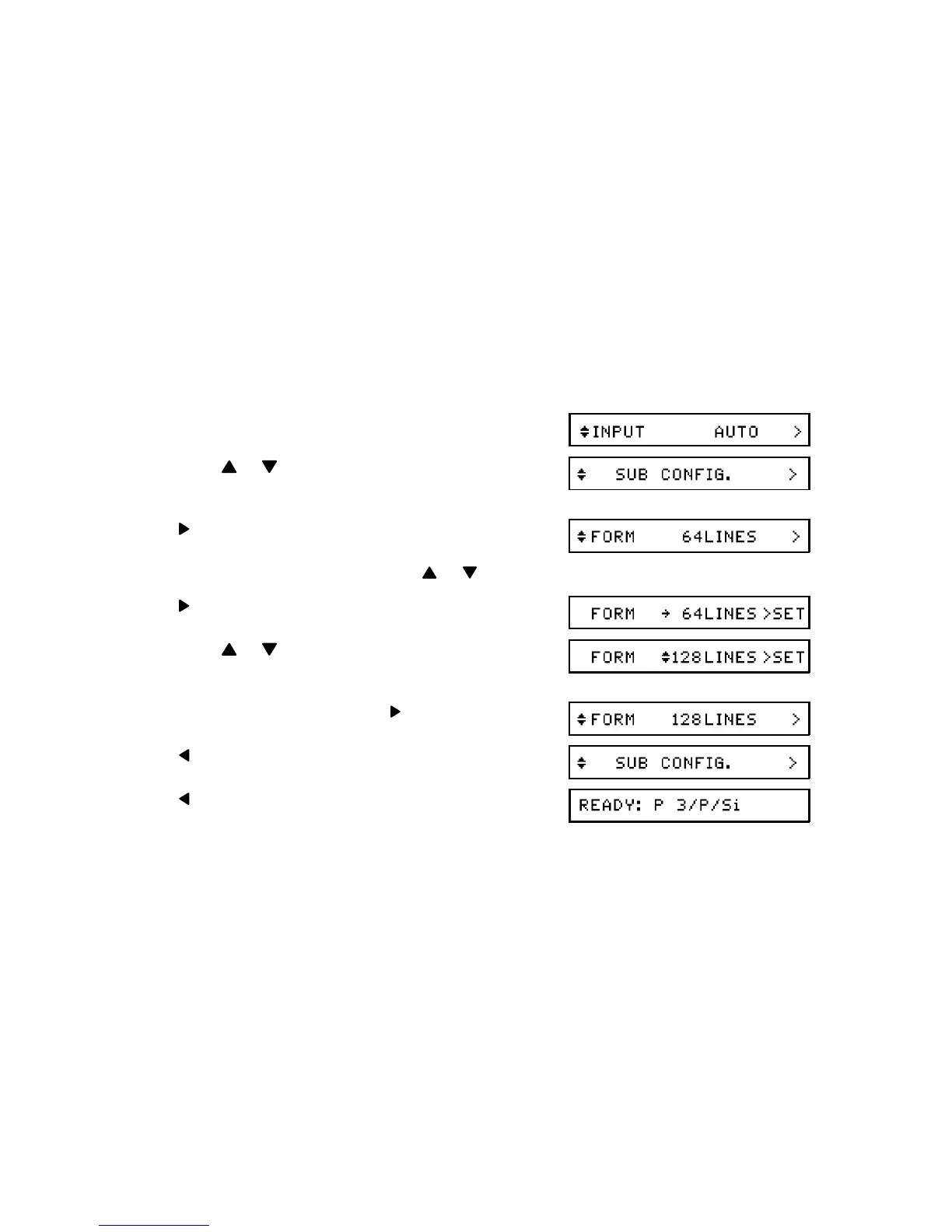
Example SUB CONFIG Procedure: Change the FORM setting to 128 lines.
1. Enter Level 1 mode (see page 26).
2. Press or until SUB CONFIG. is dis -
played.
3.
If FORM is not displayed, press or until it is.
4.
5. Press or until the required setting is dis -
played.
6. Store the displayed setting:
7.
8. twice to return to printer "Ready" mode.
APPENDIX B. HP EMULATION MODE
B-7


 To Next Page