Home
Epson
Laptop
890
Page 50
Epson 890 - Page 50
113 pages
Manual
Save Page as PDF
To Next Page
To Next Page
To Previous Page
To Previous Page
Loading...
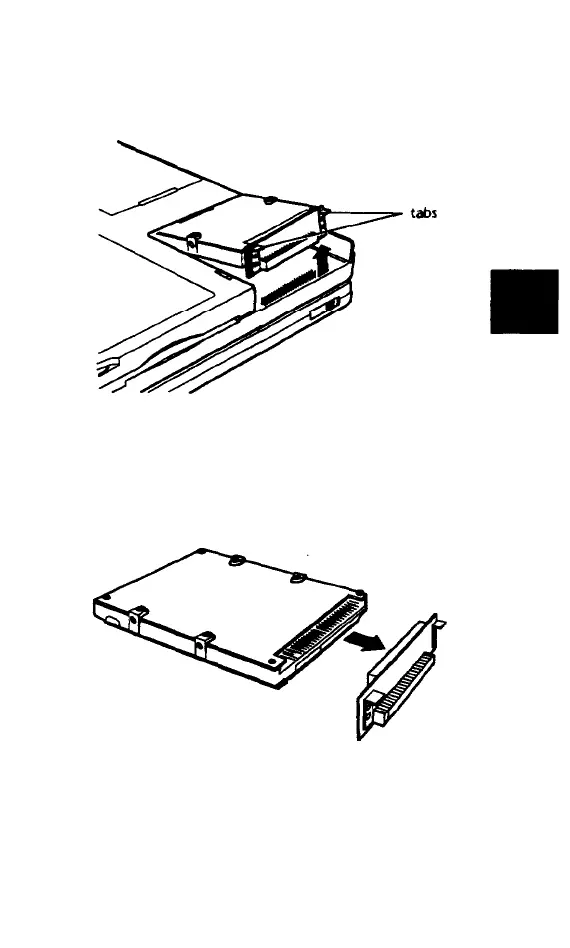
4.
Pull up on the two metal tabs to
disconnect the drive, and remove it from
the case.
5.
If you need to disconnect the connector
card, hold it by the edges and pull it away
from the drive, as shown below.
Upgrading Internal Components 5-3
49
51
Table of Contents
Main Page
Default Chapter
2
Pc Card Software
2
Upgrading the Memory
2
About Your Software
4
Important Notice
14
Important Safety Instructions
15
Wichtige Sicherheitshinweise
17
Fcc Compliance Statement
18
Table of Contents
19
1 Getting Started
22
Opening Your Computer
23
Powering Your Computer
23
Connecting the AC Power Adapter
24
Turning the Computer on and off
25
Checking the Indicator Lights
25
Adjusting the Screen Controls
27
Using the Actionpoint Touchpad
27
Learning more about Actionpoint
29
Using the Keyboard
29
Using the Fn Key
30
Using the Embedded Numeric Keypad
30
Creating Software Diskettes
31
2 Powering the Computer
32
Using the AC Power Adapter
32
Using the Battery
33
Recharging the Battery
34
Replacing the Battery
34
Using Power Management
36
Low Battery Protection
37
Using Energy Wisely
39
3 Getting to Work
40
Using Passwords
40
Entering a Password
40
Using Diskettes
41
Resetting the Computer
42
Working Comfortably
43
4 Caring for Your Computer
44
Protecting the Hard Disk Drive
45
Moving and Storing the Computer
46
Cleaning Your Actionnote
47
Cleaning the Actionpoint Touchpad
47
Cleaning the Diskette Drive
47
5 Upgrading Internal Components
48
Upgrading the Hard Disk Drive
48
Removing the Hard Disk Drive
49
Replacing a Hard Disk Drive
51
Removing the Keyboard
54
Removing and Replacing the Keyboard
54
Replacing the Keyboard
57
Chapter 6 For more Information
58
Removing a Memory Module
59
Installing a Memory Module
60
Upgrading Your Memory
58
Installing a Fax/Modem or Infrared Device
61
Connecting a Phone Line
64
6 Customizing Your Computer
66
Customizing Your Actionpoint
66
Customizing Computer Settings
68
Starting Setup
69
Changing the Settings
69
6-6 Customizing
71
Power Management
72
Customizing Power Management
73
Using Instant on and Saving to Disk
74
Using Password Security
76
Setting or Changing a Password
76
Setting a Password
77
Deleting or Changing a Password
78
Using Video Drivers and Utilities
78
7 Troubleshooting
80
Where to Get Help
80
Identifying Your System
83
Electronic Support Services
84
Error Messages
84
Troubleshooting Your Actionnote
84
The Computer Won't Start
85
The LCD Screen Is Blank
87
The Computer Locks up
88
Your Password Isn't Working
88
You Can't Access Data on a Diskette
89
The Diskette Drive Isn't Working
89
You Can't Access Files on the Hard Disk Drive
90
A PC Card Isn't Working
90
The Actionpoint Isn't Working Correctly
92
An External Monitor Is Blank
93
An External Pointing Device Doesn't Work
93
Chapter 6 For Instructions
94
Your Printer Isn't Working
95
The Memory Count Is Incorrect
95
Your Software Isn't Working Correctly
95
A Specifications
98
CPU and Memory
98
Controllers
99
Interfaces
100
Keyboard
101
Actionpoint Touchpad
101
Volume Control
101
Mass Storage
102
LCD Screen
102
Setup Program
102
Software
103
Power Sources
103
AC Power Adapter
103
AC Power Adapter Dimensions
104
Fax/Modem Specifications
104
Environmental Requirements
105
Physical Dimensions
105
Index
106
Related product manuals
Epson PX-8
168 pages
Epson FX 890
2 pages
Epson FX-890 II
2 pages
FX 890 - B/W Dot-matrix Printer
106 pages
Epson 500 Series
121 pages
Epson HX-20
75 pages
Epson NB-SL
6 pages
Epson FX-890II
165 pages
Epson FX-890IIN
165 pages
Epson Stylus Photo 895
219 pages
Epson ET-8550
4 pages
Epson ET-8500
4 pages



 To Next Page