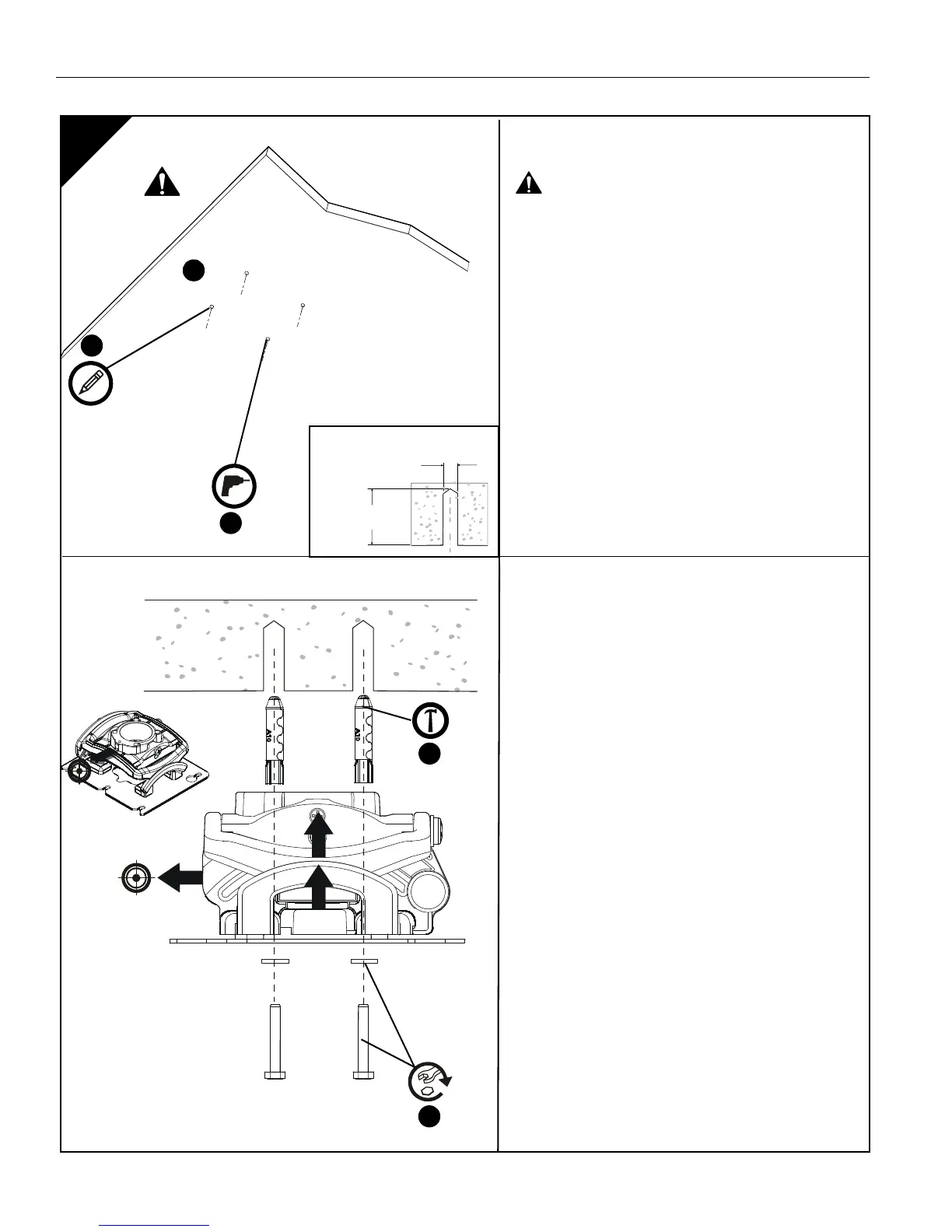
1b
Concrete Installation
1. Determine mounting location.
WARNING: IMPROPER INSTALLATION CAN
RESULT IN SERIOUS PERSONAL INJURY OR
DAMAGE TO EQUIPMENT! Structural members
MUST be capable of supporting five times the
combined weight of all equipment being mounted.
2. Using the projector mount (A) as a guide, mark four
mounting hole locations on ceiling using a pencil or
similar tool.
3. Drill four 3/8" (10mm) dia. pilot holes to a depth of
2-1/2" (64mm) deep.
4. Align four mounting holes in projector mount (A)
with four pilot holes.
IMPORTANT ! : Make sure mount is properly
oriented towards target before securing to
structure.
5. Install four Toggler A10 Alligator concrete anchors
(not included) by inserting into pilot holes and
pounding in until flush with mounting surface.
6. Secure projector mount (A) to structure using four
1/4" flat washers and four 1/4" x 3" lag bolts (not
included).



 To Next Page