Introduction
9
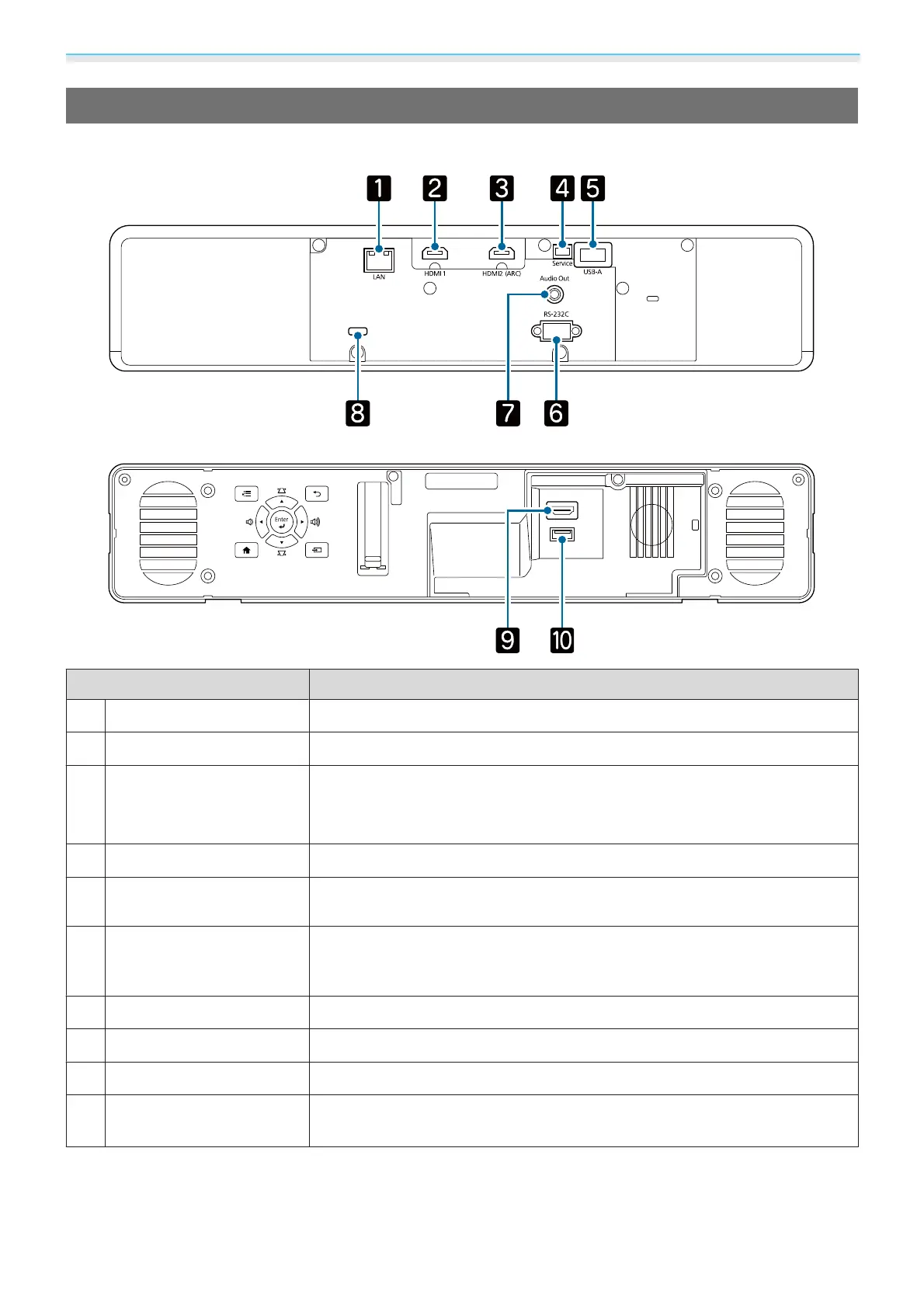
Connector Ports
Rear
Front
Menu Esc
Home Source
Focus
DC Out (2.0A)
HDMI 3
Name Function
a
LAN port
Connects a LAN cable to connect to a network. s p.19
b
HDMI1 port
Connects HDMI compatible video equipment and computers. s p.18
c
HDMI2 (ARC) port
Connects HDMI compatible video equipment and computers. s p.18
You can also output audio by connecting an ARC compatible AV amplifier.
s p.20
d
Service port
Service port. This is not normally used.
e
USB-A port
Connects the optional Wireless LAN unit. It is also used when updating the
firmware.
s p.19
f
RS-232C port
When controlling the projector, connect the projector to a computer with an
RS-232C cable. This port is for control use and should not normally be
used.
s p.98
g
Audio Out port
Outputs audio during playback to external speakers. s p.20
h
Cable holder
Pass a commercially available cable tie through here to secure the cables.
i
HDMI3 port
Inputs signals from a streaming media player. s p.17
j
DC Out (2.0A) power sup-
ply port
Provides power to a streaming media player. s p.17



 To Next Page