Part Names and Functions
8
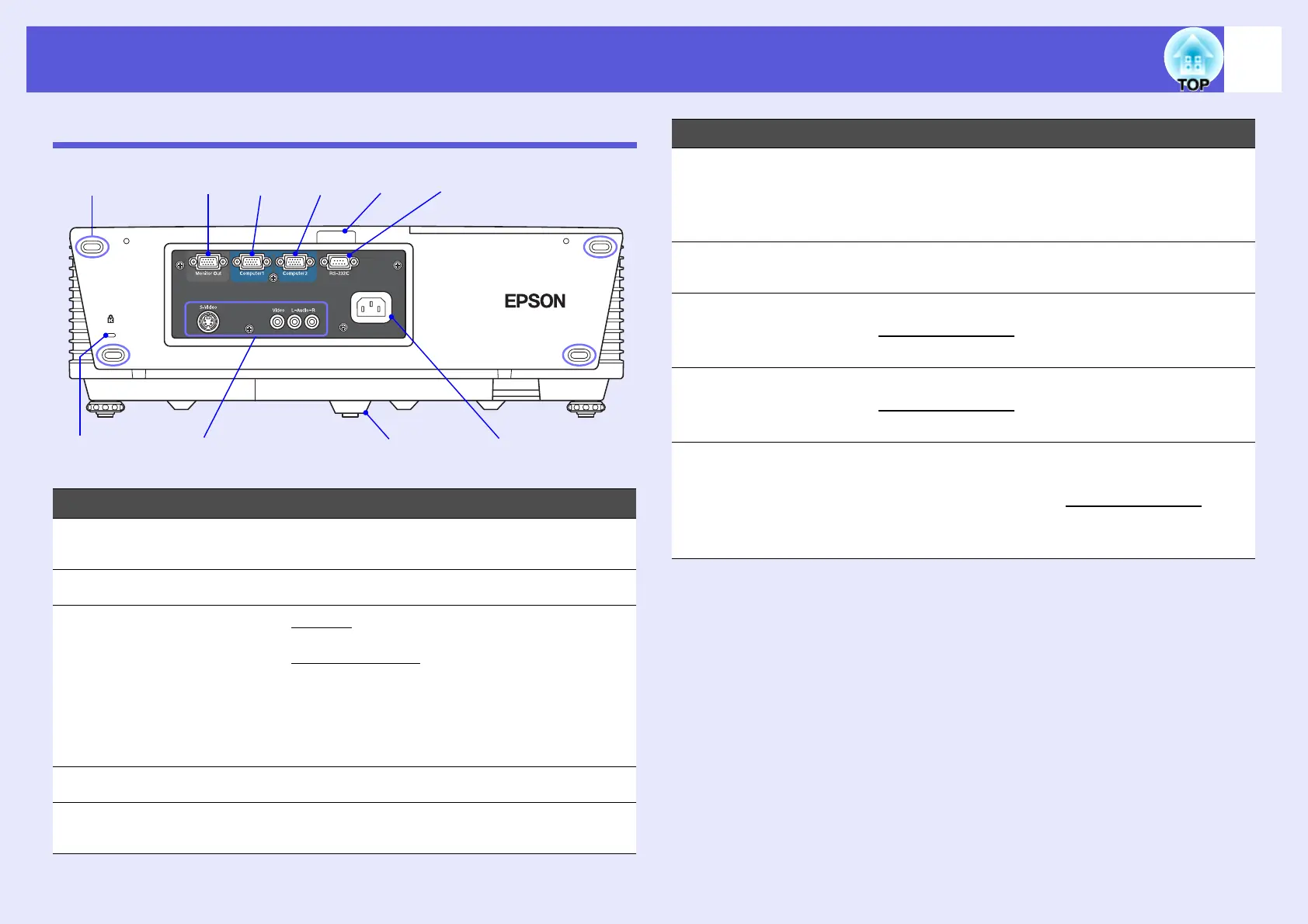
Rear (EMP-6010)
Name Function
A
Storage feet When storing the projector upright, make sure
that these feet are at the bottom.
B
Security slot (j) s p.28
C
S-Video port
For S-videog signals from video sources.
Video port
For composite videog signals from video
sources.
L-Audio-R port Connects to the audio out port of the
equipment that is providing the image source
to input the audio. s Quick Start Guide
D
Rear foot
E
Power inlet Connects to the power cable. s Quick Start
Guide
A
CDE
JI H G F
B
F
RS-232C port When controlling the projector from a
computer, connect it to the computer with an
RS-232C cable. This port is for control use and
should not normally be used. s p.76
G
Remote receiver Receives signals from the remote control.
s Quick Start Guide
H
Computer2 port For video signals from a computer and
component video
g signals from other video
sources. s Quick Start Guide
I
Computer1 port For video signals from a computer and
component video
g signals from other video
sources. s Quick Start Guide
J
Monitor Out port Outputs the computer image signal connected
to the Computer1 port to an external monitor.
This is not available for component video
g
signals or other signals being input to any port
other than Computer1 port. s p.71
Name Function



 To Next Page