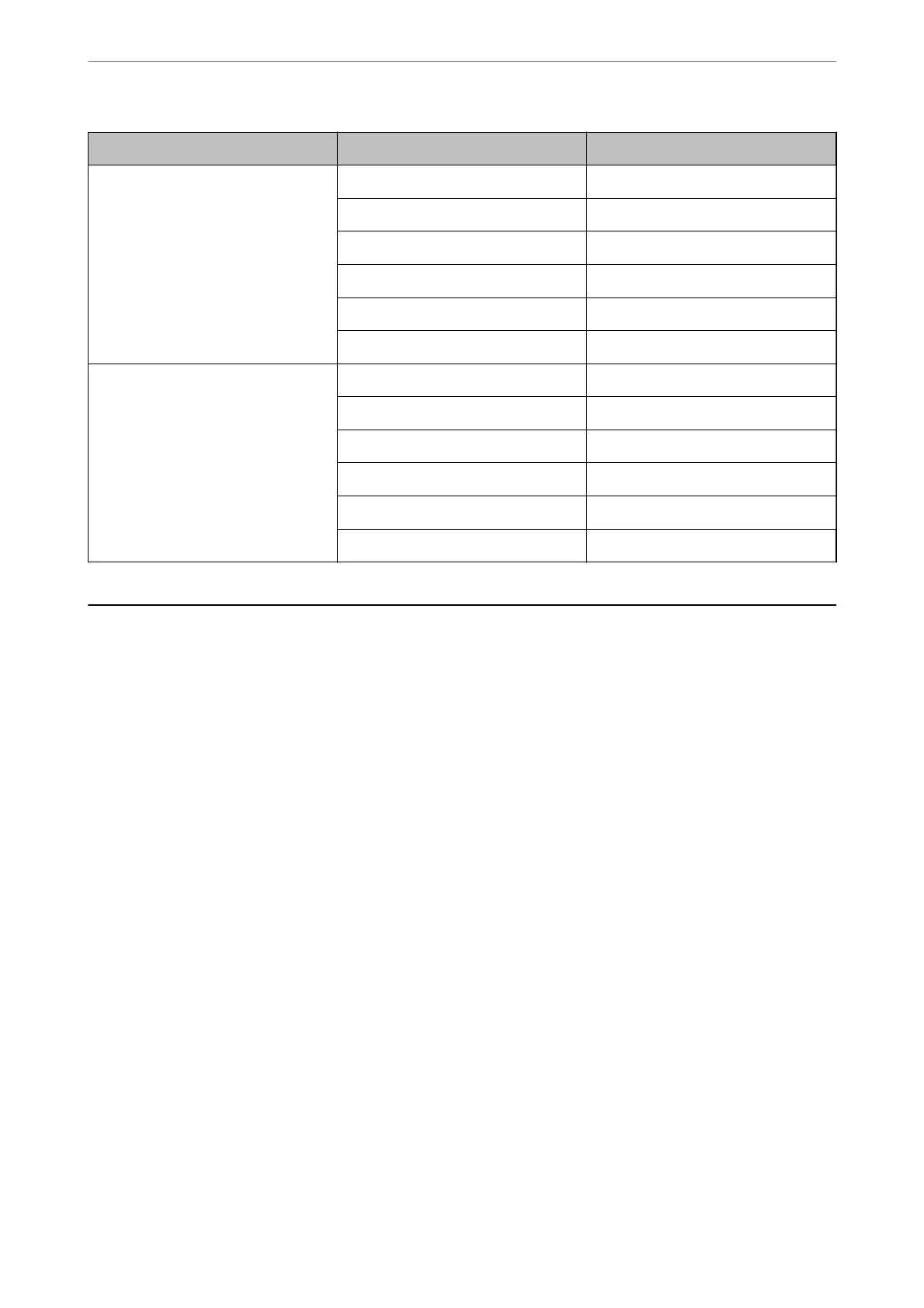
Film Size Printout Size Resolution (Reference)
6×7 cm film KG size 600 dpi
A4 1,200 dpi
A3 1,600 dpi
A2 2,400 dpi
A1 3,200 dpi
A0 4,800 dpi
4×5 inch film KG size 300 dpi
A4 600 dpi
A3 1,200 dpi
A2 1,600 dpi
A1 2,400 dpi
A0 3,200 dpi
Scanning Using a Scanner Button
You can scan using the button on your scanner.
Note:
Before using this feature, check the following.
❏ Epson Scan 2 is installed on your computer.
❏ e scanner is connected to your computer correctly.
1. Place the original.
2.
Press the
a
button.
Epson Scan 2 starts.
3.
Make scan settings if necessary, and then press the
a
button again.
Scanning starts.
Related Information
& “Part Names” on page 10
& “Placing Originals on the Product” on page 14
Basic Scanning
>
Scanning Using a Scanner Button
26















 To Next Page