EasyManua.ls Logo

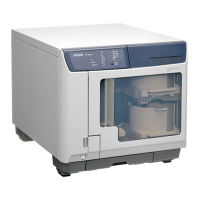
Epson PP-100 - User Manual

Epson PP-100
104 pages
Print Icon
To Next Page IconTo Next Page
Loading...
User’s Guide
4113114-02

Table of Contents

Questions and Answers

  • D
    Douglas ObrienAug 29, 2025
    How to fix drive tray open/close error on Epson Printer?
    • M
      Ms. Rebecca Jackson MDAug 30, 2025
      If you encounter a drive tray open/close error, turn off the printer and check inside for any obstructions. In addition, unplug the power cable to clear the error.
  • S
    Stanley JordanAug 30, 2025
    Why Epson PP-100 cannot write to the disc?
    • T
      Tammy MorrisAug 30, 2025
      If the printer cannot write to the disc, check that: the disc is not damaged, the disc is high-quality, the printer is used within acceptable environmental conditions, and the printer is not subject to vibration or shock.
  • Q
    qturnerAug 30, 2025
    How to troubleshoot internal drive error on Epson PP-100 Printer?
    • A
      Alan ParsonsAug 31, 2025
      If there is an internal drive error, turn off the printer, unplug the power cable, and inspect the inside of the drive.
  • P
    Patrick HartAug 25, 2025
    How to fix incorrectly installed ink cartridge in Epson PP-100 Printer?
    • R
      Rhonda PerkinsAug 25, 2025
      If the ink cartridge is incorrectly installed, reinsert the ink cartridge.
  • P
    paulbarronAug 31, 2025
    How to resolve multiple feed error on Epson PP-100?
    • T
      Tony MortonSep 1, 2025
      To resolve a multiple feed error, remove all discs from the drive and printer tray to prevent damage to the product. Also, ensure that the discs are loosely arranged in the stacker.
  • K
    klewisSep 1, 2025
    What to do for product maintenance error on Epson Printer?
    • X
      xbishopSep 1, 2025
      If a product maintenance error occurs, turn off the printer and contact your dealer.
  • T
    Thomas SantanaSep 2, 2025
    How to fix improper status error on Epson PP-100?
    • A
      Andrea SanchezSep 2, 2025
      If you receive an improper status error, turn the printer off and then on again.
  • G
    Gwendolyn TrujilloSep 2, 2025
    How to resolve disc pick up error on Epson PP-100?
    • C
      Connie WilliamsSep 2, 2025
      If a disc pick up error occurs, turn off the printer and remove the disc from the tray. If the same error occurs frequently, contact your dealer.
  • C
    Christopher StephensSep 3, 2025
    What does it mean if the ink pad is full on Epson PP-100?
    • B
      Brian KingSep 3, 2025
      If the ink pad is full, please have an authorized Epson service center service the ink pad right away.
  • P
    porterkristinSep 3, 2025
    What to do if disc cover or ink cartridge cover is open on Epson PP-100?
    • S
      Steven LeeSep 3, 2025
      If the disc cover or ink cartridge cover is open, close the covers.

Summary

Copyright and Trademarks

Important Notice and Safety Instructions

Important Safety Instructions

Essential safety guidelines to prevent injury and product damage during operation.

Setting Up the Product

Instructions for correctly setting up the product in its operating environment.

Choosing a Place for the Product

Guidelines for selecting an appropriate location for the product.

Using the Product Safely

Precautions and best practices for operating the product to ensure safety.

Handling Ink Cartridges

Precautions and procedures for handling, storing, and replacing ink cartridges.

Disc Handling and Usage Precautions

Guidelines for using and handling CDs/DVDs to prevent data loss or damage.

Usage Limitations and Loss Considerations

Restrictions on product use, limitations, and considerations for incidental loss.

Understanding Warnings, Cautions, and Notes

Explains the meaning of warning, caution, and note symbols used in the manual.

Chapter 1: Using Your Software

Adding and Uninstalling Software

Procedures for installing and removing EPSON software from your computer.

Setting Up the Working Folder

Configuring the working folder for disc publishing operations.

Overview of EPSON Disc Publishing Software

Introduction to EPSON Total Disc Maker, Monitor, and Setup utilities.

Accessing the Printer Driver

Steps to access the printer driver from various locations within the system.

Chapter 2: Publishing Discs

Product Power Management and Publishing Modes

How to turn the product on/off and understand the different publishing modes.

Drive and Printer Settings for Publishing

Configuring drive usage, write retries, and printer name for publishing jobs.

CD;DVD Writing and Printing Guidelines

Recommendations for successful CD/DVD writing and printing processes.

Standard Mode Publishing Procedures

Step-by-step guide for loading discs and performing publishing in Standard Mode.

External Output Mode Publishing Procedures

Step-by-step guide for loading discs and performing publishing in External Output Mode.

Batch Mode Publishing Procedures

Step-by-step guide for loading discs and performing publishing in Batch Mode.

Taking Out Published Discs

Procedures for removing discs from stackers after publishing.

Canceling Publishing Jobs

Steps to cancel an ongoing publishing job.

Chapter 3: Replacing Ink Cartridges

Checking Ink Cartridge Status

How to view current ink levels and status using the EPSON Total Disc Monitor.

Ink Cartridge Replacement Precautions and Procedure

Safety guidelines and step-by-step instructions for replacing ink cartridges.

Chapter 4: Maintaining Your Product

Print Head Maintenance and Alignment

Checking nozzle status, cleaning print heads, and aligning the print head.

Product Cleaning Procedures

Instructions for cleaning the product exterior, interior, and filter.

Transporting Your Product

Procedures for safely moving and packing the product.

Chapter 5: Troubleshooting

Diagnosing Problems and Error Indicators

Methods for identifying issues using product lights and common error causes.

Troubleshooting Specific Error Categories

Solutions for errors related to covers, disc transfer, stackers, ink, product, and drives.

Resolving Disc Feed and Writing Issues

Steps to fix problems with disc feeding, writing errors, and print quality.

Addressing Print Appearance and Functionality Issues

Solutions for print defects, product not functioning, and software installation problems.

Appendix A: Where To Get Help

Contacting Epson Customer Support

Information and procedures for contacting Epson for technical assistance.

Regional Support Contact Details

Contact information for users in the United States, Canada, and Europe.

Appendix B: Product Information

Product Components and Control Panel Functions

Identification of product parts and explanation of control panel features.

System Requirements and Disc Specifications

Necessary computer specifications and details about supported discs.

Technical Specifications and Cartridge Information

Detailed technical data, including printing speeds, dimensions, and ink cartridge part numbers.

Epson PP-100 Specifications

General IconGeneral
Print TechnologyInkjet
ConnectivityUSB 2.0
Number of Drives1
Paper Sizes SupportedCD/DVD
DisplayNo
Ink Cartridge ConfigurationCyan, Magenta, Yellow, Black

Related product manuals