151
Supported Video Display Formats
For best results, your computer's monitor port or video card resolution should be set to display in the
projector's native resolution. However, your projector includes Epson's SizeWise chip that supports other
computer display resolutions, so your image will be resized to fit automatically.
Your computer's monitor port or video card refresh rate (vertical frequency) must be compatible with the
projector. (See your computer or video card manual for details.)
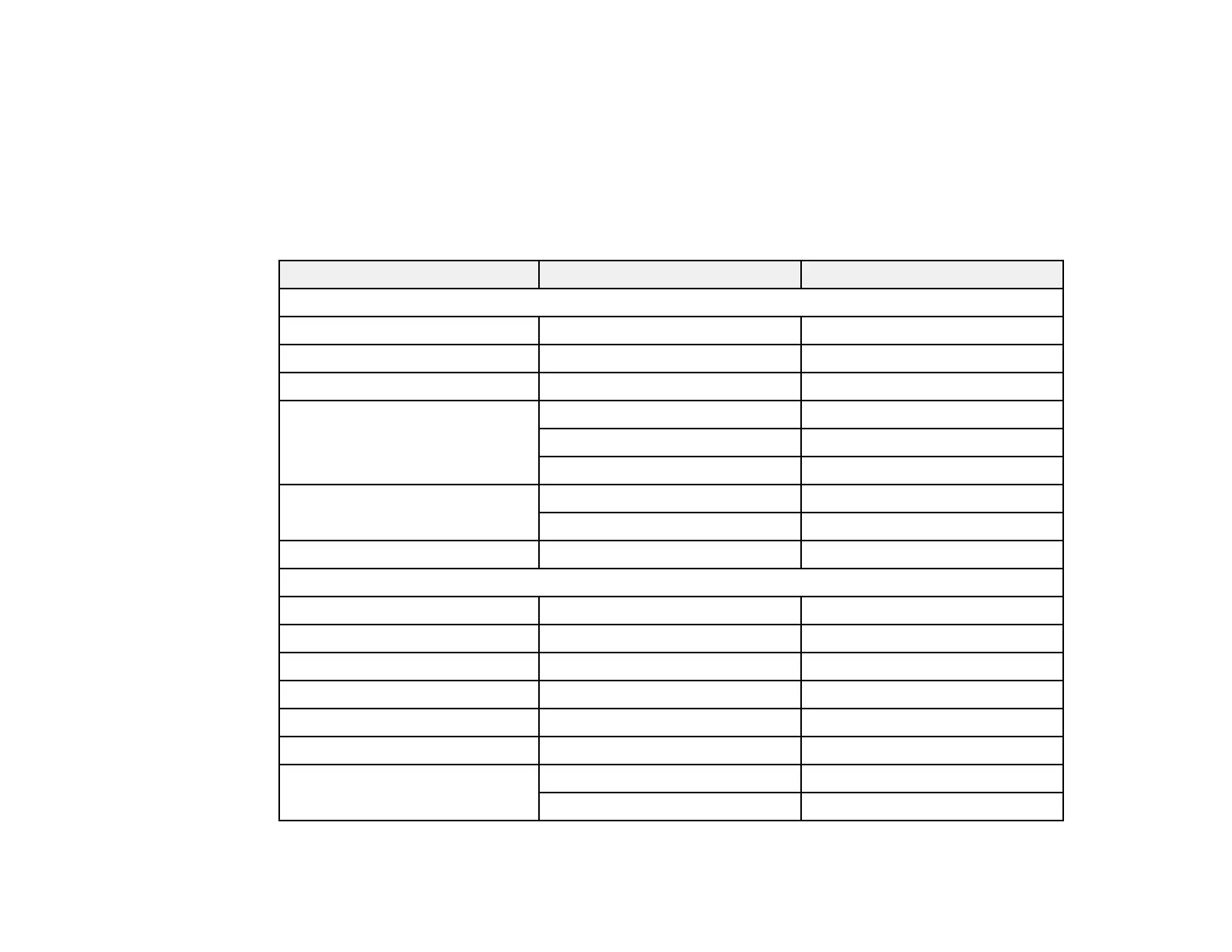
The table here lists the compatible refresh rate and resolution for each compatible video display format.
Display format Refresh rate (in Hz) Resolution (in pixels)
Computer signals (analog RGB)
VGA 60 640 × 480
SVGA 60 800 × 600
XGA 60 1024 × 768
WXGA 60 1280 × 768
60 1366 × 768
60 1280 × 800
SXGA 60 1280 × 960
60 1280 × 1024
WXGA++ 60 1600 × 900
HDMI input signals
VGA 60 640 × 480
SDTV (480i/480p) 60 720 × 480
SDTV (576i/576p) 50 720 × 576
HDTV (720p) 50/60 1280 × 720
HDTV (1080i) 50/60 1920 × 1080
HDTV (1080p) 24/30/50/60 1920 × 1080
4K × 2K 24/30/50/60 3840 × 2160
24/50/60 4096 × 2160





 To Next Page