SpectroProofer Mounter 24"/44" User’s Guide
How To Use
11
Measuring Color
This section introduces the color measuring
procedures using SpectroProofer Utilities which
is the operation tool for this product.
See the online help of the SpectroProofer Utilities
for detailed information.
Starting SpectroProofer
Utilities
Follow the instructions below to start
SpectroProofer Utilities.
Windows
Click Start, point to All Programs, point to
SpectroProofer Utilities, and then click
SpectroProofer Utilities.
Mac OS X
Double-click the hard disk icon, the Applications
folder, the SpectroProofer Utilities folder, and
then the SpectroProofer Utilities icon.
Color calibration
You can perform the color calibration to keep
high print quality with reduced color difference.
We recommend you perform the color calibration
once every two weeks or once a month.
A
Start the SpectroProofer Utilities.
See “Starting SpectroProofer Utilities”
on page 11
B
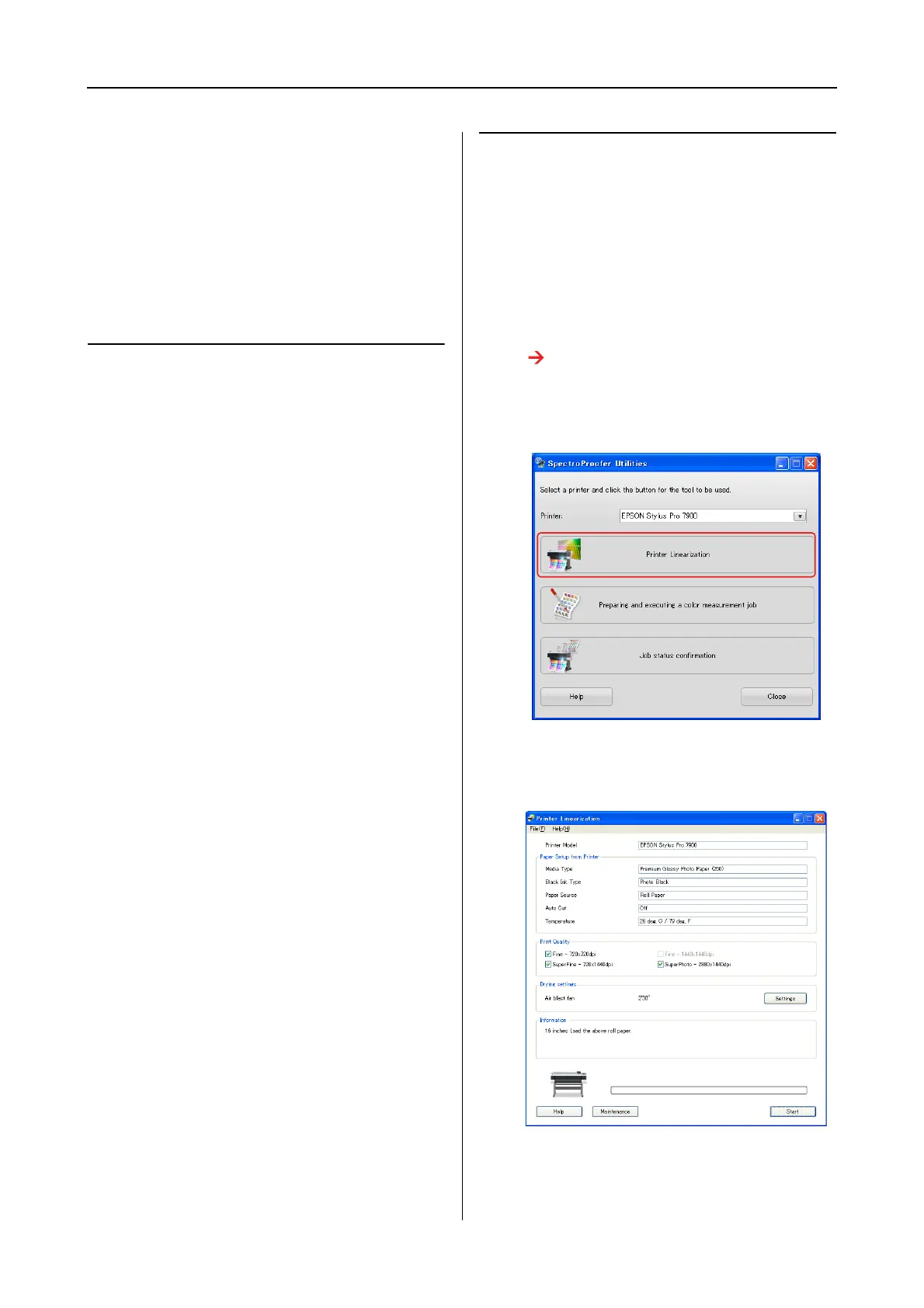
Click Printer Linearization.
C
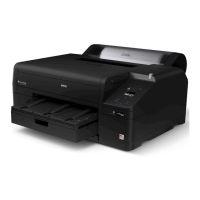
Follow the wizard to perform color
calibration.
Click the Help button to see the online help for
detailed information.


 To Next Page