SpectroProofer Mounter 24"/44" User’s Guide
Maintenance
15
Removing the Mounter
When transporting or maintaining the printer and
mounter, follow the steps below to remove the
mounter from the printer.
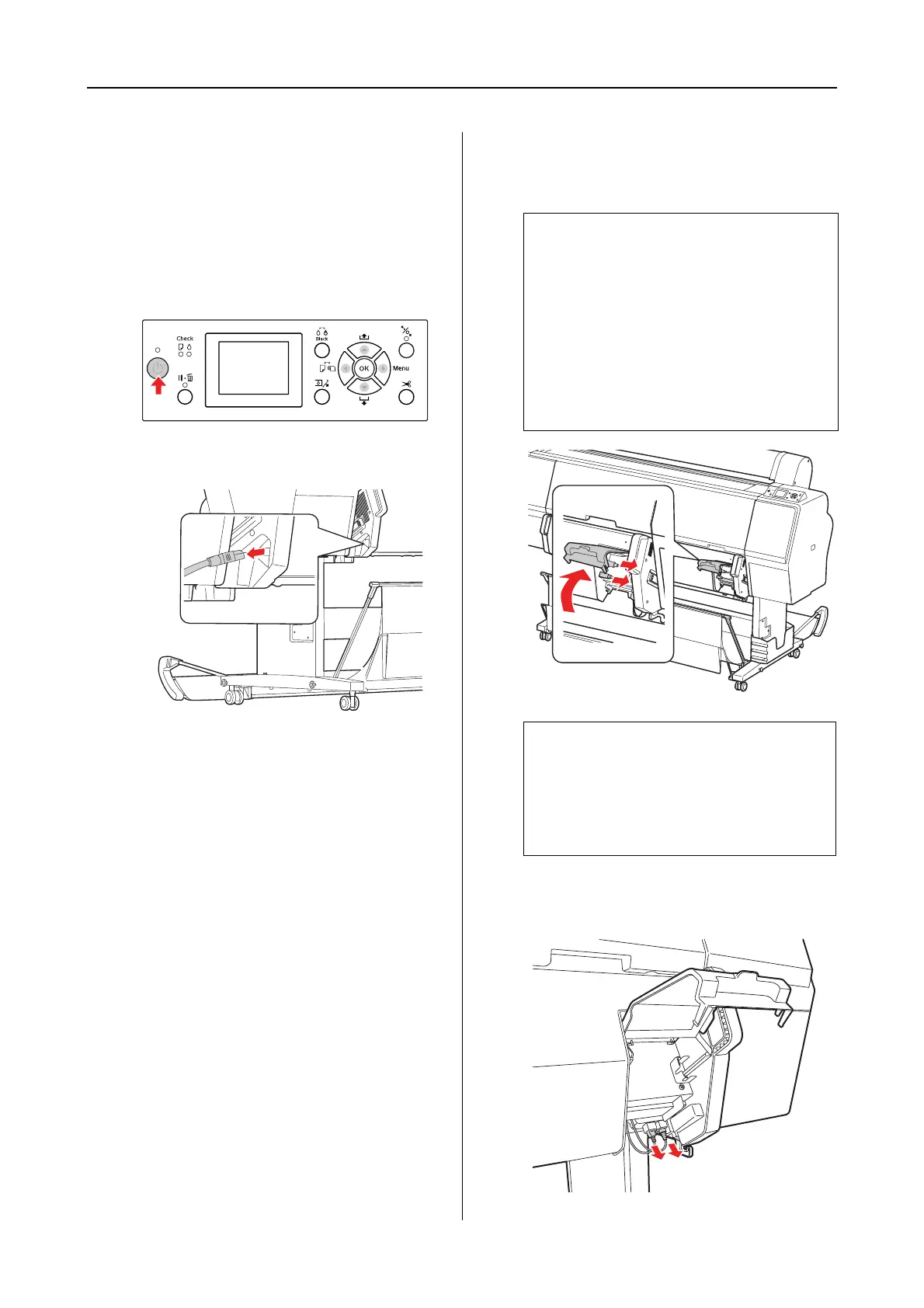
A
Turn off the printer.
B
Unplug the power cord from the mounter.
C
Open the cover, and unplug the printer
connection cable and the Auto Take-up
Reel Unit connection cable.
D
Unplug the two interface cables connected
with ILS20EP/ILS20EPUV.
c
Caution:
❏ Remove ILS20EP/ILS20EPUV from
the mounter before removing the
mounter. Leaving
ILS20EP/ILS20EPUV inside the
mounter may result in damage to the
lens when placing the mounter on the
floor.
❏ Do not touch the lens in
ILS20EP/ILS20EPUV.
Note:
The Auto Take-up Reel Unit is optional with
Epson Stylus Pro 9900/9910. The
SpectroProofer Mounter 24" for Epson Stylus
Pro 7900/7910 does not support connecting to
Auto Take-up Reel Unit.


 To Next Page