SpectroProofer Mounter 24"/44" User’s Guide
Maintenance
16
E
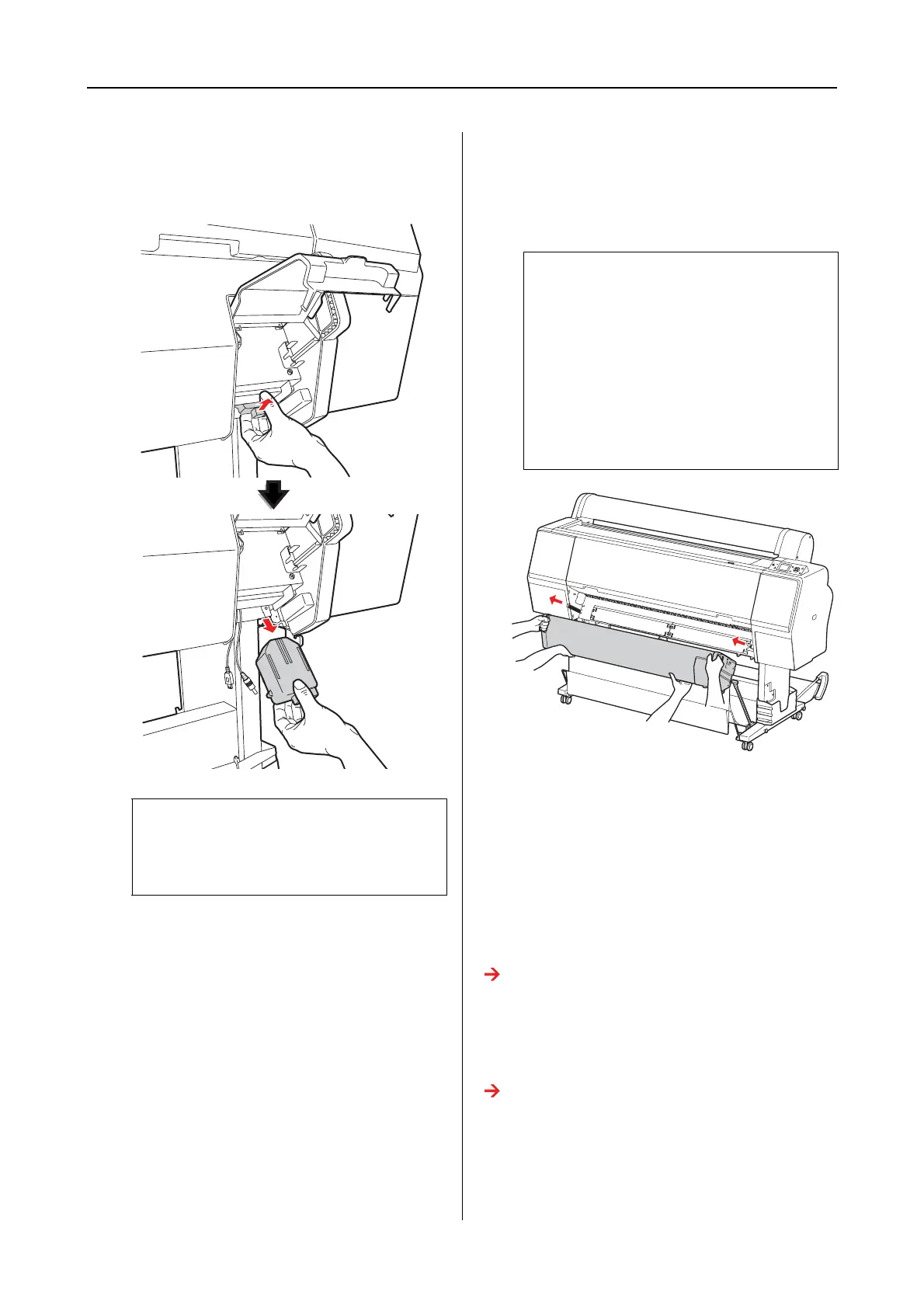
Hold the rear of ILS20EP/ILS20EPUV and
lift it a little toward you, and then remove
it.
F
Close the cover and remove the mounter
from the printer.
The mounter is heavy so have two people
hold it by handles of the mounter.
Moving or Transporting
the Product
When you transport the product, see the Setup
Guide and be sure to repack the product using the
original box and packing materials.
See the SpectroProofer Mounter 24"/44" Setup
Guide
See the following section for removing a mounter
and ILS20EP/ILS20EPUV from the printer.
See “Removing the Mounter” on page 15
c
Caution:
Do not drop ILS20EP/ILS20EPUV on the
floor. The lens may be scratched or
ILS20EP/ILS20EPUV may be damaged.
w
Warning:
❏ Lift the product by the correct
positions as shown in the User’s
Guide.
If you lift the product incorrectly, you
could drop it and cause injury.
❏ When lifting the product, please work
with appropriate posture.
You may be injured if lifting it with
inappropriate posture.


 To Next Page