Captair Flow Smart
Mobile ductless ltering clean air enclosure
4
Start-up
Calibrating the electronic anemometer
Be sure the sash is completely installed before starting the calibration.
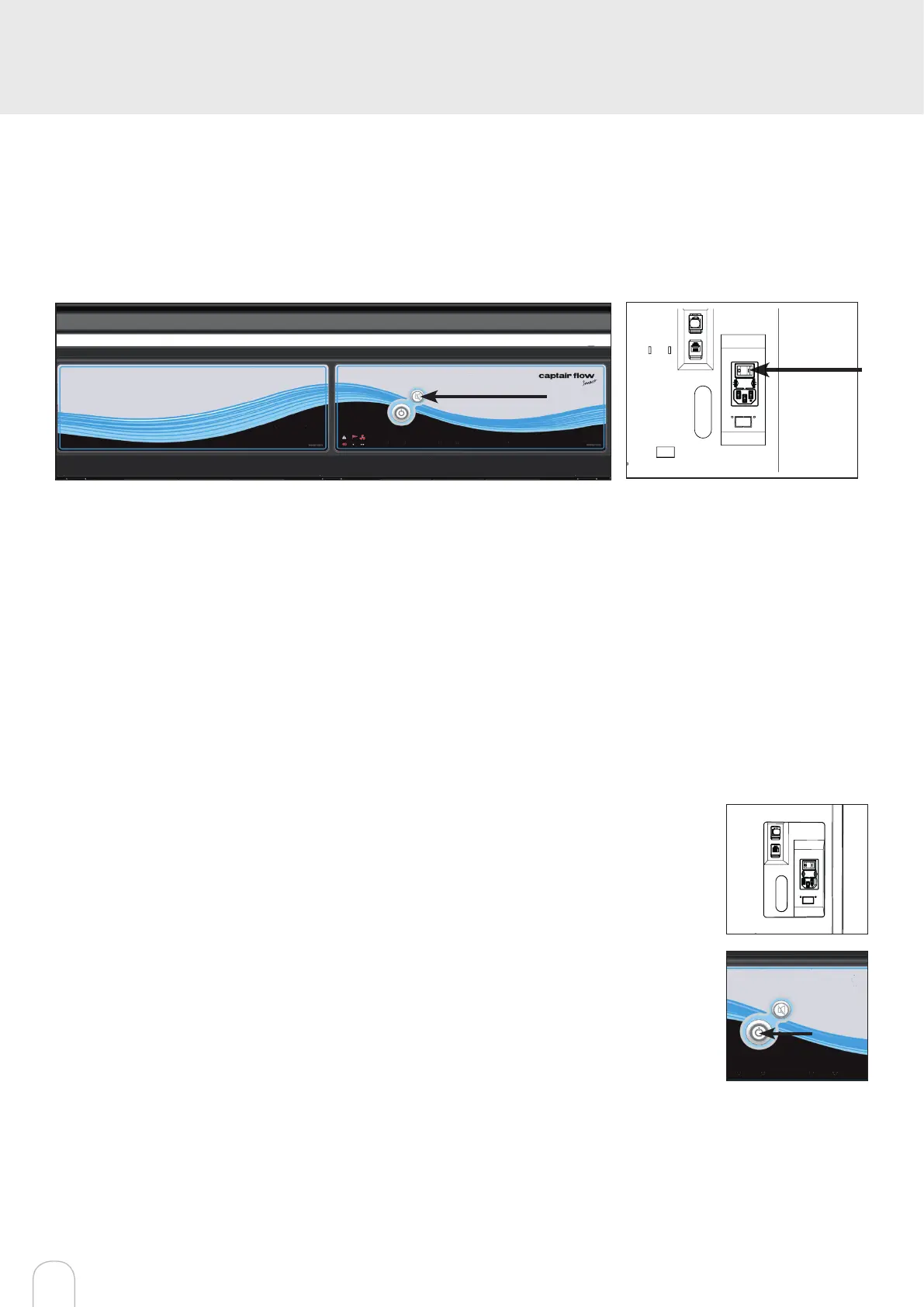
1. Press and hold the mute button located on the front of the control panel while simultaneously switching on the main
power button located behind the control panel (Off = O, On=I)
2. Release the mute button. A beep indicates that the unit has started the calibration mode. The white bar above the
front of the control panel will pulse for 5 minutes and 30 seconds. Stick with just the instructions for the anemometer.
3. Once the pulsing light stops, the anemometer is calibrated and the unit is ready to be turned on.
4. To operate, push the power button located on the front control panel.
Good practices :
• Avoid any air turbulence in the area during calibration
• Anemometer should be calibrated every year and every time a modication is done on the ltration column
Having carefully followed the steps described in the installation guide, your Captair Flow Smart ductless ltering clean air
enclosure is now ready to use.
Default settings
The power switch is located at the back of the control panel.
Note: we recommend never turning off the main device power switch after the machine as
been started for the rst time.
The button on the control panel turns on the fan and the lights.
The green indicator light and LED light system should come on.
We also recommend verifying the operating parameters before each new use.
To modify settings, please access the administrator interface.


 To Next Page