Captair Flow Smart
Mobile ductless ltering clean air enclosure
8
Accessing the administrator interface
To monitor the parameters and modify the settings of the unit.
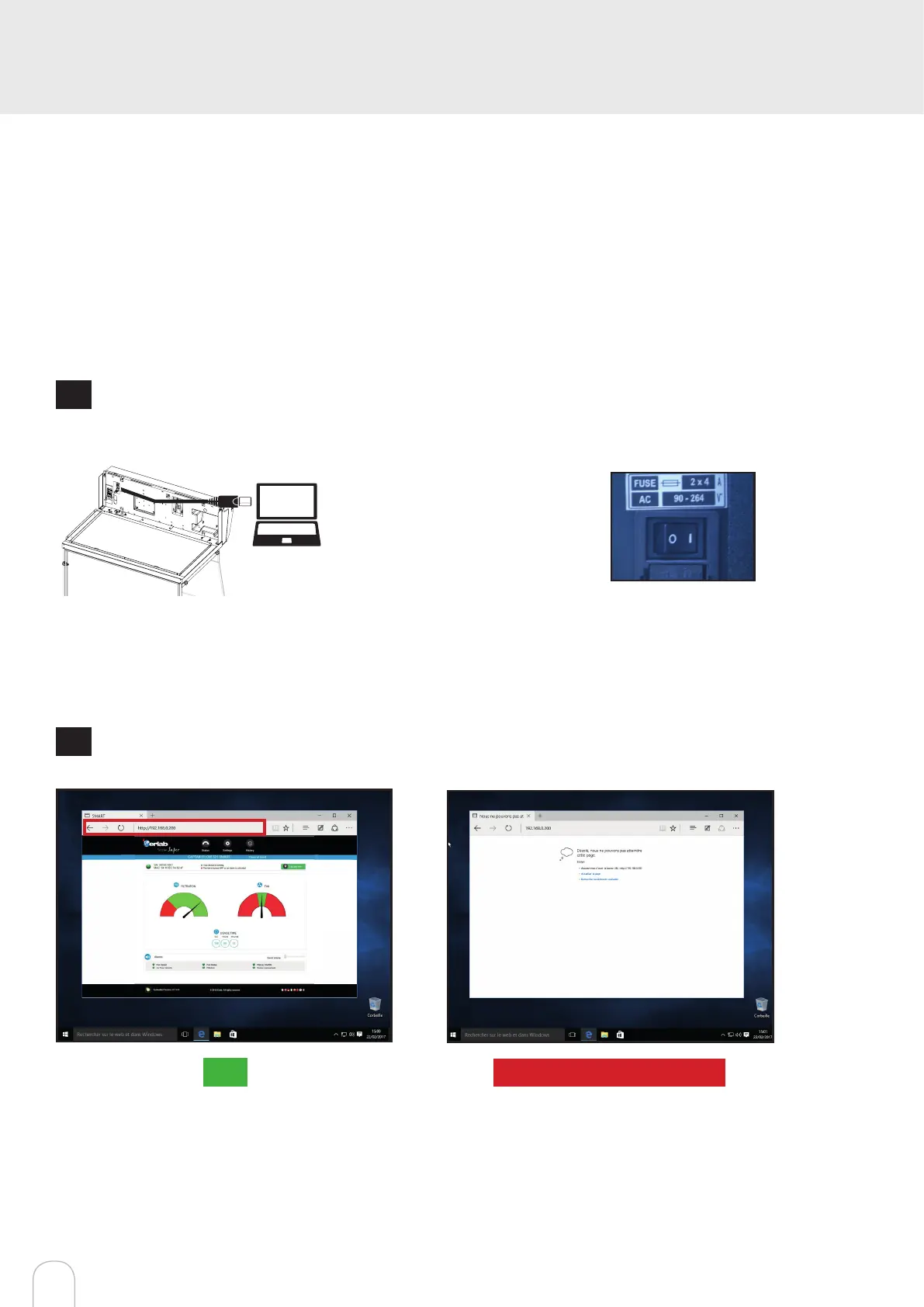
In order to connect:
• Use a computer equipped with an Ethernet port (to plug the RJ45 cable)
• WIFI of the computer must be switched off
• Web browser (Internet Explorer, Edge, Chrome, Mozilla Firefox, Safari, …) must be installed on the computer
Note: RJ45 cable used to plug the unit to the computer is provided.
1
Direct connection on computer
• Check that main switch of the device is ON.
• Take RJ45 cable (black) is already connec-
ted to the unit and placed behind the back
of the control panel.
2
Open your web browser, type the following IP address 192.168.0.200 into the address bar and validate
OK
You are connected to the embedded software
You enter the « Status » page and you can have
access to the « Settings » using the following
credentials:
Login : erlab / Password : smart
Please go to page 12
Page is not accessible
Computer network parameters are not allowing
the access to the embedded software.
Apply the following procedure


 To Next Page