Captair Flow Smart
Mobile ductless ltering clean air enclosure
6
Alarm
type
Light
signal
Problem Details
Silence
the alarm
Reset the alarm
4 beeps
5 seconds
apart
Pulses
Filter breakthrough
sensor replacement
(Molecode S/A/F
option)
The sensor has reached
the end of its service life.
Please contact Erlab or your
usual maintenance contact.
Reset network settings
Forgot network settings? Follow these steps to reset the IP address:
• The main power switch is in the “On” position (located on the left of the controller behind the panel)
• The workstation should not be running (no lights or fans are “On”),
• Hold in the mute button for «10» seconds
• Wait until you hear «click», «click»
• Release the mute button
• Reboot unit:
1. Turn the power switch to the “Off” position (located on the left side of the controller).
2. Turn the power switch to the “On”.
• The Primary IP address to use is 192.168.0.200.
Note: In some cases, you may need to use the secondary IP address 192.169.0.200.
eGuard App
Welcome to a safer connected world
The connectivity of Erlab Smart devices allows you to monitor all your safety settings remotely.
After registering your product on line, download eGuard App and:
• Stay in touch wherever you are
• Receive safety alerts
• Access your statistics usage
• Make the most of an exclusive warranty program
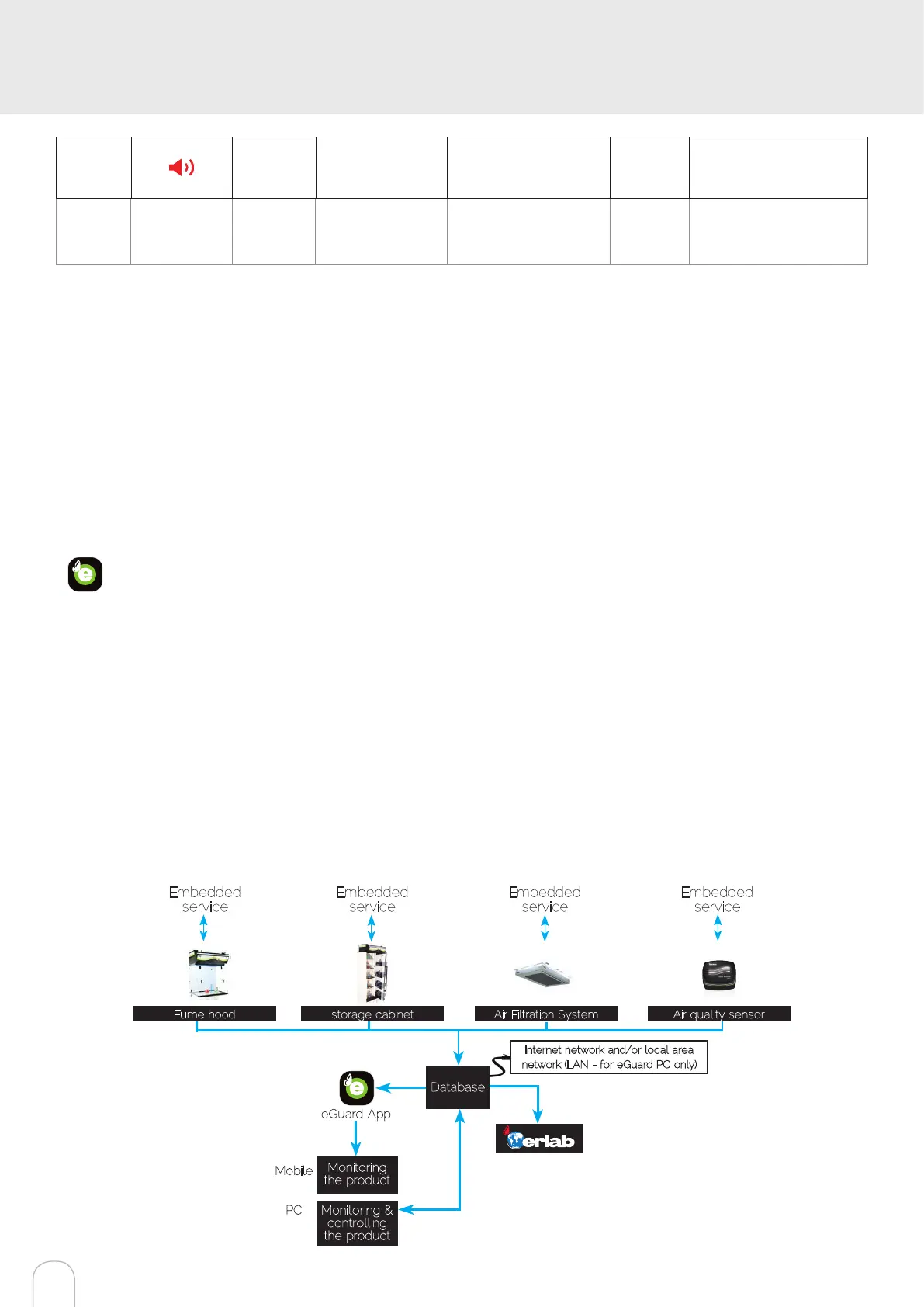
Connectivity principle
Ecosystem designed for simpler use and safer protection
Embedded
service
Embedded
service
Embedded
service
Embedded
service
Fume hood storage cabinet Air Filtration System Air quality sensor
Internet network and/or local area
network (LAN - for eGuard PC only)
Database
Monitoring
the product
Monitoring &
controlling
the product
eGuard App
Mobile
PC
Ethernet-TCP-IP


 To Next Page