7
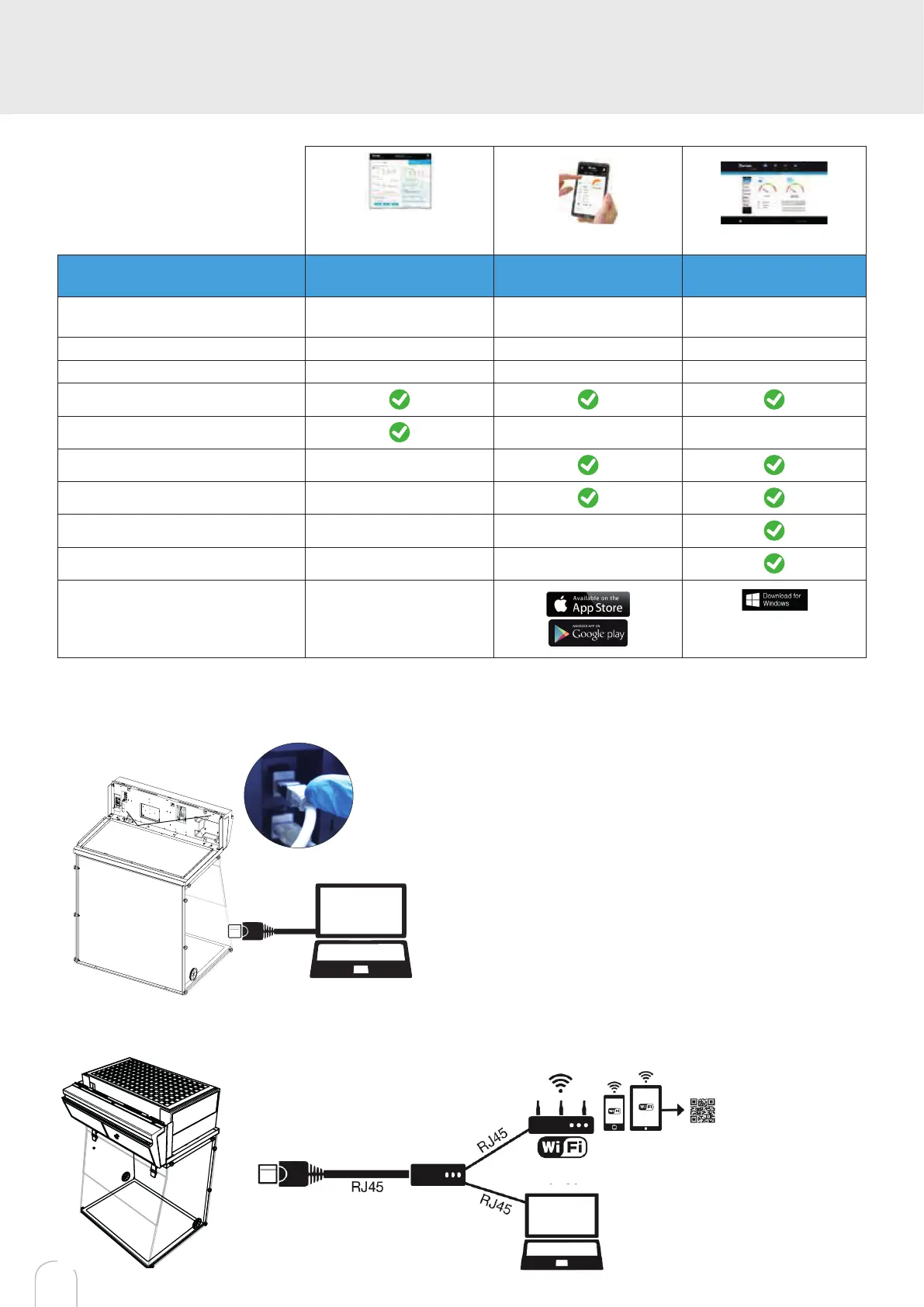
3 methods of
connection to
the Smart Portal
Embedded
service Mobile app PC app
Conditions
of use
Direct connection on PC
with data cable (RJ45)
Web connection
(via 3G/4G)
Web and/or local
connection
Hardware requirements 1 PC + 1 cable
1 Apple or Android
Smartphone
1 PC connected to
Internet or local network
Parameters Monitoring + Controlling Monitoring Monitoring + Controlling
Data access One unit Multiple units Multiple units
Historical data access
Historical data download
Alerts
Monitor multiple devices
Allow multiple user accounts
Automated status report
Download
available on
www.erlab.com
Options to connect
Embedded service
RJ45
Mobile or computer app
and/or
Internet
network
Flash the QR code to
access usage datas of
the device.


 To Next Page