GB-8
GB
Operation
MODE
RESET
ON/OFF
MODE RESET ON/OFF
MODE RESET ON/OFF
1
3
5
7
4
2
6
ON/OFF
OFF 1
2
3
4
5
AUTO
+AUT
MODE
(RESET)
ON/OFF
O
Operating modes
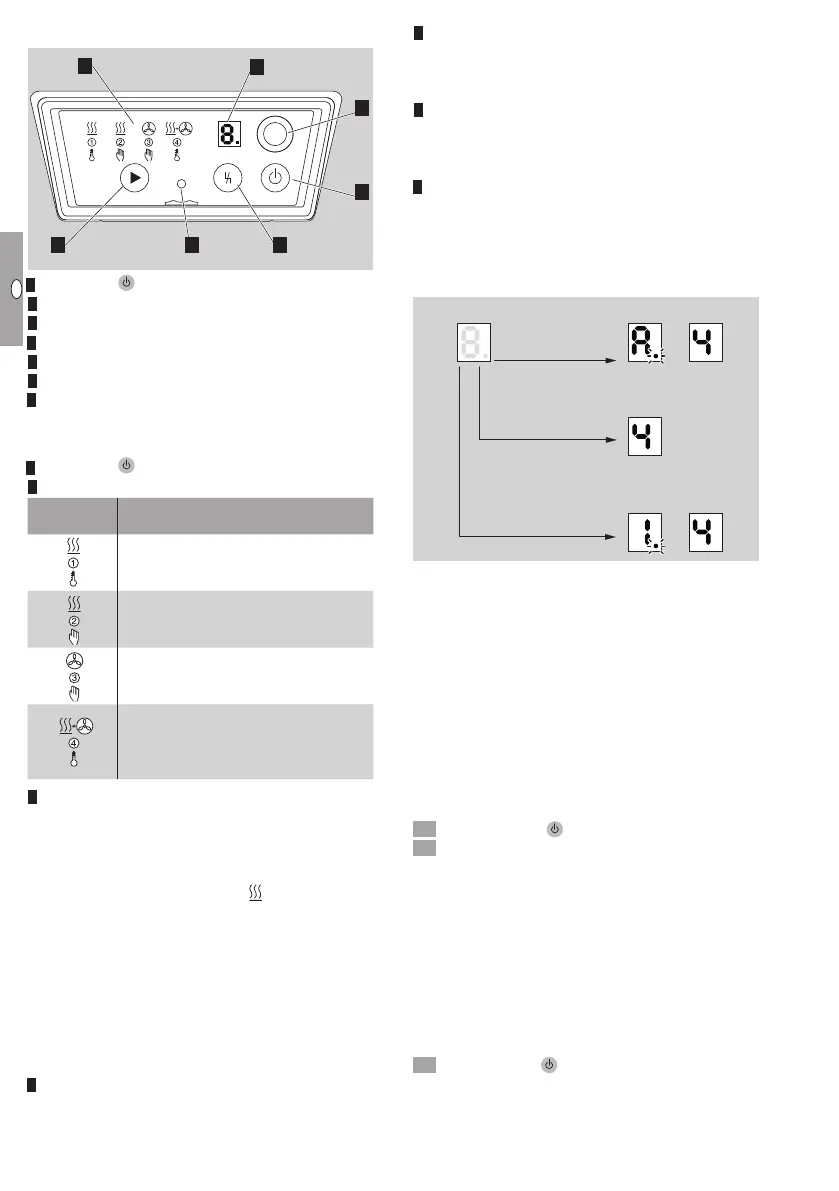
MODE selection button
4 RESET
5 Status indicator
6 Optical interface
7 7-segment display
Description
ON/OFF
OFF 1
2
3
4
5
AUTO
+AUT
MODE
(RESET)
ON/OFF
O
: to switch the heater on and off.
Operating modes:
Operating
mode
Explanation
The burner control unit waits for the
signals for controlled air flow or heating
(automatic)
Continuous heating
(manual)
Control air flow in continuous opera-
tion
(manual)
Controlled air flow in continuous op-
eration and heating when a thermostat
signal is applied
(automatic)
MODE selection button (heater switched on):
By pressing the MODE selection button, it is pos-
sible to switch between the different operating
modes.
By pressing and holding the MODE selection
button in operating mode 2 Heating, the cur-
rent capacity setting is displayed and can be
selected, see page10 (Display and selection
of the capacity setting).
MODE selection button (heater switched off):
By pressing and holding the MODE selection but-
ton, you can go to Setting mode, see page9
(Setting mode). The multi-functional outputs can
be assigned and the eBus address specified in
this mode.
4 RESET: internal reset button
5 Status indicator (light):
red: fault
yellow: standby/ready for operation
green: TR in operation
6 Optical interface:
The PC software BCSoft can be used with the PC
opto-adapter via this interface, see page20
(Accessories).
7 7-segment display:
Fault code
Flame signal
Number of operating cycles
can be displayed. The decimal point indicates
that another figure follows.
Fault code
RESET button
Flame signal
Operating cycles
> 3 s RESET button
ON
Fault code: a fault is displayed immediately in the
form of an alternating letter and number indicat-
ing a warning or fault, see page12 (Assistance
in the event of malfunction).
Flame signal: pressing the RESET button displays
the flame signal, see page11 (Flame signal).
Operating cycles: pressing and holding the
RESET button for more than 3s displays the
number of operating cycles in changing displays,
see page19 (Maintenance).
▷
Press the RESET button to exit the display of
the flame signal or operating cycles.
Switching on
• Press ON/OFF
OFF 1
2
3
4
5
AUTO
+AUT
MODE
(RESET)
ON/OFF
O
.
• The LED for the last selected operating mode will
flash. A different operating mode can be selected
within 2s. If you retain the selection, the flashing
light will change to permanently lit after 2s.
▷ The heater will start once the thermostat signal
has been applied and the set switch-on delay
elapsed, see page7 (Setting the switch-on
delay).
▷
The burner starts after approx. 15s and operates
in the last selected operating mode.
Switching off
• Press ON/OFF
OFF 1
2
3
4
5
AUTO
+AUT
MODE
(RESET)
ON/OFF
O
. The burner control unit display
and the burner will switch off immediately. Mains
voltage is still supplied however. The display in-
dicates “–”.


 To Next Page