User guide
Additional features
19
Auto turn-on in standby mode
When the unit is connected to a mains outlet and turned off in standby mode, the Escape™ P9 will
automatically turn back on when it detects an audio signal.
When the unit is not connected to a mains outlet and turned off in standby mode, the Escape™ P9
can only be turned on via the keypad.
8.2 Locking the keypad
When the Escape™ P9 is used in a professional setting (bars, restaurants, hotels), it may be advisable
to disable the buttons of the keypad.
1. To lock the keypad, press and hold down the previous track button for 5 seconds until you
hear a confirmation tone.
The previous track button LED will blink white three times and stay white to confirm that the
keypad is locked. The LED will blink three times every time one of the keypad buttons is pressed
in keypad lock mode, except for the Twin button. (That button needs to be pressed twice
shortly or once longer before the track button LED will blink white three times.)
2. To unlock the keypad, press and hold down the next track button for 5 seconds until you
hear a confirmation tone.
Note: You will only hear a confirmation tone if the unit is in Bluetooth® mode.
3. Once the unit is turned off, the keypad will be unlocked automatically.
8.3 Anti-theft anchor point
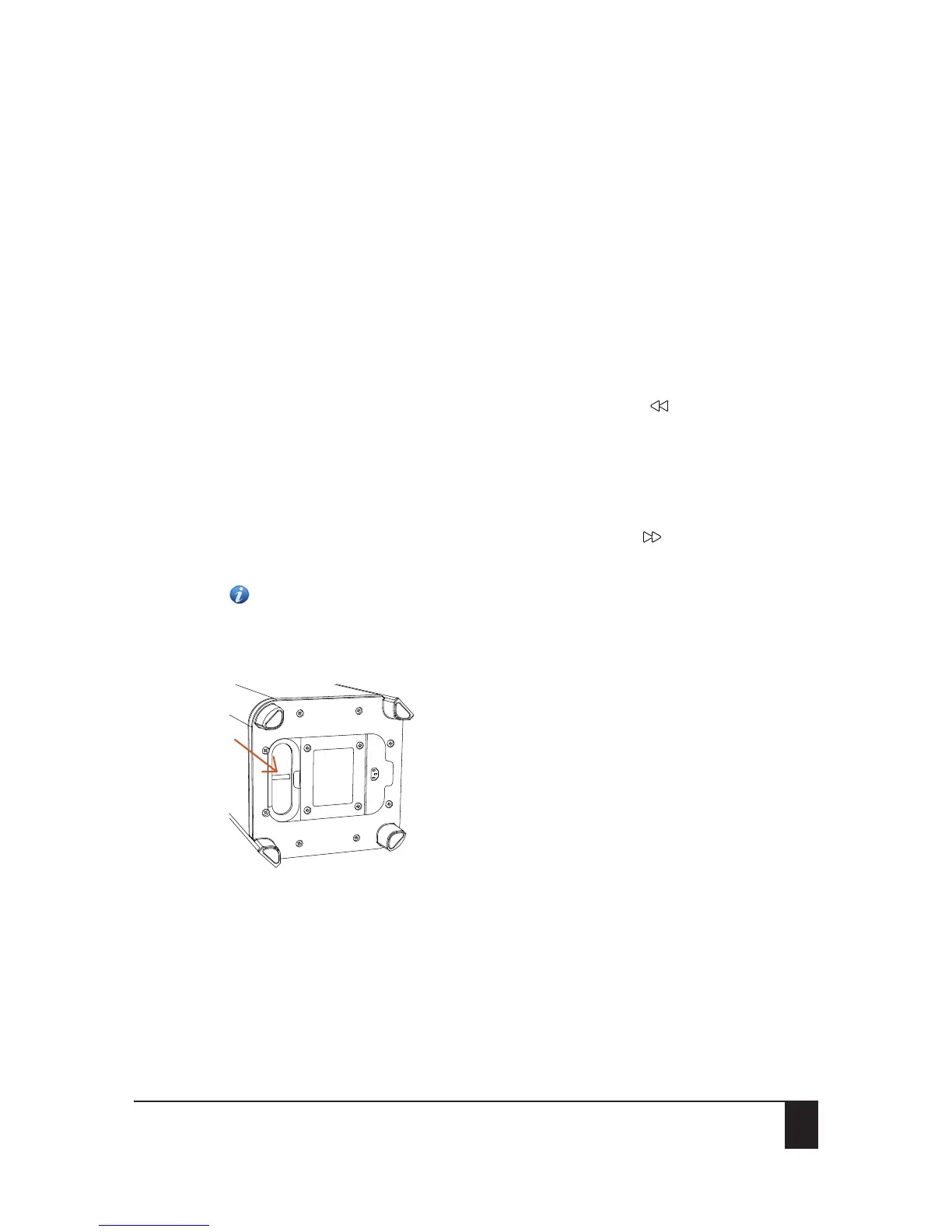
An anti-theft anchor point is located in the bass reflex port at the bottom to secure your unit with a
steel cable.


 To Next Page