Advanced Operation
1
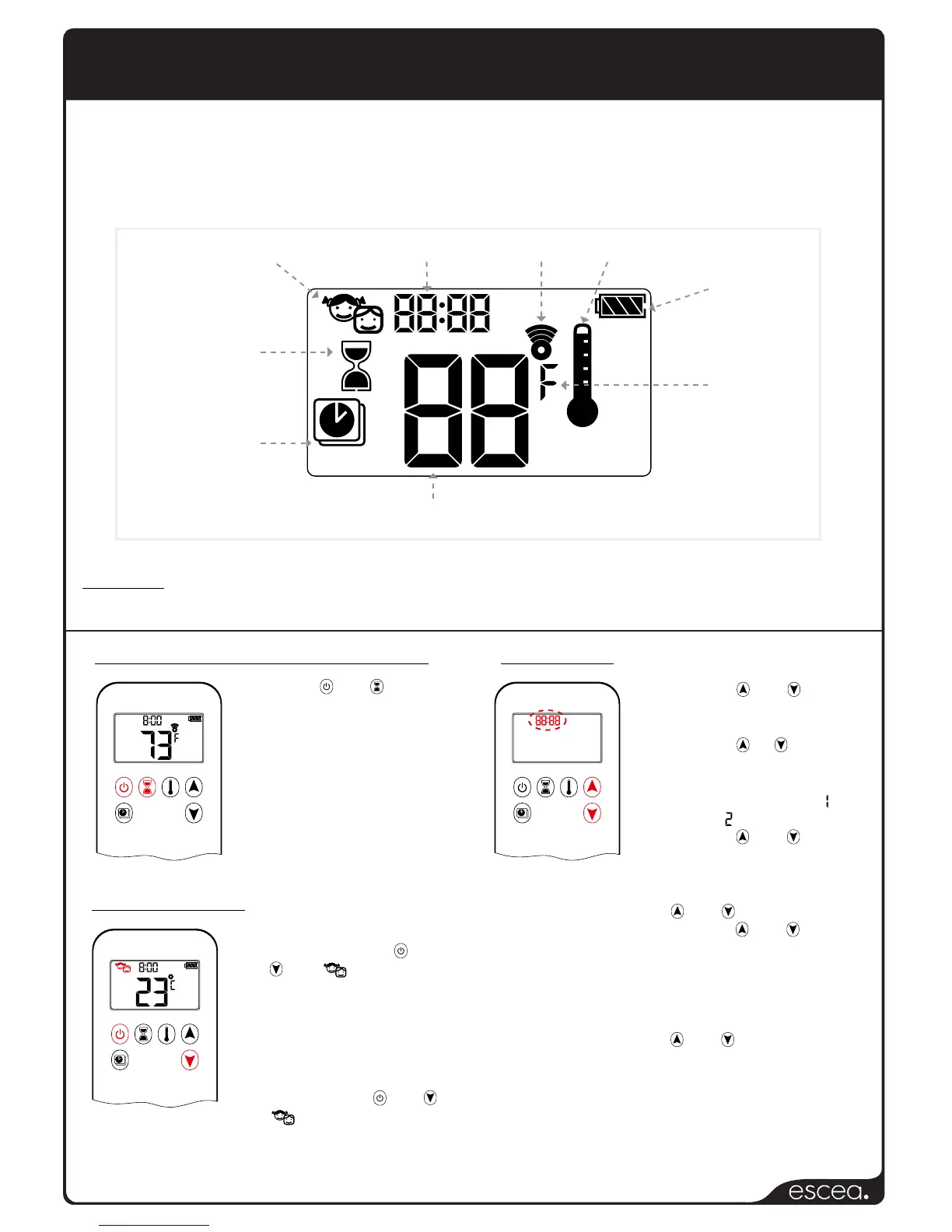
Program Mode
Temperature
Time
Countdown Timer
Battery Status
Signal Indicator
Child Proof
Thermostatic Mode
1 2
ON
AM
PM
OFF
1 2
ON
AM
PM
OFF
Fahrenheit
or Celsius
Changing the display from Celsius to Fahrenheit
Setting the Child Lock
Setting the Time
Press both and
buttons simultaneously
to change between
Celsius and Fahrenheit.
Note: choosing
Fahrenheit will change
the clock to a 12hr clock;
choosing Celsius will
change the clock to a
24hr clock.
ON: To turn on the Child
Lock, press and hold
and until is displayed.
The handset will no longer
respond to any button
presses except for the OFF
function.
OFF: To turn the child lock
off press and hold and
until is no longer
displayed.
1 2
AM
PM
1 2
ON
AM
PM
OFF
1. Press the and buttons
simultaneously until the word
“day” flashes.
2. Press the or button to
select a number; each
corresponding with a day of
the week (eg. Monday =
Tuesday = ).
3. Press the and buttons
simultaneously until the word
“hour” flashes.
4. To change the hour press
the and buttons.
5. Press the and buttons
simultaneously until the word
“minutes” flashes.
6. To change the minutes
press the and buttons.
7. To change the hour press
the and buttons.
© 2014, Maxitrol Company
Warning: If the pilot does not light or stay lit after several tries, call a qualified service
person to have the fireplace serviced.
The ST900 remote handset allows the user to: turn the fireplace ON and OFF, control
the flame height in Manual mode, or control the room temperature in Thermostat
mode. The remote has a maximum range of 30 feet, and because the remote works
by radio frequency, it does not need to be aimed at the ST900 for it to operate.


 To Next Page